


This article defines Active, Pending, and Inactive for the Current Special Education record in SIRAS.
The Current record status should reflect the student's known status in the field as soon as staff know it. Do not wait for later data cleanup, a reporting deadline, or CALPADS certification to make Current reflect what actually happened.
The status appears in the upper-right SIRAS header with the student's designation and placement.

Confirm that you are working in the Special Education designation before applying the Active, Pending, and Inactive guidance in this article.
Changing Current to Active, Pending, or Inactive updates the operational Special Education record. It does not by itself create, change, or submit every required SWDS, MEET, PLAN, or SERV transaction.
| Active Eligible, enrolled, and participating in Special Education. | Pending A temporary SPED work/follow-up state while the lasting outcome is unresolved. Only with Special Ed. and 504 not SST. | Inactive Not currently participating through this SPED record, not eligible, no longer enrolled/residing, or the local SPED workflow ended. |
This article discusses Special Education Current Active Status = Pending. It is different from IEP Manager Pending Changes, Pending As Of MEET, and an archived transaction whose Report Status = Pending. See Pending in SIRAS: Know Which “Pending” You Mean.
In This Guide
| Why Timely Status MattersCurrent status drives SIRAS work lists, monitoring, and census views. | Active StatusUse only when eligibility, enrollment, and participation are all established. |
| Pending StatusUse as a temporary Special Education work queue while the outcome is unresolved. | Inactive StatusUse the actual date and reason when participation or the local workflow ends. |
| Status → Reporting FlowUnderstand how Current status leads into archives and CALPADS transactions. | Monitor Status WorkReview Pending, Active, and Inactive exceptions on a recurring basis. |
| Designation and PlacementKeep program designation separate from Current SPED record status. | Record Status ChecklistVerify the field outcome, Current record, and reporting follow-up. |
Why Timely Status Entry Matters
SIRAS uses the Current record for searches, work lists, caseloads, census-day populations, monitoring, and comparison with other systems.
When staff delay a known status change:
- a student who already began participating can still appear Pending or Inactive;
- a student who left can continue to appear Active;
- a completed Initial Evaluation can still look unfinished;
- SIRAS and CALPADS can appear inconsistent even though the field event occurred on time; and
- required archive/reporting work can remain hidden until a later monitoring cycle.
SIRAS cannot know that an event occurred until the applicable date, outcome, and status are entered. Make Current reflect the known field event promptly, then complete the reporting history.
For the distinction between Current, meeting data, and archived history, see Special Education Current Data: MIS Summary and Data Flow.
Active Status
Use Active when all three statements are true:
- The student is eligible for Special Education.
- The student is enrolled in the district.
- The student is participating in Special Education.

Active should describe the actual participating Special Education record—not simply a record that staff need to work on.
For an Active Special Education record, the related CALPADS history generally needs to support the same story: overlapping enrollment, an applicable eligible-and-participating SWDS history, the relevant MEET history, and the participating PLAN/SERV history.
If Current is Active but the expected CALPADS history is missing, review the governing meeting/archive and submission history. See What an Active SIRAS Record Should Look Like in CALPADS.
Pending Status — The Special Education Work Queue
Current Active Status = Pending means the lasting Special Education outcome is not yet established. It is a temporary work/follow-up status, not a long-term resting place for a record.
Common Special Education examples include:
- a new Part B referral or Initial Evaluation in progress;
- a newly arriving or returning student whose eligibility, enrollment, or participation still needs to be verified;
- a record waiting for consent, an SSID, an evaluation/meeting, participation information, or another field outcome; and
- an eligible but currently non-participating student temporarily moved to Pending so staff can complete a follow-up meeting while preserving the existing inactive/non-participation history.

Pending identifies unresolved Special Education work. Resolve the field question, then move the Current record to the status that represents the outcome.
The District SPED Clerk and other locally responsible SEDS staff should review Pending records routinely—commonly as a daily work queue—and resolve them to Active or Inactive when the field outcome becomes known.
For an eligible but non-participating student, a record can be temporarily Pending for an appropriate meeting/follow-up while the existing inactive date and non-participation reason remain in place until participation actually begins.
For Initial Evaluations, see Initial Evaluation Process. For incoming or returning students, see New or Returning Students.
For every other meaning of the word Pending, use Pending in SIRAS.
Inactive Status
Use Inactive when the Special Education Current record is no longer the current participating record or the applicable local SPED workflow has ended.
Examples include:
- the student transferred or left the district;
- the student is eligible but not participating;
- the student was determined not eligible or is no longer eligible;
- an anticipated arrival never enrolled;
- a referral ended without an evaluation; or
- another documented circumstance ended the local Special Education workflow.

Inactive should represent the known participation/workflow outcome in the field.

Use the actual date and the reason that accurately describe what happened.
The inactive reason and the actual event determine whether a new reportable status transaction is needed. Some local record closures do not create a new SWDS status.
Use When Students Leave, Stop Participating, or Become Inactive for scenario-specific guidance.
Make Current reflect the known field event, then complete the applicable archive, correction, submission, and verification work.
Status Changes and the Special Education Reporting Flow
A complete Special Education data-flow cycle can involve several different layers:
| Field outcome | Current-record action | Historical/reporting follow-up |
|---|---|---|
| Student begins participating | Make Current Active using the actual participation/approval context. | Finalize or create the applicable archive so the required SWDS/MEET/PLAN/SERV history can be reported. |
| Student leaves or stops participating | Make Current Inactive using the actual date and reason. | Create/report a status transaction only when the event/reason is reportable. |
| Initial Evaluation consent received and evaluation remains in progress | Keep the Current SPED record Pending while the Initial Evaluation workflow is unresolved. | Use the documented Initial Evaluation / Pending As Of MEET workflow when required. See Initial Evaluation Process and Send the Pending As Of MEET Record. |
| Meeting/evaluation completed | Make Current reflect the actual outcome. | Finalize/review the governing archive and confirm the resulting transaction history. |
An archived transaction can have Report Status = Pending, meaning SIRAS should attempt to submit the selected components. That is a reporting state of the archive, not the student's Current status. See Pending in SIRAS.
See Data Record - Archived Transaction, Reporting data to CALPADS, and CALPADS Submission Log Help.
Monitor and Resolve Status Work
Record status is one input to the broader Special Education data-monitoring loop. Review:
- Pending referrals and incoming records;
- Pending records whose outcome is now known;
- records with consent but missing required meeting/reporting follow-up;
- Active records whose CALPADS history does not support the participating status;
- Inactive records still requiring an archive or correction; and
- students whose arrival, participation, or exit occurred near a census/reporting date.
Useful monitoring destinations:
Designation and Placement Are Separate from Special Education Record Status
The student header can also show a program Designation and locally configured Placement information.
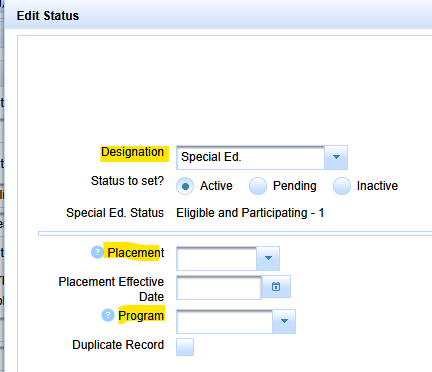
Designation, placement, and Special Education Current status answer different questions. Do not use one as a substitute for another.
504 and SST can have their own status behavior even when the interface uses similar labels. For 504/SST summary-page status, use 504/SST MIS Summary Page Help. For the SST workflow, use 10 Steps to Develop an SST Plan.
Special Education Record Status Checklist
- ☐ Am I working in the Special Education designation?
- ☐ Does Current status reflect what is known in the field now?
- ☐ Was the actual event/effective date entered promptly?
- ☐ Is Active used only when eligibility, enrollment, and participation are established?
- ☐ If status is Pending, do I know exactly what work/outcome is unresolved?
- ☐ Have I distinguished Current-status Pending from the other Pending contexts in Article 541?
- ☐ If status is Inactive, do the date and reason match the field event?
- ☐ Does the applicable meeting/archive preserve the historical event correctly?
- ☐ If reporting is required, was the transaction submitted and accepted?
- ☐ Has the original monitoring item been rerun or otherwise verified?

