


What do you need to do on the 504/SST Summary Page?
| Review the student's current 504 or SST informationDistrict/school, referral/demographic information, providers, and designation-specific information. | Understand changes coming from 504/SST Forms ManagerCurrent information can populate forms; meeting changes can return as pending/current data through the applicable workflow. |
| Correct a locked fieldAuthorized administrator-level users can unlock protected fields for direct correction. | Change or understand the record status504 uses Active / Pending / Inactive; SST uses Active / Inactive according to the SST workflow. |
| Review a warning or errorUse the page and Choose Student indicators to find data that needs attention. | I need the full 504 or SST workflowGo to the 504 Module Guide or SST Tracker Guide for meeting/program procedures beyond this summary screen. |
The 504 and SST Summary Pages overlap in layout, but their status and Forms Manager lifecycle are not interchangeable. First confirm whether you are working in 504 or SST.
| Working in 504?504 module root. Use Article 95 for the 504 Forms workflow. | Working in SST?SST module root. Use Article 96 for the end-to-end SST workflow. |
This is the DFA help article for the 504/SST Summary Page. The screen brings the important current student fields for the selected 504 or SST designation together in one place.
The left side contains LEA, referral, and demographic information. The right side contains providers and either 504 Information or SST Information, depending on the designation currently in use.
Use MIS Summary Help for the Special Education MIS Summary and its SWDS/MEET/PLAN/SERV archived reporting model.
| Field DefinitionsUse question-mark help for unfamiliar fields. | Warnings and ErrorsReview anomalies and missing/conflicting data. |
| 504 and SST Status RulesActive, Pending, Inactive, exit, and no-longer-under-review behavior. | 504/SST and SIS IntegrationRoute data-handoff questions to the current integration articles. |
Review the Current 504/SST Summary
The Summary Page is the current-record overview for the selected designation. Review it before opening a new 504 or SST meeting so the forms begin with accurate current information.
Common information on the page includes:
- district and school information;
- referral and demographic information;
- providers associated with the student; and
- designation-specific 504 or SST information.
The information and status choices on the right side change depending on whether the record is being viewed as 504 or SST.
Relationship Between the Summary Page and 504/SST Forms Manager
SIRAS uses a push-and-pull relationship between the Summary Page and the 504/SST Forms Manager. When a form is opened, applicable current student information populates the form.
During the meeting workflow, proposed or pending changes can be held for review. When the meeting is completed/finalized according to the applicable 504 or SST workflow, SIRAS preserves the meeting history and applies the changes that belong in the current record.
Confirm that the current record reflects the actual meeting outcome instead of assuming every value entered in a form automatically became current.
For the full workflows, use 504 Module Guide or SST Tracker Guide.
Do not use the Special Education Pending Changes or SWDS/MEET/PLAN/SERV archive model to explain this screen. For 504, Meeting Held pushes important completed 504 data to the Summary Page; for SST, Meeting Complete pushes important completed SST data to the Summary Page.
Unlocking a Student Record
Many fields are protected because they rarely need direct editing. Authorized administrator-level users can use Unlock when a direct correction is appropriate.
Unlock makes protected fields available for an authorized correction.
If the value should be established by a 504 or SST meeting, use the applicable Forms Manager workflow rather than bypassing it with a direct edit.
Field Definitions
Many fields include a small question-mark help icon. Use it to review the definition before changing an unfamiliar field.

Field-level help explains the purpose of an individual control.
Warnings and Errors
Errors identify missing or conflicting information that needs correction. Warnings identify an anomaly that should be reviewed to determine whether the data is actually wrong.
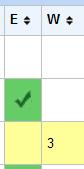
Error and warning indicators can also be visible from Choose Student.
Do not change a valid value simply to remove a warning. Confirm what is true for the student and then correct the appropriate current record or meeting workflow.
504 and SST Record Status
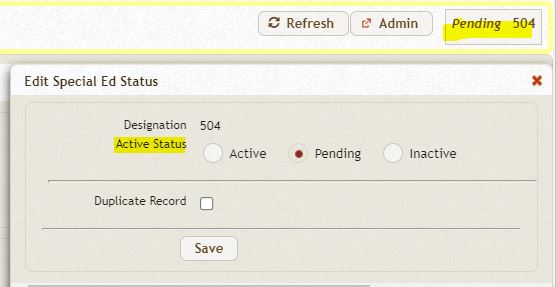
The 504 designation includes Active, Pending, and Inactive status choices. SST status behavior is different.
504 status
| Status | Use when |
|---|---|
| Active | The student is currently participating on an active 504 plan. |
| Pending | The student is under consideration/review for 504 eligibility or a 504 plan and the outcome is not yet resolved. |
| Inactive | The 504 record is no longer the current participating record—for example, the student exited 504, was determined not eligible, or the local 504 process ended. |
When a 504 record is made Inactive, use the applicable reason and date required by the 504 workflow. A record should not be made Inactive merely to remove it from a list or bypass an open process.
SST status
SST does not use the same Pending/exit-reason model as 504. An SST record can be Active while the student is under SST review. Make the SST record Inactive when the student is no longer under review and another SST meeting is not anticipated under the local process.
Complete or otherwise close the applicable meeting workflow before changing the record to Inactive when the open meeting prevents the status change.
A 504 record can be Pending while the student is under consideration/review for a 504 plan. This is not the Special Education IEP Manager Pending Changes feature and is not an archived CALPADS report status. See Pending in SIRAS: Know Which “Pending” You Mean.
504/SST and SIS Integration
This Summary Page article does not own SIS integration configuration. Where the district exchanges SIRAS data with its SIS, use the integration articles that own that data flow.
- Data Export: Special Ed and 504 Data from SIRAS to SIS — Special Education / 504 data handed from SIRAS to the district SIS.
- SIS Integration Guide — broader file-based integration architecture and responsibilities.
Do not use the SWDS/MEET/PLAN/SERV guidance from Article 12 as the reporting model for this 504/SST page.
Need More Than Summary-Page Help?
| Need | Use |
|---|---|
| 504 eligibility, meetings, plans, forms, and program workflow | 504 Module Guide |
| SST meetings, tracking, forms, and SST workflow | SST Tracker Guide |
| Student contact/profile information | Student Profile |
| Providers / student assignments | Student Providers Help |
| Special Education MIS Summary | MIS Summary Help |

