


Sending a pending meeting record
Last updated: Oct 15, 2026
You are here: Correct → Pending As Of MEET. Not sure why this action is needed? Go back to Data Monitoring Help. After the reporting archive is created, continue through Submit and Verify as needed.
Use this procedure only after the decision points to Pending As Of.
For the normal annual/triennial use, the student is overdue as of the upcoming reporting date, the meeting was arranged in SIRAS on or before that reporting date, and the actual meeting date will be after the reporting date. If you are not sure whether Pending As Of, Meeting in Progress, or neither applies, start with Pending in SIRAS: Know Which "Pending" You Mean.
For the normal annual/triennial use, the student is overdue as of the upcoming reporting date, the meeting was arranged in SIRAS on or before that reporting date, and the actual meeting date will be after the reporting date. If you are not sure whether Pending As Of, Meeting in Progress, or neither applies, start with Pending in SIRAS: Know Which "Pending" You Mean.
SIRAS click path: Student Info → MIS Summary → Archive for Reporting → Pending / Planned Meeting (report MEET Only)
What this record means:
A Pending As Of MEET is a good-faith reporting notice that the LEA knows an overdue annual or triennial meeting is due, has already arranged the meeting in SIRAS, and is actively working on it even though the meeting itself will occur after the applicable reporting date.
A Pending As Of MEET is a good-faith reporting notice that the LEA knows an overdue annual or triennial meeting is due, has already arranged the meeting in SIRAS, and is actively working on it even though the meeting itself will occur after the applicable reporting date.
Use This Procedure When
| Check | Required condition |
|---|---|
| Overdue status | The annual plan review or reevaluation/triennial is overdue, or will be overdue, as of the applicable reporting date. |
| Meeting arranged | The meeting event was created/arranged in SIRAS on or before the reporting date. |
| Meeting date | The planned meeting date is after the reporting date. |
| Delay reason | The applicable Meeting Delay reason has been entered before the archive is created. |
| Timing | The Pending As Of archive is created and reported before the planned meeting occurs. |
Do not create this record just because a meeting is open or coming up.
If the planned meeting will occur on or before the upcoming reporting date, Pending As Of is not needed for the normal annual/triennial reporting use. Let the meeting occur. If it later appears that the meeting cannot be finalized before the LEA wants to LEA Approve/certify, review the Meeting in Progress decision instead.
If the planned meeting will occur on or before the upcoming reporting date, Pending As Of is not needed for the normal annual/triennial reporting use. Let the meeting occur. If it later appears that the meeting cannot be finalized before the LEA wants to LEA Approve/certify, review the Meeting in Progress decision instead.
Initial Evaluation?
Do not use this article for the parental-consent Pending As Of scenario. Use Send a Pending As Of MEET for Initial Evaluation Parental Consent.
Do not use this article for the parental-consent Pending As Of scenario. Use Send a Pending As Of MEET for Initial Evaluation Parental Consent.
Before You Create the Archive
- Confirm the student meets the Pending As Of conditions above.
- Confirm the planned meeting date is after the applicable reporting date.
- Confirm the meeting event was created in SIRAS on or before the reporting date.
- Enter the applicable Meeting Delay reason before creating the archive.
- Do not replace the Pending As Of date with the future meeting date.
Pending As Of date:
For an annual plan review or reevaluation/triennial, the Pending As Of date is the date the meeting event was created in SIRAS. It is not the future meeting date.
For an annual plan review or reevaluation/triennial, the Pending As Of date is the date the meeting event was created in SIRAS. It is not the future meeting date.
Create and Report the Pending As Of MEET
- Open the student's MIS Summary.
- Select Archive for Reporting.
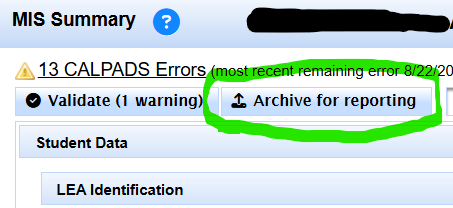
From the student's MIS Summary, use Archive for Reporting after the Pending As Of conditions have been verified.
- Select Pending / Planned Meeting (report MEET Only).
- Confirm the Report Event Date is the date the meeting event was created in IEP Manager.
- Confirm the planned Meeting Date is after the applicable reporting date.
- Confirm the applicable meeting delay information is present.
- Select the option to Archive and report to CALPADS.
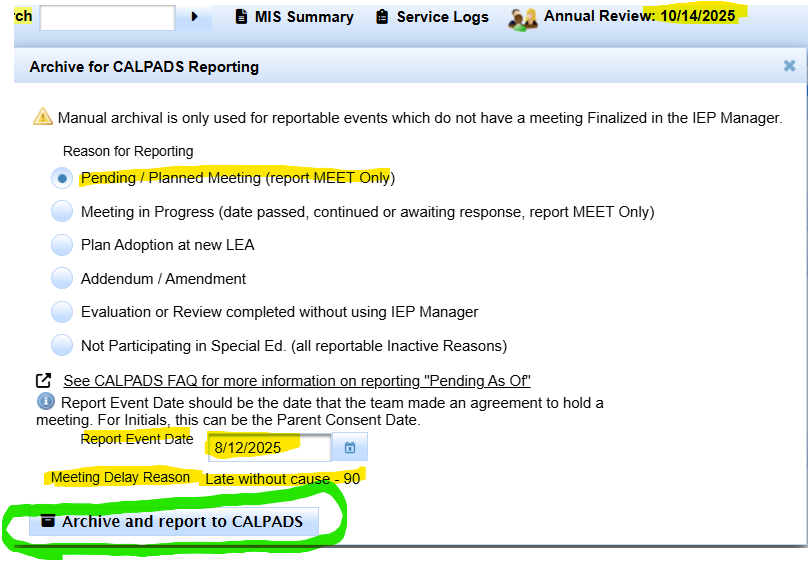
Verify the Report Event Date and future Meeting Date before creating the Pending As Of MEET archive.
Observable result:
SIRAS creates a MEET-only archived transaction representing that the overdue meeting was still pending as of the reported date and had already been arranged for a later date.
SIRAS creates a MEET-only archived transaction representing that the overdue meeting was still pending as of the reported date and had already been arranged for a later date.
What this action changes
- Found Set: Not applicable.
- View: A new dated archived transaction becomes available in the student's reporting history.
- Data: Changes student reporting history and can submit a MEET transaction to CALPADS.
- Persistence: Permanent reporting/history change unless corrected through the normal archived-transaction/CALPADS correction process.
CDE monthly-monitoring exception:
An LEA currently subject to monthly CDE monitoring may be directed to report planned Pending As Of MEET records for very overdue students outside the normal Fall 1/EOY use above. Follow the monitoring requirements applying to that LEA. Do not treat that exception as routine district practice.
An LEA currently subject to monthly CDE monitoring may be directed to report planned Pending As Of MEET records for very overdue students outside the normal Fall 1/EOY use above. Follow the monitoring requirements applying to that LEA. Do not treat that exception as routine district practice.

