


When Students Leave, Stop Participating, or Become Inactive
Use this offboarding workflow after confirming why the student is leaving or no longer participating.
Resolve the meeting workflow → review CALPADS SENR exit data → use the exit-to-SWDS crosswalk → choose the correct SIRAS inactive reason → create an archive only when a new SWDS status must be reported.
Contents
1. Complete the Meeting Workflow First
Before manually changing the record to Inactive, determine whether an open IEP Manager event should complete the status change and create the reporting transaction.
- Exit Triennial / reevaluation: finalize the agreed event. SIRAS normally makes the record Inactive and creates the applicable MEET/SWDS archive.
- Initial Evaluation with a not-eligible or eligible-but-not-participating outcome: complete or properly close the event so the meeting workflow applies the outcome.
- Other open meeting: complete, force finalize, or otherwise resolve the event according to the applicable procedure before manually offboarding the record.
When a finalized meeting is the source of the status change, review the resulting archived transaction instead of creating a second manual archive.

A finalized exit reevaluation normally creates the applicable historical transaction automatically.
2. Review the CALPADS SENR Exit Information
For a manual offboarding event, begin with the student’s CALPADS enrollment record. Record the:
- Student Exit Category code and name;
- SENR exit date; and
- School Completion Status code, when the exit is a completion.
The verified SENR exit date normally becomes the SIRAS Inactive Date for a student who actually left enrollment. It should align with the real last date of attendance or availability for services.
Some status changes—such as written revocation, cessation of services while the student remains enrolled, a true anticipated-student no-show, or an IFSP transition outcome—may not begin with a conventional enrollment exit. Use the documented event date and the current CALPADS SWDS/NPR definitions for those situations.
3. Use the Exit-to-SWDS Crosswalk
Look up the SENR exit reason and completion status in:
The crosswalk determines whether:
- the existing SWDS [1] Eligible and Participating status can remain; or
- a new SWDS [2], [3], or [4] status and applicable Non-Participation Reason must be reported.
Some exit and completion codes have more than one possible SWDS outcome. Review the completion code, whether the student will return for transition services, where the student is enrolling, the parent’s documented intent, and the existing CALPADS history.
| Crosswalk result | Next workflow |
|---|---|
| SWDS [1] remains | Make the local SIRAS record Inactive using a non-reportable reason. Do not create a new SWDS archive. |
| Report SWDS [2], [3], or [4] | Make Current Inactive using the mapped reportable reason, then create and verify the new SWDS archive. |
| Varies / scenario-dependent | Stop and research the actual field event, enrollment, participation, parent communication, and current CALPADS code definitions before choosing the SIRAS reason. |
4. Enter the Inactive Status in SIRAS
- Open the student’s Current MIS Summary.
- Select Active in the upper-right header.
- Select Inactive.
- Enter the verified Inactive Date.
- Select the broad Type of Inactive Reason.
- Select the specific Inactive Reason or Non-Participation Reason.
- Review the resulting Special Education Status.
- Select Save.

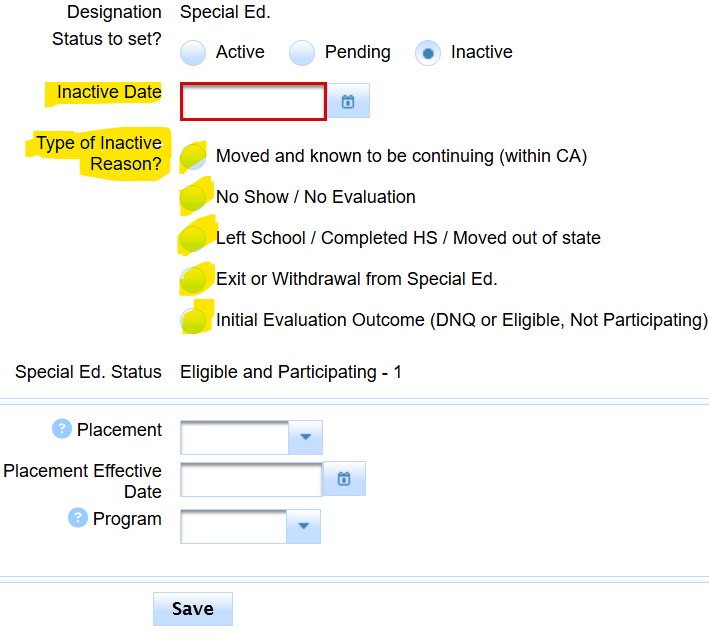
5. Branch A — SWDS [1] Remains: Make Inactive Without a New Archive
Use this branch when the crosswalk and actual scenario show that the student remains eligible and participating statewide, even though this district’s Current record should become Inactive.
Moved and known to be continuing within California
Use the verified SENR exit date. Select Moved and known to be continuing (within CA). This closes the local Current record without reporting a change from SWDS [1].

True no-show or anticipated student who never enrolled
Use No Show / No Evaluation and the applicable local Other Reason. A true no-show means the anticipated enrollment or participation event never occurred. Do not report a later SWDS exit for an arrival that did not happen.

Abandoned, put on hold, or district-denied assessment workflow
Document why the process ended or stalled, resolve any open meeting, then use the applicable No Show / No Evaluation Other Reason. This branch applies only when there is no reportable SWDS status change.
Historical inactive record, not Current
Use the historical local reason when the old record should no longer remain Current and no new statewide eligibility or participation event occurred.
Current is Inactive with the correct date and local reason, the existing SWDS [1] history remains unchanged, and no archive-required warning is present.
6. Branch B — Report a New SWDS Status and Non-Participation Reason
Use this branch only when the crosswalk or documented non-enrollment event requires SWDS [2], [3], or [4]. Select the SIRAS inactive reason that produces the intended current CALPADS code.
| Current CALPADS outcome | Examples requiring careful documentation |
|---|---|
| SWDS [2] Eligible and Not Participating | NPR [11] no education plan after eligibility/declined FAPE or services; [12] future plan expected; or [29] cessation of services without written revocation. |
| SWDS [3] Eligible and Not Enrolled | NPR [31] left school and not expected to return, when the current CALPADS definition and the actual enrollment scenario support it. |
| SWDS [4] Not Eligible | NPR [21] not eligible after initial evaluation; [22] no Part B evaluation consent during Part C-to-B transition; [23] maximum age; [25] returned to California no longer eligible; [26] IFSP team determined no Part B evaluation needed; [27] no consent for initial provision; [28] written revocation; or [30] no longer eligible after reevaluation or standard diploma. |
Current CALPADS codes distinguish [28] Not Eligible – Written Revocation from [29] Eligible – Cessation of Service without Revocation.


Create the reporting archive
- Save the verified Current inactive information.
- Select Archive for Reporting.
- Choose the option representing the new not-participating status.
- Confirm the Report Event Date equals the effective inactive/status-change date.
- Verify the SWDS status and Non-Participation Reason.
- Create the archive and leave or return its Report Status to Pending.
- Submit and confirm acceptance in CALPADS.

7. Completion, Private-School, and Parent-Choice Scenarios
Completers
Do not assume every completion ends eligibility. The same completion code may result in:
- SWDS [1] when the student is expected to return for transition services;
- SWDS [3] / NPR [31] when the student is not expected to return; or
- SWDS [4] / NPR [30] for a standard high school diploma that ends eligibility.
Private-school exits
Private-school scenarios depend on enrollment location, ISP participation, proportionate-share services, and whether the family actually ceased services. Use the crosswalk and verify the current CALPADS code definition before reporting. Do not treat every private-school transfer as cessation.
Written revocation versus cessation
- [28] Written Revocation: the parent/adult student revokes consent; eligibility ends.
- [29] Cessation without Revocation: the student remains eligible but stops receiving services.
The governing distinction is the documented intent and PWN process—not simply that the student left a school or stopped attending.
8. Worked Offboarding Examples
Use the workflow in this article first. Then open the worked example that most closely matches the facts you are reviewing. Each example shows the evidence checked, the crosswalk decision, the SIRAS action, the archive decision, and the final verification.
| Scenario | Outcome illustrated | Detailed example |
|---|---|---|
| Student moved within California and is known to be continuing in special education | SWDS [1] remains; make the local SIRAS record Inactive using [76]; do not create a new Archive for Reporting. | Worked Example: Student Moved Within California |
| Additional scenarios | Future examples may cover withdrawal, completion, moving out of state, private-school placement, non-participation, and other exit combinations. | Follow the same evidence-to-decision structure used in Article 725. |
Article 290 remains the canonical decision workflow. Screenshot-heavy examples are maintained in separate articles so the workflow stays readable as more scenarios are added.
9. Section 504 and SST Records
Section 504 and SST records can be made Inactive using the applicable local reason. These status changes are not archived as CALPADS SWDS transactions.
- Use the actual local inactive date.
- Select the reason that best represents the local program outcome or move.
- Coordinate 504 eligibility changes with the district SIS/program process.

Section 504 inactive status is a local record action and is not a CALPADS SWDS archive.
10. Verify and Monitor the Result
- Open meeting or evaluation workflow was resolved first.
- SENR exit reason, exit date, and completion code were reviewed.
- The May 2026 crosswalk was used.
- The selected SIRAS inactive reason matches the intended SWDS/NPR outcome.
- No archive was created when SWDS [1] remains.
- A Pending archive exists when a new SWDS [2], [3], or [4] is required.
- The CALPADS submission was accepted.
- The record does not remain unresolved on Inactive Records Requiring Archive.
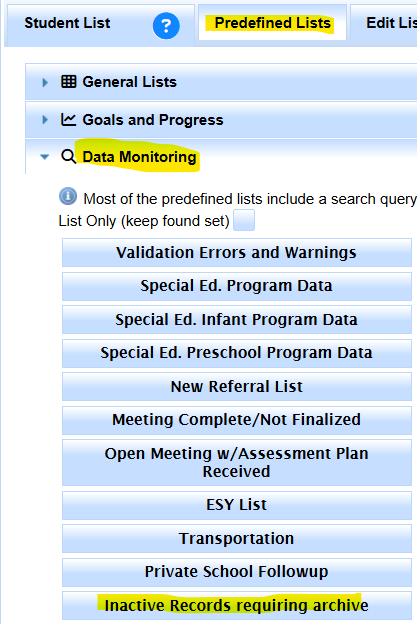
Use the monitoring list to locate reportable inactive records that still need review.

