


Show Me the Plan Adoption I Need
| 1. Standard Plan Adoption — student already SWDS 1Student is already Eligible and Participating and the receiving LEA is adopting the same plan type. Screenshot walkthrough: PLAN + SERV, Reason for PLAN 3. | 2. Plan type will change — IEP ↔ ISPAdopt the incoming plan first and flag that plan type will change at the follow-up meeting. Screenshot walkthrough: Reason for PLAN 4. |
| 3. Incoming SWDS 2 or 3 — participation is beginningStudent is currently not participating/not enrolled in CALPADS but will now participate. Screenshot walkthrough: SWDS 1 + PLAN + SERV. | 4. New student, but there may be no plan to adoptNew to the district does not automatically mean Plan Adoption. Check eligibility, Part C/Part B pathway, actual enrollment, and whether an existing U.S.-based plan really exists. |
Already created the Plan Adoption?
| I need the existing archive to report SWDS 1Correct the archive after the PLAN/SERV baseline already exists and the verified participation-status transaction still needs to be sent. | I selected the wrong Reason for PLANCorrect Same Plan Type vs. Different Plan Type after verifying the actual arrival scenario. |
Other Plan Adoption Tasks
| Find students needing Plan Adoption nowUse the Plan Adoption Required monitoring population, then verify each candidate. | SIRAS, CALPADS, and the field do not agreeReconstruct the incoming student's actual story before creating the archive. |
| The student has another special incoming scenarioOut-of-state, IFSP, no-show, or another variation. | Use the Plan Adoption checklistFinal verification before and after archiving. |
Use this guide after the incoming-student review has determined that the district should complete a Plan Adoption.
Plan Adoption establishes the receiving district's reporting baseline for an existing U.S.-based special education plan. In the standard situation, the receiving district reports new PLAN and SERV records effective as of the student's District Enrollment Date.
How Do I Make a Plan Adoption in SIRAS?
At the simplest level:
- Update the MIS Summary so it reflects the best current information about the incoming plan.
- Verify the District Enrollment Date and confirm that it agrees with the student's actual district enrollment in CALPADS.
- From the MIS Summary, select Archive for Reporting and choose Plan Adoption at New LEA.
- Confirm that the Report Event Date and Plan Effective Date are the District Enrollment Date, then create and verify the archived transaction.
When SIRAS, CALPADS, and the information from the field all agree, that may be all that is required.
However, incoming students are not always that simple. Before creating the transaction, staff still need to determine what is actually true about the student's eligibility, participation, enrollment, plan, and services.
- What SIRAS says
- What CALPADS says
- What actually happened in the field
SIRAS and CALPADS are important sources of information, but neither should automatically be assumed to contain the most current information. When the records are incomplete, inconsistent, or do not match what staff understand to have occurred, confirm the student's actual situation with the IEP team and other appropriate staff before deciding how SIRAS and CALPADS should be brought up to date.
The goal is not simply to make SIRAS match CALPADS. The goal is for SIRAS and CALPADS to accurately represent the student's real special education history.
If you have not yet completed that incoming-student review, begin with New or Returning Students – Onboarding & Special Education Status Review.
In This Guide
Reconcile the Three Sides of the Incoming Student's Story
Before archiving Plan Adoption, reconcile the information available from SIRAS, CALPADS, and the field.
| Source | What It Can Tell You | What to Keep in Mind |
|---|---|---|
| 1. SIRAS | Current eligibility, plan, services, meeting information, prior SIRAS archives, record status, and information transferred from another SIRAS district. | The record may contain information that has not yet been updated to reflect a more recent event. |
| 2. CALPADS | District enrollment and the most recently reported SWDS, MEET, PLAN, and SERV history. | CALPADS shows what has been reported and posted. It may lag behind events in the field or contain information that still needs correction. |
| 3. The Field | The incoming IEP or IFSP, records from the prior district, information from the family, current enrollment facts, and what the IEP team understands about eligibility, participation, and services. | This is where staff determine what actually happened and what the student's current situation really is. |
When all three agree
If the SIRAS record, CALPADS history, and field information tell the same story, update any remaining Current information, verify the District Enrollment Date, and create the Plan Adoption transaction.
When they do not agree
Do not automatically copy CALPADS into SIRAS, and do not automatically assume the existing SIRAS record is newer.
Determine what actually occurred. Depending on the issue, this may require checking with:
- the IEP team or case manager;
- the family or guardian;
- the prior district or agency;
- district enrollment or SIS staff; or
- the prior LEA's CALPADS/SEDS contact.
Once the actual student story is understood:
- Update the SIRAS MIS Summary so Current reflects the best known information.
- Correct or coordinate correction of inaccurate CALPADS history when needed.
- Create the Plan Adoption transaction that represents the receiving district's actual arrival event.
- Report later events separately rather than changing a valid earlier event to match a later outcome.
Fully update the MIS Summary before creating the archive
The MIS Summary should contain the best available information about the student's:
- eligibility and disabilities;
- current plan and plan type;
- most recent evaluation or review;
- services;
- participation status;
- school and enrollment information; and
- other reportable information needed to represent the incoming plan.
If the incoming plan was created outside SIRAS, reconstruct the applicable MIS information from the incoming plan, prior records, CALPADS history, and verified information from the field.
Hold provider assignment until this review is complete. This helps prevent staff from creating a meeting or archive from incomplete inherited information.
For the complete arrival review, see New or Returning Students.
Create a Standard Plan Adoption
Before archiving
Confirm:
- the student actually enrolled in the district;
- the District Enrollment Date in SIRAS is correct;
- the applicable district enrollment is present and correct in CALPADS;
- the student's current eligibility and participation situation is understood;
- the incoming plan, services, and most recent meeting information have been reviewed;
- the MIS Summary reflects the best available incoming information; and
- a follow-up meeting has not already been created from incomplete incoming data.
The receiving district may reasonably determine that the student is expected to participate under the incoming plan even if literal service delivery has not yet started. Plan Adoption establishes the receiving district's responsibility for the plan; it is not proof that every service was physically delivered on the District Enrollment Date.
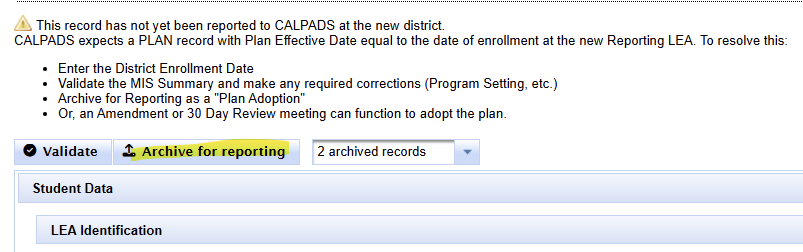
Archive the Plan Adoption
- Open the student's MIS Summary.
- Validate and resolve any information that should be corrected before archiving.
- Select Archive for Reporting.
- Choose Plan Adoption at New LEA.
- Confirm Report Event Date = District Enrollment Date.
- Confirm Plan Effective Date = District Enrollment Date.
- Select a special Plan Adoption option only when the student's actual scenario requires one.
- Create the archive.
- Open the new archived transaction and verify the dates, components, and Report Status.
For details about the Archive for Reporting screen and special Plan Adoption options, see Archive for Reporting: When to Create or Correct an Archived Transaction.
For more about the relationship between the Plan Effective Date and CALPADS PLAN/SERV reporting, see Plan Effective Date, Service Start Date & CALPADS SERV Reporting.
Create the follow-up meeting after Plan Adoption
After the Plan Adoption transaction has established the receiving district's incoming baseline, the IEP team may create the Plan Review, 30-day review, amendment, or other meeting needed to document what happens next.
This allows the next meeting to begin from the most accurate incoming Current information and preserves the distinction between the plan the student arrived with and what the receiving team decides next.
What Does a Standard Plan Adoption Report?
A standard Plan Adoption creates the receiving district's:
- PLAN record;
- SERV record(s); and
- Plan Effective Date equal to the District Enrollment Date.
A district change by itself does not require another SWDS 1 when the student was already reported as eligible and participating and that status has not changed.
| Incoming Situation | Typical Plan Adoption Reporting |
|---|---|
| Already SWDS 1 and participation continues | PLAN + SERV |
| SWDS 2 or SWDS 3 and student now becomes participating | PLAN + SERV + new SWDS 1 |
| Out-of-state-established U.S. eligibility with no prior California special education history | Additional SWDS and MEET information may also be required |
See Archived Transaction Components: SWDS, MEET, PLAN, and SERV for more about the four CALPADS transaction components.
SWDS & Participation Variations
Incoming CALPADS SWDS 1 – Eligible and Participating
When CALPADS already shows SWDS 1 and the verified field situation indicates that participation is continuing, use the standard Plan Adoption. The receiving district generally reports its PLAN and SERV baseline.
Do not create another SWDS 1 merely because the student changed districts.
Incoming SWDS 2 or SWDS 3 – Participation Is Beginning
If CALPADS shows the student as eligible but not participating or not enrolled, and the student now enrolls and is expected to participate, the arrival represents an actual participation-status change.
Use the Add SWDS [1] Eligible and Participating option in the Plan Adoption archive so the transaction reports the new SWDS 1 in addition to PLAN and SERV.
Continued non-participation is already clear at arrival
If the due-diligence review determines that the student will continue not participating, do not create a Plan Adoption simply because the student enrolled or because an older CALPADS record shows participation.
Follow the applicable status and reporting workflow in Student Record Offboarding: Inactive Status and SWDS Reporting.
Participation was expected, but the outcome changes later
If the student actually enrolled and the district reasonably expected participation at arrival, the Plan Adoption can remain a valid historical event even if the student later stops or declines participation.
Do not rewrite the valid arrival history to match the later outcome. Report the later status change as a later event.
Successive SWDS records are appropriate when each record represents an actual change in eligibility, enrollment, or participation.
True no-show – student never enrolled
A student who was merely expected to arrive but never actually enrolled is different.
If no district enrollment or valid receiving-district arrival occurred, no Plan Adoption should remain reported. Correct an anticipated Plan Adoption rather than reporting PLAN and SERV for an enrollment that never happened.
Special Plan Adoption Scenarios
New to the District Does Not Automatically Mean Plan Adoption
Plan Adoption assumes there is an existing U.S.-based special education plan for the receiving LEA to adopt. A student being new to the district by itself is not enough.
Do not create a Plan Adoption merely because the record is new when:
- the student is not actually eligible for Special Education;
- the child is in a Part C-to-Part B Initial Evaluation pathway and there is not yet a Part B plan to adopt;
- the student never actually enrolled in the receiving district; or
- the due-diligence review determines there is no existing U.S.-based plan that the LEA is assuming.
Return to New or Returning Students to determine the actual arrival workflow. For Part C / IFSP questions, use New, Transferring & Incoming IFSP Students. For a true Initial Evaluation, use the current Initial Evaluation workflow rather than manufacturing a Plan Adoption.
Out-of-State IEP – First Check the Existing CALPADS History
A student arriving or returning from another state is not automatically a first-time out-of-state IEP entry into California reporting.
First review the existing CALPADS SWDS, MEET, PLAN, and SERV history.
| What CALPADS Shows | What to Do |
|---|---|
| CALPADS already contains the student's Special Education Initial Entry Start Date and eligibility/SWDS history. | Leave CA Entry Date blank. Use the standard Plan Adoption when appropriate. Do not recreate SWDS or MEET history merely because the student returned from outside California. |
| Eligibility was established in another U.S. state and CALPADS contains no California special education history for that eligibility. | Set SELPA From = Out of State, identify the state, and use CA Entry Date as applicable. The Plan Adoption must establish the required incoming SWDS, MEET, PLAN, and SERV history. |
See Out-of-State IEP Fields – SELPA From & CA Entry Date for the complete field and reporting decision.
Plan Type Will Change Immediately – IEP ↔ ISP
Adopt the plan the student actually arrived with. In the Plan Adoption archive, select Plan Type Is Changing. The subsequent meeting then documents the receiving team's change to the new plan type.
See the Plan Adoption special options in Archive for Reporting.
Incoming plan was not created in SIRAS
Reconstruct the MIS Summary using the best available incoming information:
- the current IEP or IFSP;
- other records from the family or prior district;
- CALPADS SWDS, MEET, PLAN, and SERV history; and
- verification from the IEP team when the sources do not agree.
The goal is to represent the actual incoming plan, not simply copy whichever source is easiest to access.
Eligibility or plan developed outside the United States
Special education documentation developed outside the United States is not treated as an existing U.S.-based eligibility for Plan Adoption.
Use the Initial Evaluation Process to establish locally recognized eligibility and, when appropriate, an IEP.
IFSP transfers
Some district-to-district IFSP transfers use Plan Adoption, but not every incoming IFSP situation does.
Use New, Transferring & Incoming IFSP Students to determine whether the incoming Part C situation uses Plan Adoption, another archive workflow, or a Part C-to-Part B transition process.
Find Students Needing Plan Adoption
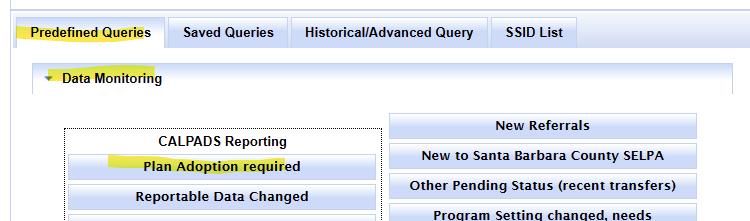
Find known incoming records in SIRAS
- Click Search.
- Select Predefined Queries.
- Under Data Monitoring, select Plan Adoption Required.
- Review each result before archiving.
Do not rely only on the predefined query
The district still needs a process for identifying newly enrolled students with existing special education eligibility, including students whose family has not yet provided an IEP or whose SIRAS record is incomplete.
Use New or Returning Students as the primary onboarding review.
Large incoming groups
For a large group of students who all require Plan Adoption, contact SIRAS Support to determine whether batch archive assistance is appropriate.
Before requesting batch assistance, confirm for each student:
- actual district enrollment;
- the verified District Enrollment Date;
- current school and attending information;
- the incoming eligibility and participation status;
- the current plan and services;
- the most recent meeting/evaluation information;
- an accurately updated MIS Summary; and
- any special Plan Adoption reporting option that is required.
Reporting, Archive Status & Common Errors
Verify the archive after creating it
Open the newly created archived transaction and confirm:
- Archive Type = Plan Adoption;
- Report Event Date;
- Plan Effective Date;
- expected SWDS, MEET, PLAN, and SERV components;
- Report Status; and
- that the archived information represents the incoming plan you intended to report.
For the Current/archive relationship, report status, editing, and resubmission, see Archived Transactions: Current Data, Components, and Reporting Status.
GERR0005 – Check district enrollment first
A Plan Adoption PLAN or SERV transaction can fail when the receiving district does not yet have the applicable enrollment in CALPADS or when the Plan Adoption date does not align with that enrollment.
Check:
- Did the student actually enroll?
- Is the enrollment posted in CALPADS?
- Does the SIRAS District Enrollment Date match the actual district enrollment start date?
- Does the Plan Adoption Report Event Date / Plan Effective Date align with that enrollment?
If the enrollment is wrong, coordinate correction with the district SIS/CALPADS staff. If SIRAS Current contains the wrong District Enrollment Date, correct Current and the affected Plan Adoption transaction as appropriate before resending.
For the general CALPADS reporting cycle, see Reporting Data to CALPADS.
Plan Adoption Checklist
- ☐ I confirmed that the student actually enrolled in the district.
- ☐ I reviewed the existing SIRAS record and history.
- ☐ I reviewed the applicable CALPADS enrollment and SWDS / MEET / PLAN / SERV history.
- ☐ I reviewed the incoming plan and other available records from the field.
- ☐ If the sources disagreed, I confirmed the actual situation with the IEP team or other appropriate staff.
- ☐ I understand the student's current eligibility and participation status.
- ☐ The SIRAS MIS Summary reflects the best current incoming information.
- ☐ The District Enrollment Date is correct and aligns with the applicable CALPADS enrollment.
- ☐ I selected Plan Adoption at New LEA from Archive for Reporting.
- ☐ Report Event Date = District Enrollment Date.
- ☐ Plan Effective Date = District Enrollment Date.
- ☐ I selected a special SWDS or Plan Type option only if the actual scenario requires it.
- ☐ I created and reviewed the resulting archived transaction.
- ☐ The archive contains the expected CALPADS components.
- ☐ The Plan Adoption was completed before creating the follow-up meeting.
Reconcile SIRAS, CALPADS, and the field; update Current to the best known incoming plan; verify the District Enrollment Date; then archive Plan Adoption to establish the receiving district's reporting baseline.
Related Resources
- New or Returning Students – Onboarding & Special Education Status Review
- Archive for Reporting: When to Create or Correct an Archived Transaction
- Archived Transactions: Current Data, Components, and Reporting Status
- Plan Effective Date, Service Start Date & CALPADS SERV Reporting
- Archived Transaction Components: SWDS, MEET, PLAN, and SERV
- Student Record Offboarding: Inactive Status and SWDS Reporting
- Out-of-State IEP Fields – SELPA From & CA Entry Date
- New, Transferring & Incoming IFSP Students

