


If you have the PDF of an inherited IEP, 504, SST, or other applicable meeting document, the placeholder lets staff see that historical event in the student's SIRAS meeting history without recreating the outside forms as though they were authored in SIRAS.
Use Show Me: Amend an IEP Created Outside SIRAS for the provider-facing sequence. This article remains the step-by-step mechanics for creating the historical placeholder.
| I have an outside IEP/504/SST PDFUse the actual historical meeting purpose and date, upload the PDF as Non-SIRAS Forms, and finalize it as Uploaded Documents Only. | I need to amend an IEP created outside SIRASEstablish the inherited plan/history first; then create the current Amendment against the plan that is actually in effect. |
Before You Start
A placeholder meeting is appropriate when the meeting already occurred outside SIRAS and you need the event and its PDF preserved in SIRAS history for future review.
This is especially useful for a new SIRAS record when staff need access to the student's most recent outside plan before the next current meeting.

An inherited plan can be preserved for staff review without recreating the outside forms in SIRAS.

The historical PDF remains the source document for the outside meeting.
First decide whether incoming-record preparation is still required
For an incoming Special Education record, first determine the student's actual arrival status. If Plan Adoption is required, complete that incoming-record step before adding the historical placeholder. If there is no plan to adopt, do not create a Plan Adoption merely because the student is new.
Use New or Returning Students to determine the arrival workflow and Plan Adoption – Incoming Students & CALPADS Reporting when Plan Adoption is actually required.
Placeholder rules
- The placeholder represents a meeting that already happened outside SIRAS.
- Use the actual historical meeting purpose and actual historical meeting date.
- Do not complete SIRAS meeting forms for the historical event.
- Upload the outside PDF as Non-SIRAS Forms.
- Use Set Meeting as Uploaded Documents Only, then finalize the placeholder.
- Do not use a placeholder to invent history, bypass a blocked current meeting, or make an overdue indicator disappear.
For current meeting-purpose definitions, see Forms Manager Meeting Purposes and Selecting Meeting Purpose Issues.
Advanced Use: Amendment to an Outside-SIRAS Plan
Start with Show Me: Amend an IEP Created Outside SIRAS. Return here when you reach the placeholder step.
If the student's current IEP was created in another system or by another LEA and the provider now needs to hold an Amendment in SIRAS, the outside plan should be represented as history before the current Amendment is created.
The Amendment should be an amendment to the plan that is actually in effect. The placeholder gives SIRAS a visible historical meeting/document to build from and gives the current team a reliable reference to the plan being amended.
- Verify the incoming record. Confirm the student, eligibility/participation, plan dates, and outside document are the correct record.
- Resolve incoming onboarding first. If SIRAS/local workflow requires Plan Adoption, complete it before the placeholder. If record preparation is handled by local SPED/SEDS staff, hand that part to them.
- Create the placeholder. Use the actual outside meeting's purpose and date; do not fill SIRAS forms.
- Upload the outside IEP PDF and finalize the placeholder.
- Verify the inherited meeting now appears in history.
- Create the current Amendment. Use the current meeting-purpose guidance; do not reconstruct the prior IEP as a new SIRAS-authored plan.
For the broader provider record-readiness cycle, see Getting Started for Providers.
Create the Placeholder Meeting
1. Choose the historical meeting purpose
Create a meeting using the purpose that matches the meeting that actually occurred outside SIRAS—for example, the most recent Annual or Triennial when that is the event represented by the PDF.
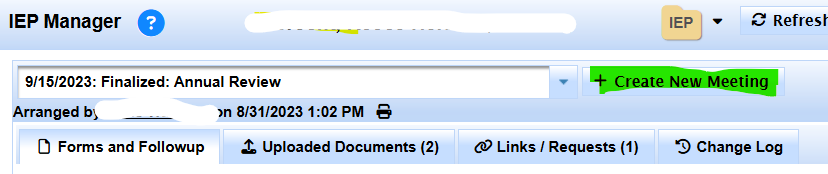
Choose the purpose that matches the outside meeting you are preserving.
2. Create the meeting
Select the correct meeting type/purpose and choose Create New Meeting.
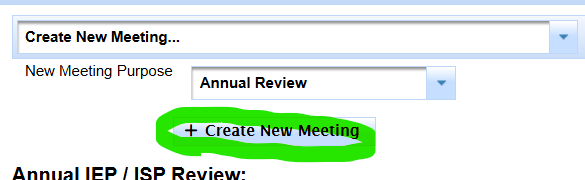
Create the placeholder using the actual historical event type.
3. Enter only the historical meeting date
Enter the date the outside meeting actually occurred. For the placeholder, the meeting time is not needed. Do not complete the SIRAS forms for this historical event.
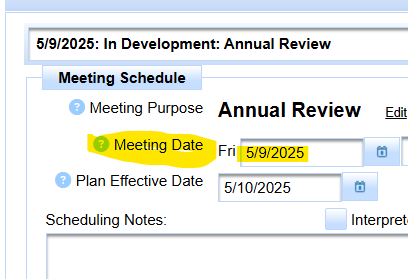
Use the actual date of the meeting held outside SIRAS.
Upload the Outside Document
4. Open Uploaded Documents
Select the Uploaded Documents tab in the meeting.

Open Uploaded Documents instead of completing the SIRAS meeting forms.
5. Select Upload File
Choose Upload File at the bottom-left of the Uploaded Documents area.
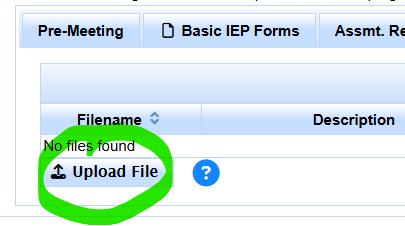
Start the upload from the Uploaded Documents tab.
6. Use the Non-SIRAS Forms category
Select the category Non-SIRAS Forms, then continue with the upload.
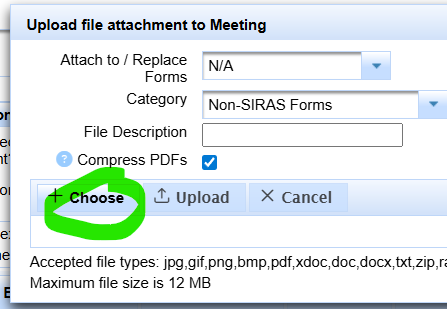
Categorize the inherited meeting PDF as Non-SIRAS Forms.
7. Choose the outside PDF
Select Choose, browse to the PDF, and confirm that you selected the correct student's document before uploading.
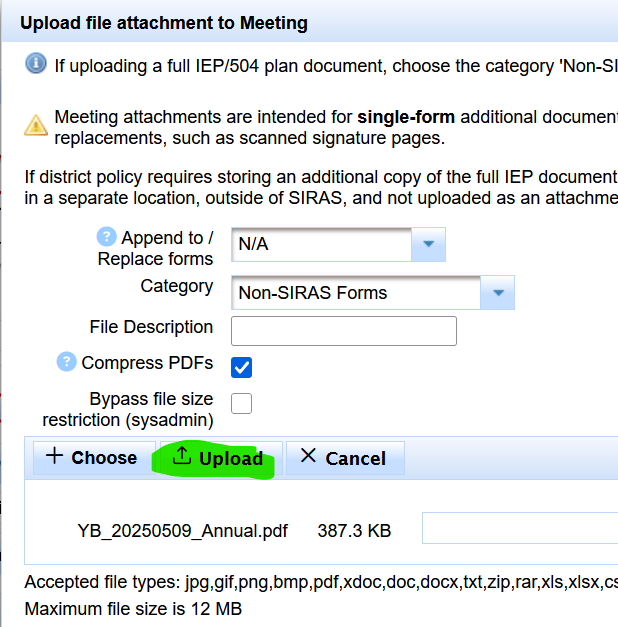
Select the PDF that contains the actual outside meeting forms.
8. Verify the filename and upload
After the file is selected, verify the filename and choose the final Upload action.
Set Uploaded Documents Only & Finalize
9. Set the meeting as Uploaded Documents Only
After the PDF appears in Uploaded Documents, choose Set Meeting as Uploaded Documents Only.

Mark the placeholder as Uploaded Documents Only so SIRAS does not expect normal meeting forms.
10. Confirm the choice
Confirm that this meeting is being used only to preserve uploaded outside documents.
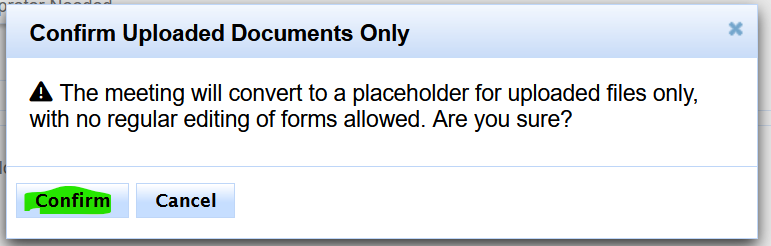
Confirm the Uploaded Documents Only setting.
11. Verify the historical event and finalize
Before finalizing, verify:
- the historical meeting date is correct;
- the meeting purpose/type matches what actually occurred; and
- the correct PDF is attached.
Then choose Finalize Meeting.
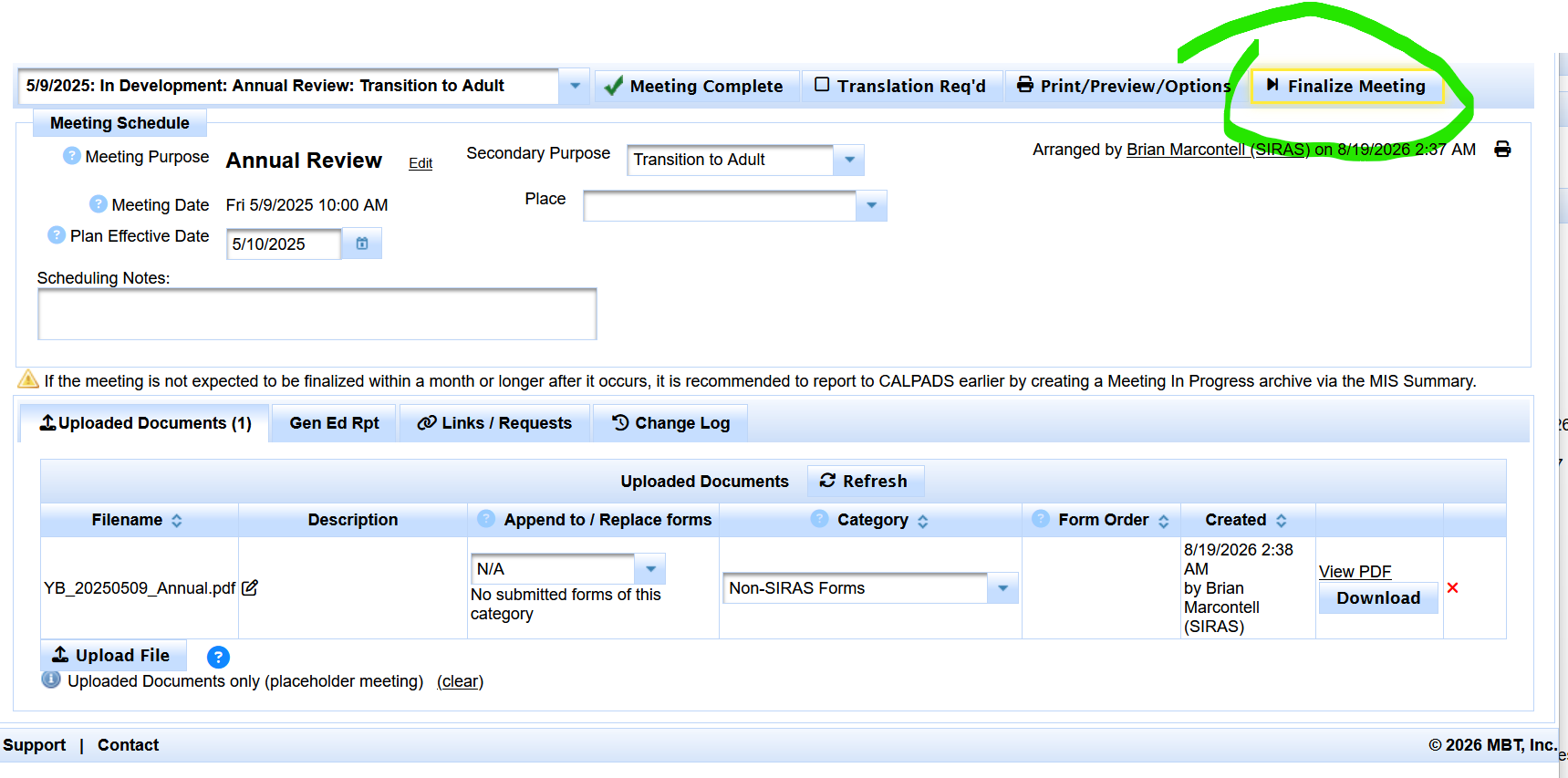
Verify the historical date, purpose, and PDF before finalizing the placeholder.
After the Placeholder Is Created
Amend the outside IEP now → use the provider Amendment Show Me.
Report progress on the outside IEP's existing goals without holding a new meeting → establish the inherited goals as Current Goals, then use regular Progress Reports.
Staff can open the finalized placeholder from meeting history and review the outside PDF as the reference document for that inherited plan.
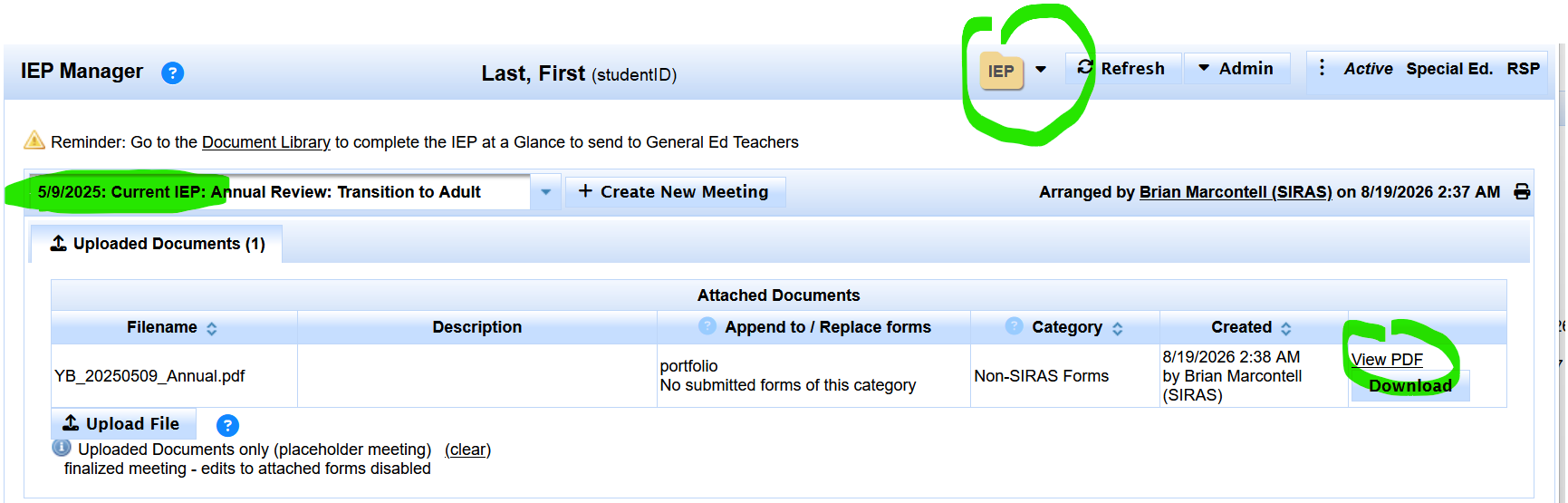
The finalized placeholder gives staff a historical meeting entry for the outside plan.
If the outside IEP now needs an Amendment
Once the inherited plan is represented and any required incoming-record preparation is complete, create the current Amendment using the current meeting-purpose guidance. The new Amendment is the SIRAS-authored event; the placeholder remains the historical reference to the plan being amended.
Preserve the outside document as history, then document new work prospectively in SIRAS.
If the next meeting is an Annual or Triennial
The same record-readiness principle applies: preserve the inherited plan/history first, then create the new current meeting. For goal development, use Goals Developer Help; do not recreate old SIRAS forms solely to reproduce an outside plan.
Need help deciding what meeting to create next? See Forms Manager Meeting Purposes and Selecting Meeting Purpose Issues.

