


The student has an active IEP created outside SIRAS, the provider needs to report progress on the goals from that plan, and there is no new meeting to hold right now.
The goals already exist educationally in the agreed-to outside IEP. SIRAS simply needs those goals entered as Current Goals so normal Progress Reports can be completed.
1. Prepare the Record & Preserve the Outside IEP
Make sure the correct student record exists and the incoming/current plan information is represented accurately. Complete any incoming-record preparation or Plan Adoption that is actually required for the student's arrival.
Then use Placeholder Meeting for Inherited IEP/504/SST Documents to preserve the most recent outside IEP as historical/reference documentation.
Do not reconstruct the outside IEP as a new SIRAS-authored meeting just so progress can be entered.
2. Enter the Existing Goals as Current Goals
After the outside IEP is preserved, go to Student Info → Goals Developer → Current Goals.
- Choose Create New Blank Goal.
- Using the outside IEP as the source, enter the existing agreed-to goal accurately.
- Complete the applicable goal fields needed by SIRAS.
- Save the goal as part of the student's Current Goals.
- Repeat for each goal on the active outside IEP that staff must report progress on.
There is no proposed new plan in this scenario. These are the goals already in effect from the outside IEP, so staff are establishing them in SIRAS as Current Goals for progress reporting.
For the goal-entry controls, see Goals Developer Help.
3. Verify the Current Goal Set
Before starting progress reports, compare Goals Developer against the outside IEP and make sure every goal that should receive progress reporting is present as a Current Goal.
- Check that no inherited goal was accidentally omitted.
- Check that the goal text and measurable criteria match the plan being implemented.
- Do not create extra proposed goals merely to fill out SIRAS.
This verification matters because Progress Report Help explains that the progress-report functions search for students with active goals; a student without goals in SIRAS will not appear in the normal progress-report population.
4. Complete Progress Reports the Normal Way
Once the inherited goals are established as Current Goals, use the normal SIRAS Progress Report workflow. You do not need a special outside-IEP progress process after this point.
Choose the Progress Report date and reporting period
Use the normal student-level Progress Report or Bulk Progress Reports workflow described in Article 31.

After Current Goals exist, use the normal Progress Report date and period controls.
Enter progress for each Current Goal
Enter the required progress information for each inherited Current Goal using the same process used for goals created originally in SIRAS.
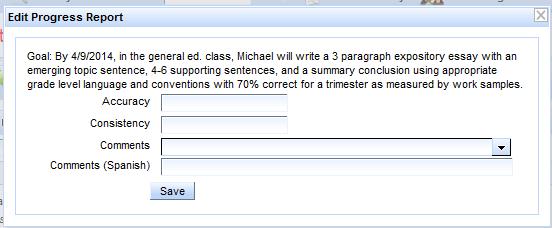
Enter progress using the regular Progress Report interface.
Continue with Progress Report Help for the full procedure.
5. If You Are Actually Preparing the Next IEP
This Show Me article is for entering inherited goals so staff can report progress on the current outside plan.
If the goal already exists as a SIRAS Current Goal and staff are preparing the next IEP, use Keep/Revise in Goals Developer to copy the Current Goal into Goals in Development for revision.
If the provider instead needs to amend the outside IEP now, use Show Me: Amend an IEP Created Outside SIRAS.

