


The student is already participating in your district, the current IEP was created outside SIRAS, and you now need to hold an Addendum/Amendment in SIRAS.
Do not open the Amendment against an empty or incomplete SIRAS history. First obtain or create the correct student record, update the MIS Summary from the incoming plan, complete Plan Adoption when it is actually required, and preserve the outside IEP as a finalized placeholder meeting.
1. Prepare the Student Record
Before opening the Amendment:
- If the student already has an older SIRAS record, request/obtain the existing record rather than creating a duplicate.
- If a new SIRAS record truly must be created, follow the current student-record creation/onboarding process.
- Update the MIS Summary so Current reflects the incoming plan and the facts that are already in effect.
- If the incoming-student workflow requires Plan Adoption, complete that before creating the placeholder meeting.
- Upload the complete outside IEP into SIRAS using the historical placeholder procedure in Placeholder Meeting for Inherited IEP/504/SST Documents.
For incoming-record decisions, see New or Returning Students. For Plan Adoption, see Plan Adoption – Incoming Students & CALPADS Reporting.
The provider may not be the person who performs every clerk-side onboarding correction, but the provider should recognize that the record is not ready and get the record prepared before opening new meeting history.
2. Verify the Outside IEP Is in SIRAS
Go to the student's meeting history and confirm that the most recent outside IEP is represented by the finalized placeholder meeting and that the PDF can be opened for reference.
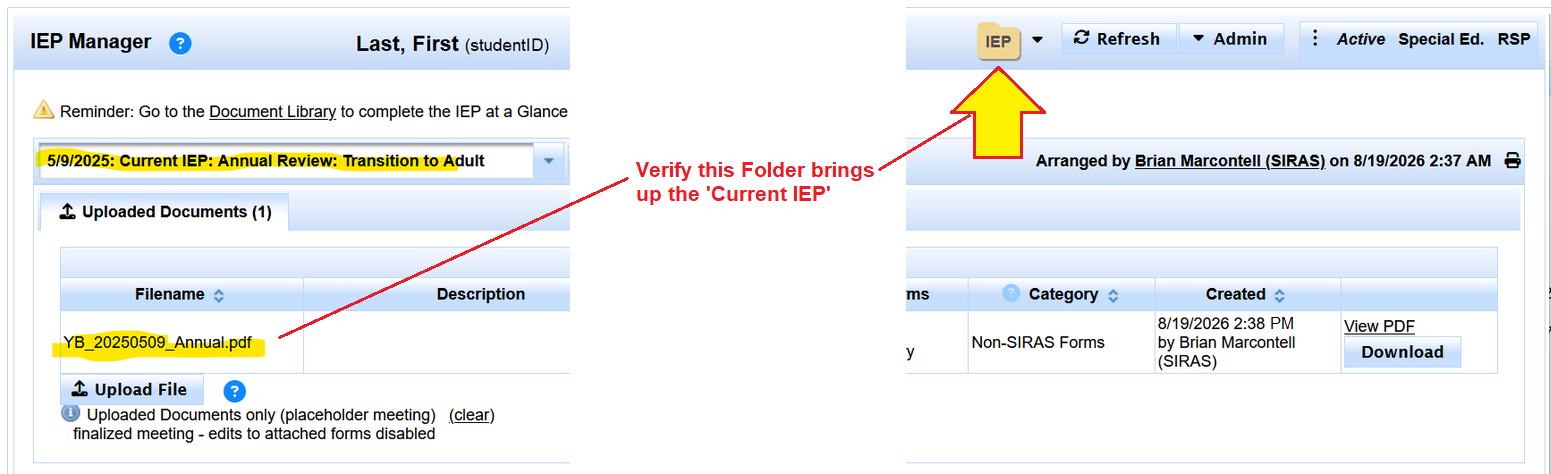
Verify the outside IEP is present in SIRAS meeting history before creating the Amendment.
If the inherited IEP has not been uploaded to SIRAS yet, that needs to be done first. Go to Placeholder Meeting Setup.
If the inherited IEP is not showing up in a folder, refresh and or log off to see SIRAS update.
If it still doen't appear feel free to reach out to [email protected] to get further assistance.
3. Create the Addendum/Amendment
Select Addendum/Amendment
Once the outside IEP is represented in history, select Create New Meeting and choose the meeting purpose Addendum/Amendment.
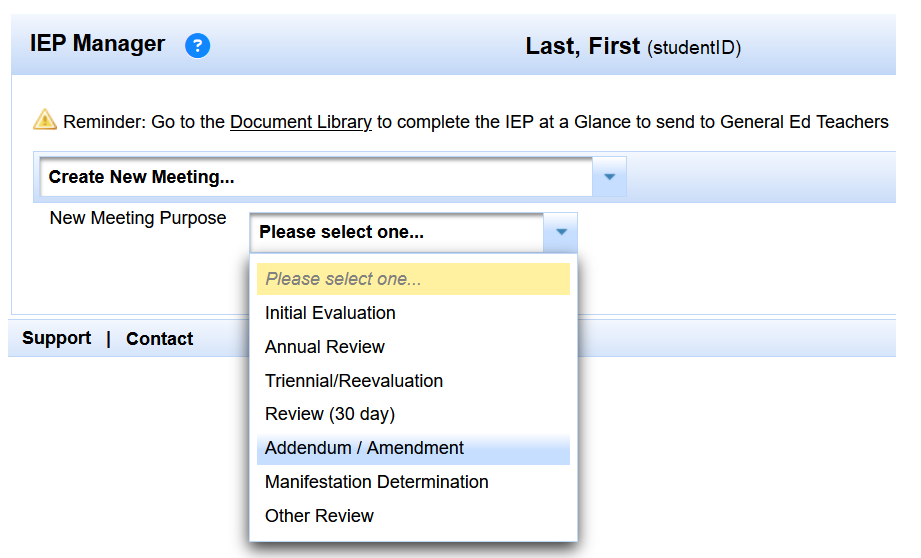
Choose Addendum/Amendment only after the inherited plan is represented in SIRAS.
Create the new meeting
Confirm the meeting purpose, then select Create New Meeting.
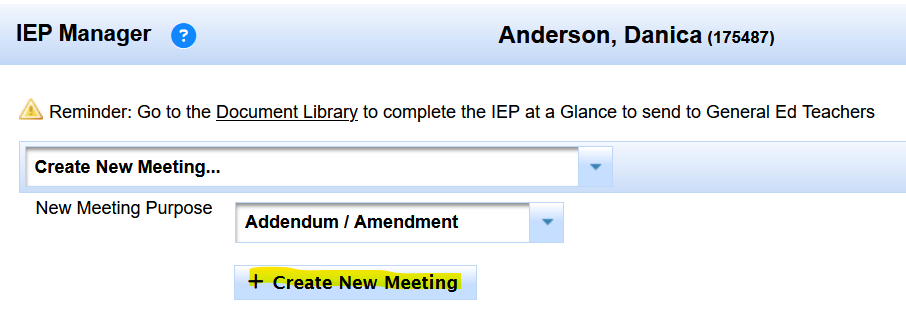
Create the current Amendment as a new SIRAS-authored event.
The placeholder remains historical/reference. The new Addendum/Amendment is where you document the change being proposed now.
For current meeting-purpose guidance, see Forms Manager Meeting Purposes and Selecting Meeting Purpose Issues.
4. Prepare Only the Information Being Amended
What you need to enter depends on what the team is proposing to change.
Services
Make sure the currently agreed-to services from the inherited plan are represented correctly in Current/MIS. Enter proposed new or changed service information in the current Amendment meeting where it belongs. Proposed service changes should not become Current merely because they are being discussed or appear in a draft; Current/MIS should reflect the plan that has actually been agreed to and implemented.
Goals
If the Amendment will change a goal that exists only in the outside IEP, recreate the goal information needed for the current work in Goals in Development / Goal Developer so the new SIRAS meeting can document the proposed goal change. Use Goals Developer Help.
Present Levels or other forms
If the Amendment changes Present Levels or another form area that does not already exist as editable SIRAS content, use the appropriate blank/current meeting form and enter only the information needed for the new SIRAS event. The uploaded outside IEP remains the reference for the prior plan.
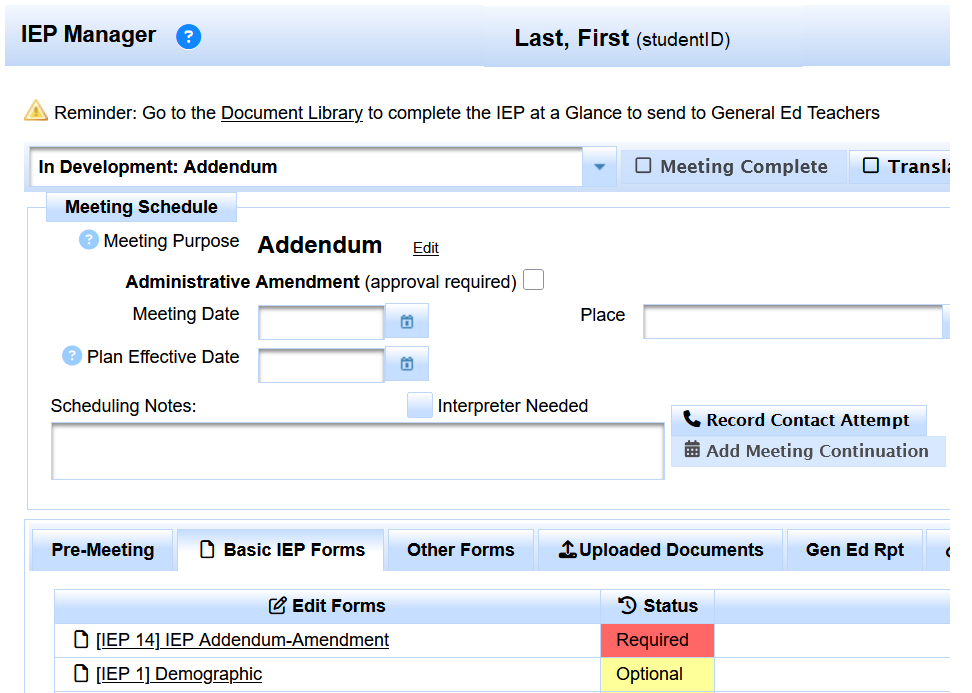
Use the new Amendment forms for the current change; use the uploaded outside IEP as the historical reference.
The placeholder preserves the historical plan. Enter the current changes needed for this Amendment and use the current meeting forms to document what the team is proposing now.
5. Finish the Amendment & Verify the Approved IEP
After the applicable Amendment forms are prepared, continue through the normal meeting workflow: hold or continue the meeting as needed, record the Parent Response, review Pending Changes, and make sure the event accurately reflects what occurred before finalization.
Review the Amendment before finalizing
Preview the Amendment and verify that the new SIRAS forms contain the changes the team actually made. The inherited placeholder PDF remains the reference for the rest of the existing plan.
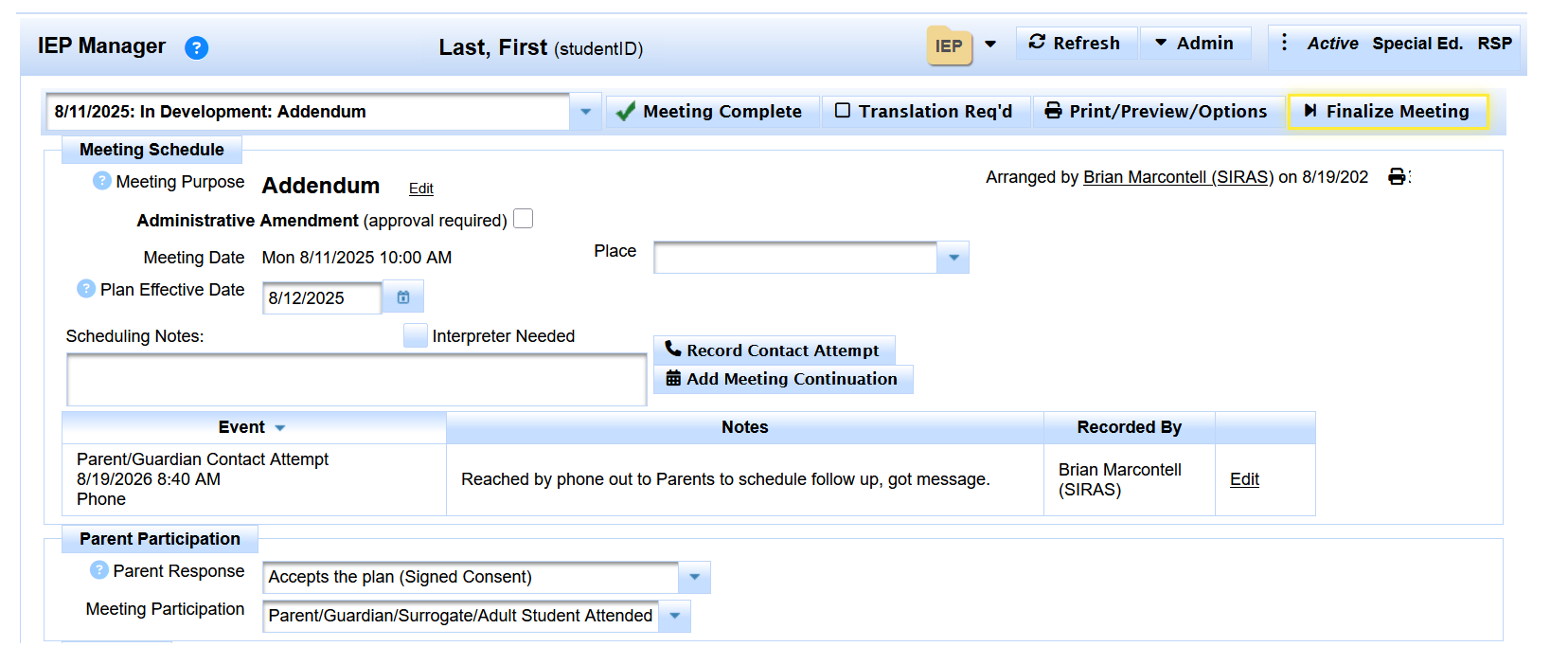
Before finalizing, review the Amendment document and confirm the current changes are accurate.
Finalize the Amendment
Finalize the meeting only after the Parent Response, Pending Changes, and documentation accurately reflect the outcome.
For Parent Response and disagreement handling, see Parent Response - Definitions, Parent Response - Impact Table, and Parent Response - Steps for Disagreements.
Verify the Most Recent Approved IEP
After finalization, open the Most Recent Approved IEP using the IEP folder icon and verify the resulting document set.
In this workflow, SIRAS can present the inherited placeholder PDF together with the newly created SIRAS Amendment so staff have the prior outside plan and the current SIRAS-authored change together for review.
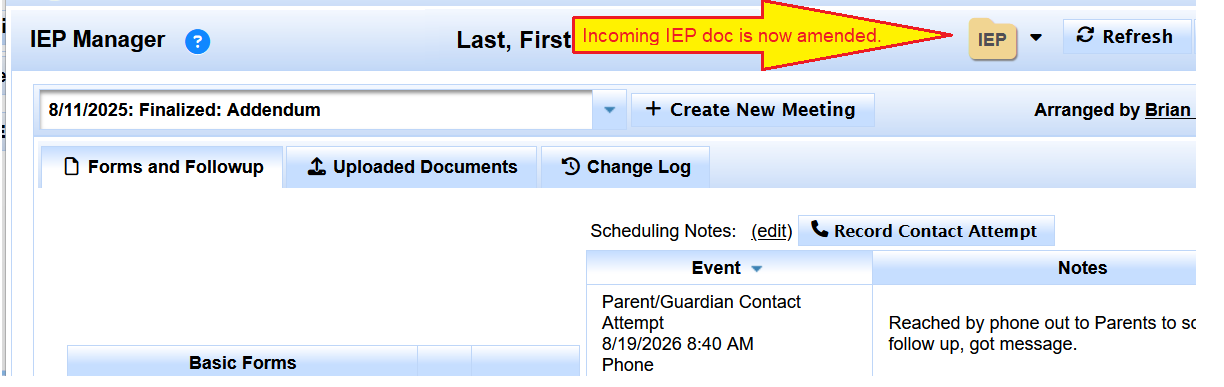
After finalization, verify the Most Recent Approved IEP contains the inherited placeholder plan together with the new Amendment.
The inherited IEP remains preserved as historical/reference documentation, and the new Amendment is now the current SIRAS-authored meeting that documents the change.
For the broader provider work cycle, see Getting Started for Providers.

