


What Do You Need to Find?
| One archived record for a student who leftSearch by SSID, then switch from Current to Archived Records. | An older archive tied to a CALPADS errorUse report-event date and CALPADS report status to isolate the transaction. |
| A very old Inactive/Historical recordUnderstand SIRAS's historical designation for older inactive records. | Many historical records or a complex archive setUse Advanced Historical Queries instead of repeating the one-student procedure. |
Find One Student's Archived Record
- Select Search.
- Enter the student's SSID or other known identifier.
- If zero Current results are returned, that can simply mean the Current record is no longer at your district.
- Open Modify → Historical/Advanced Query.
- Change Historical Query Type from Current to Archived Records.
- Set a date range broad enough to include the report-event date of the archive you need.
- Select Search to List.
- Open the result whose student link/report-event date matches the historical transaction.
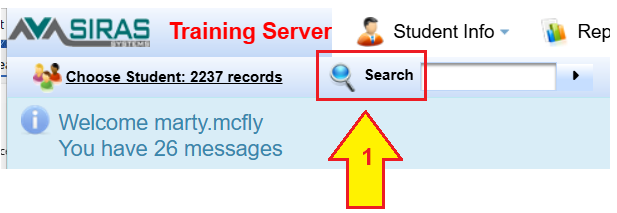
Start by searching the student's SSID or local identifier.
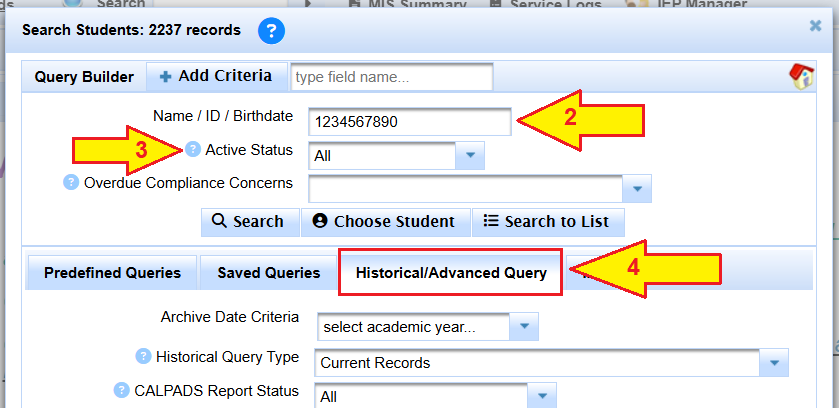
If the Current record is no longer in your district, continue to Historical/Advanced Query.
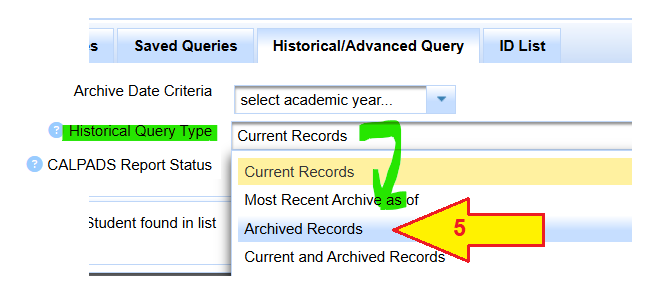
Change Historical Query Type to Archived Records.
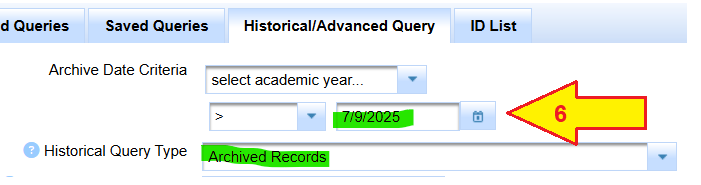
Use a date range broad enough to include the archived transaction you need.
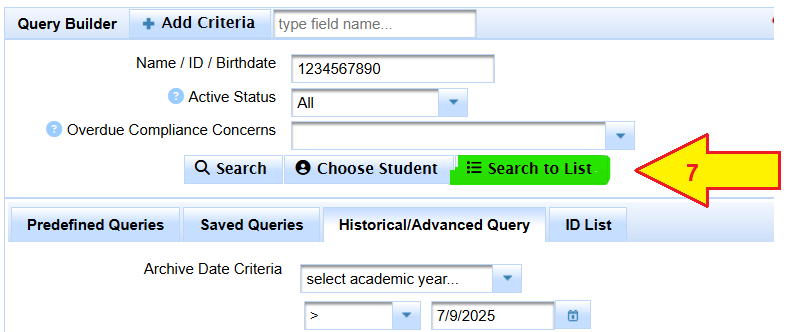
Search to List after the archived-record criteria are ready.

Open the result whose report-event date matches the historical transaction you need.
Find an Older Archive Tied to a CALPADS Error
If you are looking for an archive that your district previously sent to CALPADS:
- Search the student's SSID.
- Use Historical/Advanced → Archived Records.
- Set the transaction/report-event date range broad enough to include the error's historical date.
- Use CALPADS report status criteria when helpful:
- All to see every matching archive.
- Complete when you want archives that were already reported.
- Search to List and open the matching dated archive.
Records Over Age 26 or Inactive for a Long Time
SIRAS can move very old Inactive records into a Historical designation so they do not appear in ordinary searches. The current source guidance describes records over age 26 with both Inactive Date and Last Modified more than one year in the past as candidates for this historical designation.
If one of these records must be returned to an active Special Ed/504/SST designation, the existing procedure uses a Transfer Request and acceptance workflow.
Need More Than One Student?
| Reconstruct a past Census/EOY population | Historical Population Estimate |
| Build a complex historical archive query | Advanced Historical Queries |
| Compare a SIRAS historical extract with CALPADS | SIRAS vs. CALPADS Bulk Extract Reconciliation |

