


CALPADS 16.25: DINC 2 Initial Part B Timeline Compliance

Last updated: Sep 21, 2026
CALPADS 16.25 — DINC 2 Monitoring. DINC 2 = Initial Evaluation >60 days after Parent Consent.Use report to monitor Indicator 11 timeline components. See here for CALPADS 16.25 Resource Page
You are here: Monitor → CALPADS 16.25.
DINC 2 = Initial Evaluation >60 days after Parent Consent. Use Meeting Compliance Quick Actions for the SIRAS-side DINC 2 work queue and 16.25 for the CALPADS-side view.
Description: Reports details for students who are enrolled on the report date OR who have held initial Part B evaluations within academic year of the report period, and are either:
- Overdue, Exceeded 60-days
- Evaluation Held Late, Exceeded 60-days
- Pending Evaluation, 60-days Not Yet Exceeded
- Timely Evaluation within 60-days
What Do You Need to Do?
| Run 16.25 for the appropriate As Of dateUse the date that answers the monitoring or reporting question. | Review the fields that explain the exceptionMonitoring Category, Days Overdue, Meeting Delay Code, and Evaluation Type. |
| Review a DINC 2 Initial Evaluation exceptionVerify consent, meeting, MEET history, delay documentation, and the actual field event before correcting data. | Confirm the review is completeCorrect/understand the exception, rerun 16.25, then return to the monitoring workspace. |
For SIRAS-side Initial Evaluation monitoring before the CALPADS report, use New Referral List and Initial Evaluations over 60 days.
On This Page
Run the CALPADS 16.25 Report
- Log in to CALPADS.
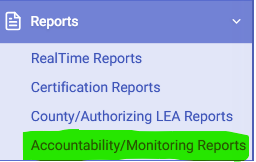
- Select Reports from the left navigation.
- Select Accountability/Monitoring Reports.
- Open the 16.25 Initial Part B Timeline Compliance report.
- Choose the As Of date that matches the monitoring question. For a reporting snapshot, use the applicable census/reporting date.
- Select View Report.
Review the Key Fields
Pay particular attention to:
Need to interpret the MEET fields themselves? Use 16.25 for the DINC 2 work queue; use the MEET reference when you need to understand Referral Date, Parent Consent Date, Meeting Date, Evaluation Type, Pending As Of, or Delay Code. See MEET Component: Evaluation and Review Events.
- Monitoring Category
- Days Overdue
- Meeting Delay Code
- Evaluation Type
If CALPADS shows the evaluation as overdue:
Verify whether the field event was actually late, whether required MEET/evaluation data is missing, and whether any Meeting Delay Code is accurate and supported by documentation.
Verify whether the field event was actually late, whether required MEET/evaluation data is missing, and whether any Meeting Delay Code is accurate and supported by documentation.
Investigate and Correct 16.25 Findings
- Use Data Monitoring Investigation Guide when the reason for the exception is not immediately clear.
- Use Process for Error Resolution after the correction owner is identified.
- Use Reporting data to CALPADS when a corrected transaction must be submitted.
- Use CALPADS Submission Log Help to verify the submitted job when needed.
- Rerun 16.25 and return to Data Monitoring Tasks.
Completion Standard
16.25 review is complete when:
Each exception is either corrected and reflected accurately in CALPADS, or is understood and supported by the applicable evaluation/delay documentation.
Each exception is either corrected and reflected accurately in CALPADS, or is understood and supported by the applicable evaluation/delay documentation.

