


This article is Special Education-only. Use it when the IEP Manager Pending Changes tab contains proposed changes to the student's Current/MIS data.
Pending Changes are the checkpoint where IEP staff tell SIRAS which proposed meeting data actually became agreed-to Current data when the Parent Response does not automatically resolve every individual change.
This article is about IEP Manager Pending Changes. It is not about Current Active Status = Pending, Pending As Of MEET, or an archived transaction whose Report Status is Pending. See Pending in SIRAS: Know Which “Pending” You Mean.
Cancelling a pending change prevents that proposed change from being applied to Current data. It does not remove the documented proposal from the finalized IEP forms.
Quick Links
| What Pending Changes DoUnderstand the staging layer between the meeting and Current/MIS. | Parent Response and Pending ChangesFull acceptance, partial consent, stay put, and no response behave differently. |
| Partial ConsentSIRAS cannot determine which individual portions were agreed to without staff direction. | Pending ServicesReview the entire service set carefully before accepting it into Current. |
| After FinalizationVerify Current and the archive; correct both when the same event was stored incorrectly. | Verification ChecklistConfirm that the Current record reflects only what was actually agreed to. |
What Pending Changes Do
During an open meeting, staff can propose changes to student, plan, service, and other data. Some of those proposed values are held as Pending Changes rather than immediately replacing Current data.
Accepting a pending change is a convenience that applies the approved change to Current so the same value does not need to be re-entered manually.
Parent Response and Pending Changes
| Response / situation | Pending-change expectation |
|---|---|
| Accepts the Plan (Signed Consent) | Applicable approved pending data can become Current. Verify Current/MIS, services, goals, and the meeting archive after finalization. |
| Awaiting Response | Proposed plan changes remain pending while follow-up continues. The meeting should remain open. |
| Parent Contacted, No Response | The meeting may close when the documented workflow permits, but unaccepted proposed plan changes remain held rather than becoming a new participating PLAN/SERV. |
| Does not accept the plan / Stay-Put / No Plan | Do not replace the last agreed-to Current plan with the unaccepted proposal. Review Pending Changes and Next Year's Data before finalization. |
| Partial consent | Staff must identify and apply only the agreed portions. SIRAS cannot infer the precise scope of the parent's agreement from the response label alone. |
See Parent Response - Impact Table for the full response matrix and Parent Response - Steps for Disagreements for disagreement/partial-consent procedures.
Partial Consent Requires Staff Review
When the parent gives partial consent, SIRAS cannot know from the response label alone which individual proposed data items were agreed to in the field. The IEP team and appropriate SIRAS/SEDS staff need to identify the agreed portions and use Pending Changes to complete the data flow back to Current.
- Document which goals, services, placement, dates, or other plan components were agreed to and which were not.
- Select the applicable partial-consent Parent Response.
- Review every Pending Change before applying it.
- Apply only the portions that were actually approved.
- Preserve the last agreed-to Current information for anything that was not approved.
- Verify Current/MIS, goals, services, and the meeting archive after finalization.
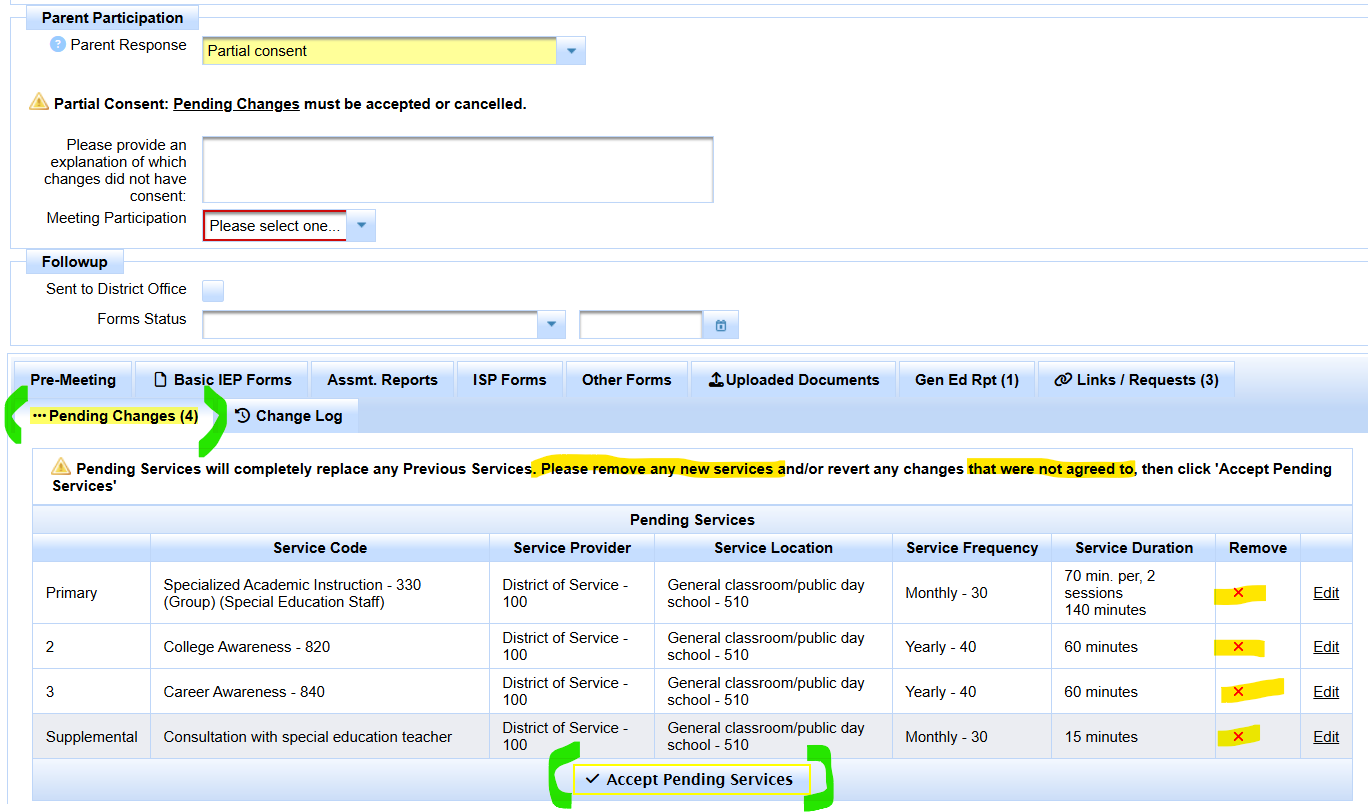
With Partial consent, review the Pending Changes tab and the pending service set before accepting anything into Current. The screen cannot determine which individual proposed items the parent agreed to without staff review.
Pending Services Need Whole-Set Review
Service changes need particular care because the pending service set can replace the previous Current service set when accepted.
Before accepting pending services:
- remove a proposed service that was not approved;
- edit an approved service when the agreed terms differ from the proposal;
- confirm the complete participating service set that should remain Current; and
- verify service dates and other service details that affect the plan/reporting history.
The Current MIS service area should represent the actual agreed-to participating plan. For the reporting relationship between Current services and CALPADS SERV, see SERV Component: Services Associated with a Plan.
If Approved Changes Are Applied After Finalization
When the meeting has already been finalized and staff later determine that an approved value was not applied correctly, review both layers:
- Correct Current/MIS so the student record reflects what is true now.
- Review the existing archived transaction for that same meeting event.
- If that archive also preserved the wrong value, correct the existing historical transaction as appropriate.
- Do not create a brand-new archive merely to conceal or replace an error in the original meeting event.
- Resubmit and verify only when the corrected historical transaction must be reported again.
See IEP Manager Meeting Archive vs. MIS Archived Transaction, Data Record - Archived Transaction, and Process for Error Resolution.
What Happens After Pending Changes Are Resolved?
Resolving Pending Changes determines what becomes Current/MIS. If the meeting/event creates an applicable historical reporting transaction, that archive then preserves the dated event state.
The archive may later have Report Status = Pending. That is a different use of the word Pending: it means SIRAS should attempt to submit the selected archived component or components.
See Data Record - Archived Transaction and Reporting data to CALPADS.
Verification Checklist
- The Parent Response accurately represents what occurred.
- Pending Changes contain only changes still awaiting a decision or staff action.
- Only agreed-to plan/service changes became Current.
- Unaccepted portions of the prior agreed plan remain intact where required.
- Current services represent the participating service set.
- Goals advanced or remained in place according to the selected response.
- The meeting archive represents the same actual event and consent outcome.
- No new PLAN/SERV is being reported for an unaccepted plan.
The finalized meeting documents the proposal and response, while Current/MIS and the archived reporting transaction represent only the data that should actually be in effect/reportable for that outcome.

