


This article covers manual record creation, the Update from API and Generate ID options on the New Student page, and the historical-data fallback used when an already-eligible student's original referral/initial-entry dates cannot be obtained. For the broader arrival review, start with 289 — New or Returning Students.
Student Info → + New Student
Before creating a student, determine whether a record with the same SSID already exists on your SIRAS server or another SIRAS server that can transfer the record. If you do not yet know whether the student has an SSID, complete that due diligence before continuing.
Before You Create a Record
- Know why the record is being created. Determine whether the student is a true new referral, an already-eligible incoming/returning student, an IFSP/Part C student, or another situation.
- Search for an existing record first. Use Request Student Transfer / the request-transfer process with the SSID when an existing SIRAS record may be available.
- If the student came from a different SIRAS server and the record cannot be obtained through the normal transfer workflow, contact [email protected] for assistance rather than creating a duplicate.
- Confirm the SSID. Do not knowingly create a second record for the same student.
- For a new or returning IEP-age student, complete the due-diligence review in New or Returning Students so you know what eligibility, participation, plan, enrollment, and historical information the new record must represent.
Check with your district office to determine whether your SIS integration/import process creates new SIRAS records automatically. If so, entering the correct information in the SIS may create the record through the next scheduled import rather than requiring manual creation.

Create the Record
- Go to Student Info → + New Student.
- Complete the required fields. SIRAS highlights required fields in red.
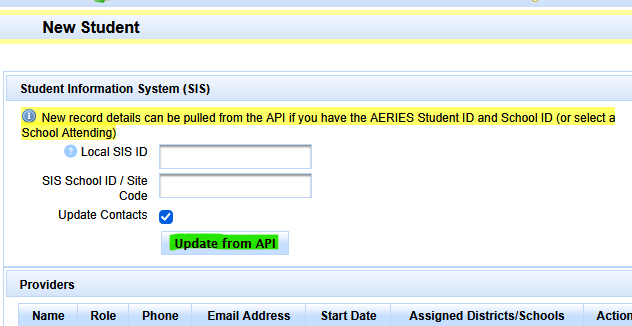
- If your district uses Aeries integration and the student's Aeries identifiers are known, see Aeries: What Does Update from API Do?.
- If the student's district SIS/local Student ID is not known yet, see What Does Generate ID Do?.
- Choose the student's status based on the actual situation. A true Initial Evaluation is normally Pending; an already-eligible and participating student may be Active. See SIRAS Record Status.
- At the top right of the New Student page, choose + Create Record, or Create and Add Another New Student when appropriate.
- If the student is already eligible, continue to the next section and fully reconstruct the MIS Summary before creating a Plan Adoption, assigning providers, or opening new meeting work.
Aeries: What Does Update from API Do?
Student Info → + New Student → enter Aeries identifiers → Update from API
Enter the student's Aeries site code/school ID and local Aeries SIS ID, then select Update from API. SIRAS uses the API connection to fill in as much available new-student information as it can return.
If the Student ID or school/site identifier does not match a student available through the Aeries API connection, SIRAS displays an error indicating why the update could not be completed.
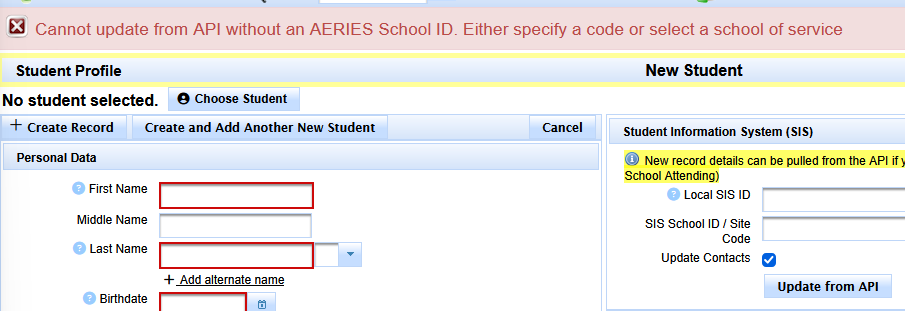
Confirm that an existing SIRAS record cannot be transferred or obtained before creating a new record.
What Does Generate ID Do?
SIRAS generates a temporary Student ID so the record can be created.
This can be useful when a student must be entered into SIRAS before the district has created the student's local SIS record. One common example is a preschool referral that begins in SIRAS before the child is enrolled in the district SIS.
Once the student's actual district SIS/local Student ID is known, replace the generated value in the Student ID field with the correct local ID.
The option reflects an older CASEMIS-era requirement in which the Student ID needed to be unique across the SELPA. A district's local SIS ID could duplicate an ID used by another district, so SIRAS supported generation of a unique ID when the local identifier was not yet available.
For referral situations in which a child may need an SSID or enrollment created before normal district enrollment occurs, see Data Entry Help for IEP Referrals: SSID, Enrollment & Student ID.
Student Is Already Eligible
When the student already has an existing U.S.-based special education eligibility, the goal is to represent the student's actual incoming history—not to create a new referral simply because the SIRAS record is new.
- Use the current IEP/other records when available.
- Review CALPADS SWDS, MEET, PLAN, and SERV history. See Create or Update SIRAS MIS Information from CALPADS.
- Reconcile the incoming records, CALPADS, and current field information using New or Returning Students.
- Complete the MIS Summary sufficiently before a Plan Adoption or other incoming-student reporting workflow. See Plan Adoption — Incoming Students & CALPADS Reporting.
The student may have been participating for a while. Preserve the Special Ed. Initial Entry Start Date as well as the historical Referral Information. Referral information comes from the student's last Initial Evaluation. It is not normally replaced unless the student exits special education and later re-enters.
If Historical Referral / Initial-Entry Dates Cannot Be Obtained
A prior district being unable to provide referral information does not by itself prove that those fields should be recreated. First determine what actually happened using the student's available IEP paperwork, CALPADS history, family information, and current district/IEP-team knowledge.
If there is no clear Referral By, Referral Date, Parent Consent Date, Initial Evaluation Date, or Special Ed. Initial Entry Start Date, look for the earliest date known to the family or shown in the available paperwork that indicates when the student started special education.
When no more specific historical dates can be established, use that earliest known special education start date for:
| Field | Historical fallback |
|---|---|
| Referral By | Use Other. |
| Referral Date | Use the earliest known date indicating when the student started special education. |
| Parent Consent Date | Use the same earliest known date when the actual date cannot be established. |
| Initial Evaluation Date | Use the same earliest known date when the actual date cannot be established. |
| Special Ed. Initial Entry Start Date | Use the same earliest known date when the actual historical entry date cannot be established. |
Do not use today's date or manufacture a new referral simply because original historical documents are unavailable. If the student is actually being newly referred now, use Initial Evaluation Process.
Special Ed. Initial Entry represents the historical start of the student's special education participation/eligibility history wherever in the U.S. the student was found eligible. For an eligibility established in another U.S. state that is being introduced into California, the Special Ed. Initial Entry Start Date represents the date the student was found eligible, even outside California. The CA Entry Date aligns with the District Enrollment Date and plan effective date. See Out-of-State IEP Fields — SELPA From & CA Entry Date for more information.
Special Arrival Scenarios
Returning student with an existing SSID
Use the transfer/search process first. Do not create a new record merely because the student is returning and the record cannot be found in the current district data.
Start with New or Returning Students.
Part C / IFSP to Part B
If the student is currently in the Part C / IFSP system, use the specialized Part C/Part B workflow rather than treating the situation as an ordinary new IEP-age record. When an IFSP record is held by another district, coordinate the appropriate SIRAS access/next-district process before creating a duplicate record.
Preschool / SSID after parental consent
For a preschool child who does not yet have an SSID, obtain the SSID as required once parental consent for an Initial Evaluation establishes the reporting obligation. Preserve the existing external training reference: CDE training on SSID requirements after parental consent.
If the SIRAS record must be created before the district SIS/local Student ID is known, use Generate ID as a temporary Student ID and replace it when the actual local ID becomes available.
Out-of-state U.S. IEP
Do not choose SELPA From = Out of State merely because the student most recently lived outside California. First check the student's existing California CALPADS special education history.
- If CALPADS already contains the student's valid eligibility / Special Education Initial Entry history, preserve that history and use the normal incoming/returning workflow.
- If the student's eligibility was established in another U.S. state and CALPADS has no California special education history for that eligibility, use Out-of-State IEP Fields — SELPA From & CA Entry Date and Plan Adoption.
Developmental Delay on an out-of-state IEP
The prior article documented the following SIRAS/CALPADS disability mapping for an adopted out-of-state IEP that uses Developmental Delay:
- 281 — Established Medical Disability for students age 3–5; or
- 280 — Other Health Impairment for students age 6–9.
Confirm the student's current age and the applicable reporting guidance before using the disability code.
Choose the Correct SIRAS Status
For Special Education records, Active should represent all three of the following being true:
- Enrollment = Yes
- Eligibility = Yes
- Participation = Yes
If one of those is not true, the appropriate SIRAS status may be Pending or Inactive depending on the actual situation. Use SIRAS Record Status and the onboarding decision in New or Returning Students.
Duplicate Records
SIRAS can detect possible duplicate records using identifying information such as Name + DOB, SSID, or Student ID. When SIRAS identifies a possible duplicate, compare the record using the SSID and locate/request the existing record. Do not knowingly create duplicate student records.


After creation/onboarding, confirm the record represents the student's verified current eligibility, participation, enrollment, and known historical information; then continue to the correct incoming-plan, Initial Evaluation, or other workflow.

