


Use this article to determine the appropriate Program Setting, prepare age/grade transitions, find records that need review, and make sure Program Setting changes are archived and reported.
A student appearing in a Program Setting query means the record needs review. It does not automatically mean the Program Setting is wrong. Confirm the student's age, grade, placement, enrollment, IEP information, and effective date before changing data.
What Do You Need to Do?
Determine the Appropriate Program Setting
Use the applicable Least Restrictive Environment decision tree:
- Preschool LRE Decision Tree – for students under age 5 or age 5 and enrolled in preschool only.
- School-Age LRE Decision Tree – for Kindergarten and Transitional Kindergarten students age 5 or older through age 22.
Verify the student's percentage-in-general-education values at the same time, especially when those values may also be changing.
Understand When Program Setting Changes
A student may move from one Program Setting to another when:
- the student turns 5 and moves from a preschool-age setting to a school-age setting;
- the IEP team changes how or where the student receives services; or
- the student enrolls in a different type of school or placement, such as moving from a public school to a nonpublic school or private school.
Do not report a school-age Program Setting before it is actually in effect. For example, a student should not be reported with a school-age setting before reaching age 5. Use a report date on or after the student's fifth birthday and while the student has an active enrollment in CALPADS.
Prepare an Automatic Next Program Setting Update
Student Info → Next Year's Data → Next Program Setting
For students age 5 or older in Kindergarten, enter the appropriate future value on the Next Year's Data page under Next Program Setting.
The nightly SIRAS data maintenance process applies the Next Program Setting to the student's Current record when the student meets the age and grade requirements, typically on the student's fifth birthday. The update is also recorded in the Change Log.
See Automatic Updates (Data Maintenance Process) for additional information.
Find Records That Need Program Setting Review
Use LEA Data Monitoring Tasks for the recurring schedule for these checks. Article 506 explains what to do once Program Setting review is needed.
Search → Predefined Queries → Compliance Concerns
KDG Requiring Updated Program Data
This query finds students who are already age 5 and enrolled in Kindergarten but still have an outdated Program Setting.
PLAN0619F1 errors can occur when a student has a valid preschool Program Setting in CALPADS but will be age 5 and enrolled in Kindergarten before the applicable reporting date.
Also review students turning 5 who may still have blank percentage-in-general-education values.
Review the student's actual setting and effective date. If a correction is needed, update Program Setting on the MIS Summary and create the appropriate reporting archive dated no earlier than the student's fifth birthday and on a date when the student is enrolled.
Program Setting 203/204 for Grade > PRS
This query finds students in Transitional Kindergarten or a higher grade who still have a preschool-based Program Setting.
Review these records with the appropriate program specialist, director, or SELPA contact and correct them when appropriate.

Use the predefined Compliance Concerns queries to identify Program Setting records that need review.
Review the returned students and related program data before making a correction.
See Cleaning up Program Setting and Related Data for additional list, sort, and population-review methods.
Update and Report Program Setting
Student Info → MIS Summary → Program Setting
The simplest way to report a new Program Setting is to update the MIS Summary and create an archive after the new setting is in effect. The archive date becomes the PLAN effective date and report event date.
Use one of the following methods:
- Update and archive the MIS Summary. Change Program Setting after it becomes effective, then archive the MIS Summary using the appropriate effective date. This is commonly the first day of school or the student's fifth birthday when that date accurately represents when the new setting became effective.
- Update before the next meeting. Enter the correct Program Setting before the next meeting so the meeting archive reports the new value using the meeting's Plan Effective Date.
- Correct an existing archive. If an older archive contains incorrect Program Setting information, correct the appropriate archive and resend it as PLAN Only. See Reporting data to CALPADS.
Updating Program Setting on the MIS Summary changes Current data. If the change must also be represented in CALPADS, make sure the appropriate dated PLAN transaction carries the corrected value.
Find a Program Setting Change That Has Not Been Reported
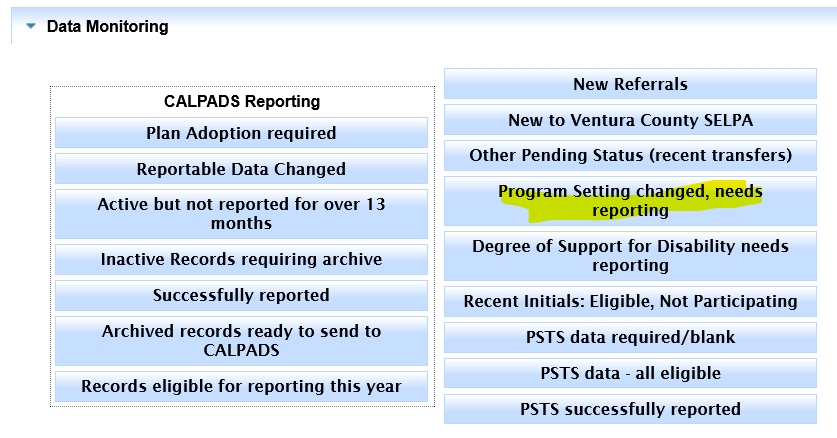
Search → Predefined Queries → Data Monitoring → Program Setting Changed, Needs Reporting
If Program Setting was corrected in Current data but the record was not archived, run Program Setting Changed, Needs Reporting.
This query finds records where Program Setting has changed but the updated value has not yet been archived for reporting.

