


Check the student's Previous Annual Review and Previous Evaluation/Triennial dates before treating the record as historical noncompliance. Missing or incorrect Previous dates can create a false-positive Previously Overdue result.
| Provider / Case Manager? Use Section 1 to find and review the student's Previous Annual Review and Previous Evaluation dates. If your IEP paperwork or other reliable documentation shows that a Previous date in SIRAS is wrong, continue through this article and notify your SEDS Coordinator / administrator when a historical correction requires administrative review or access. |
Administrator / SEDS staff? Use the same review path, then investigate and correct only the historical field that is actually wrong. If the underlying history is uncertain, use Data Monitoring Help: Investigate a Questionable Record before changing the record. |
A blank Previous Evaluation field can be correct when there was no earlier qualifying evaluation. A single prior triennial can also be both the prior evaluation and prior plan review when the verified event actually served both purposes.
1. Find and Review the Previous IEP and Evaluation Dates
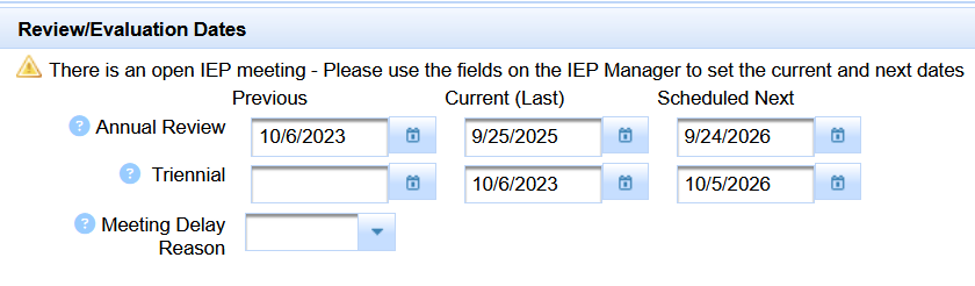
Student Info → Special Ed. Profile → Program → Review/Evaluation Dates
You do not have to start from a compliance report to review these dates. A provider may be checking the record because an IEP, scanned document, transfer paperwork, or other information shows a prior meeting date that should be compared with SIRAS.
- If the student is not already open, use Choose Student or your normal student-selection method to open the student record.
- From the student record, click Student Info.
- Open Special Ed. Profile.
- Select the Program tab.
- Scroll down to the Review/Evaluation Dates section.
- Review the displayed Previous Annual Review, Current/Last Annual Review, Previous Evaluation/Triennial, and Current/Last Evaluation dates.
Was this an Other Review?
Other Review are Amendments to the existing plan in SIRAS.
An Other Review meeting date will never update Last Annual date.
An Other Review meeting date will never update Last Evaluation date either.
If You Came Here From a Previously Overdue Result
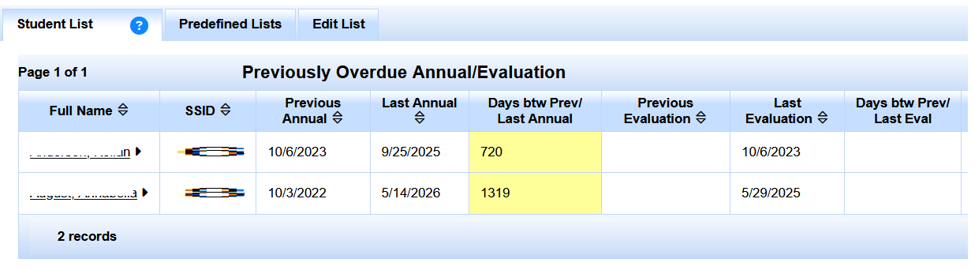
Administrators and other staff reviewing compliance may also arrive here from the Home page Previously Overdue Annual or Triennial result.

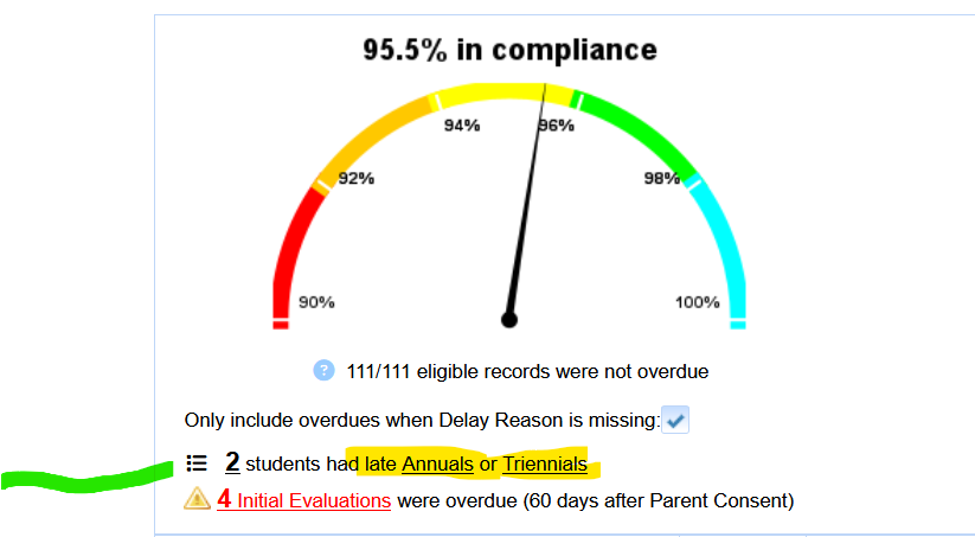
- Click the # students had late link for the applicable Previously Overdue Annual or Triennial result.
- Review the list, including Previous Annual, Last Annual, days between those dates, Previous Evaluation, Last Evaluation, and days between those dates.
- Click the student you want to investigate.
- Then use the same direct path above: Student Info → Special Ed. Profile → Program → Review/Evaluation Dates.
2. Verify What Actually Happened
Establish the student's real prior meeting history before editing the Special Ed Profile. The evidence may come from more than one source.
- Signed or finalized IEP paperwork
- Scanned documents or local electronic records
- SIRAS meeting/history information
- Records received from another district or program
- CALPADS MEET history, when it helps confirm the reported event sequence
Staff may already know a Previous date is incorrect because they have access to signed paperwork or other documentation that is not visible in CALPADS. Use the best available evidence to establish what actually occurred. If SIRAS, CALPADS, and the available paperwork disagree, investigate the discrepancy before changing the record.
Identify:
- the most recent prior plan-review/Annual event;
- the most recent prior evaluation/reevaluation event; and
- whether one meeting legitimately served both purposes.
If the verified history shows that the Current Evaluation is the student's first evaluation in the available history, there may be no Previous Evaluation date to enter.
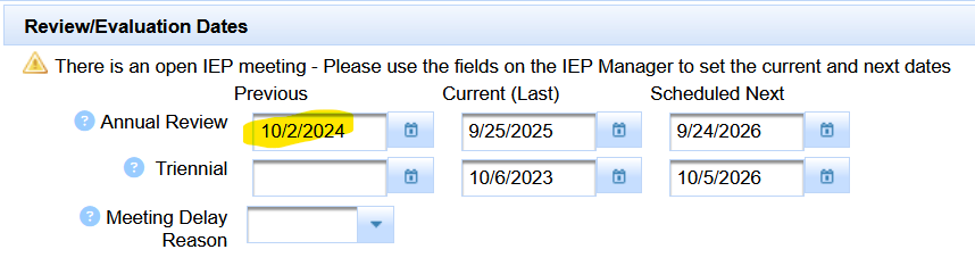
Example 1 — Only the Previous Annual Review Date Is Wrong
In this example, the Current Annual Review and Current Evaluation dates are believable. The problem is the older Previous Annual Review date.
What SIRAS Shows
What the Verified History Proves
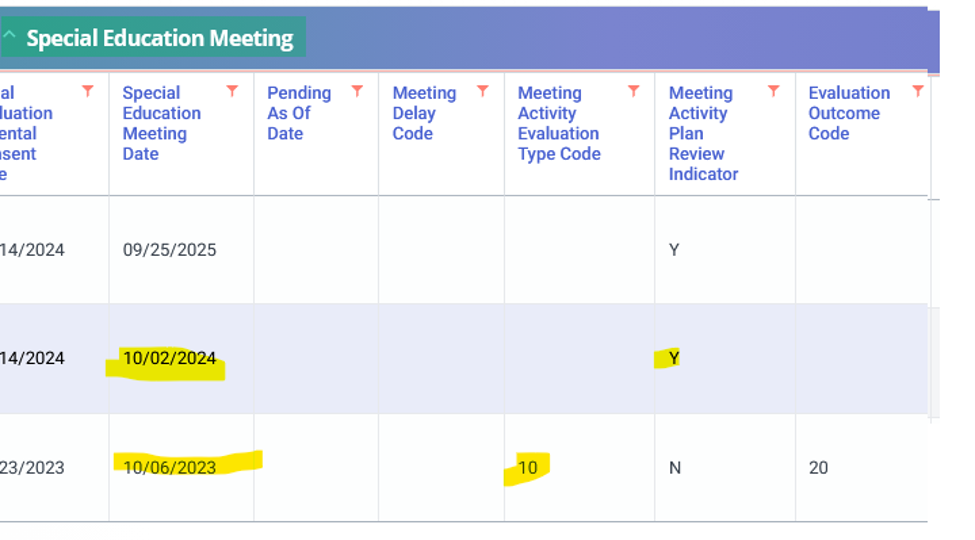
The verified history shows a newer plan-review event. In the same example, the student's initial evaluation is the same date as the Last Evaluation. Because that initial evaluation started the current three-year evaluation timeline, there is no earlier qualifying evaluation date to enter.
Correction
Update the Previous Annual Review field to the verified prior plan-review date. Leave Previous Evaluation blank when the investigation does not establish an earlier qualifying evaluation.
Example 2 — Both Previous Dates Need Correction
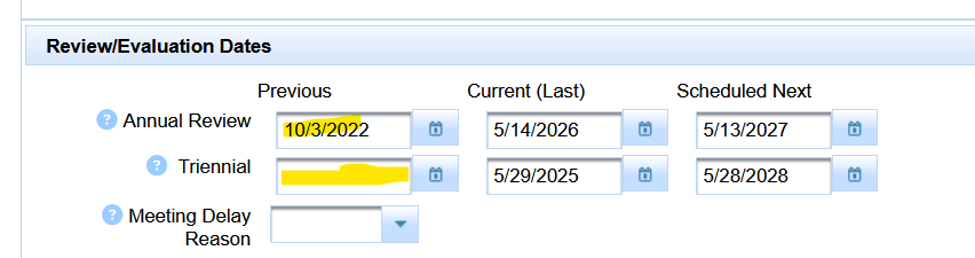
In this example, the Previous Annual Review is incorrect and the Previous Evaluation is blank. The verified history shows a later reevaluation/triennial that was also a plan review.
What SIRAS Shows
What the Verified History Proves
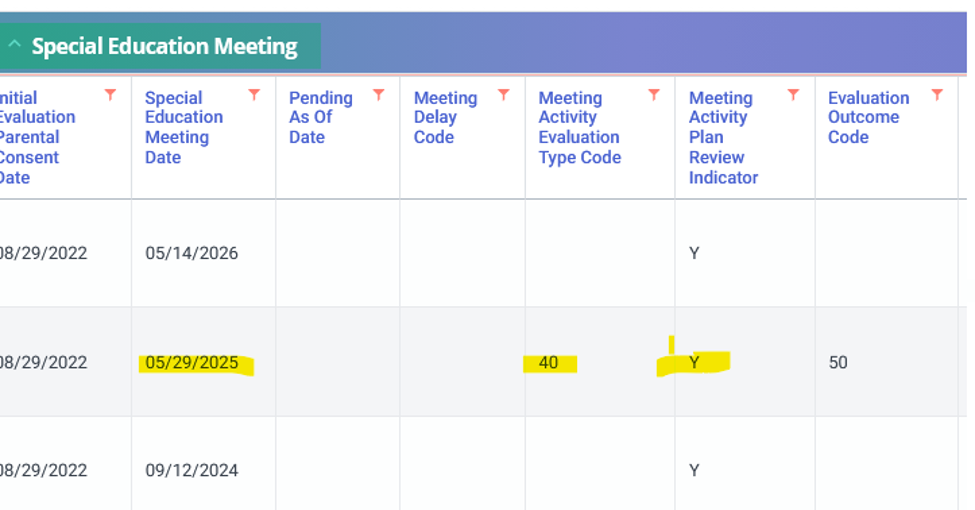
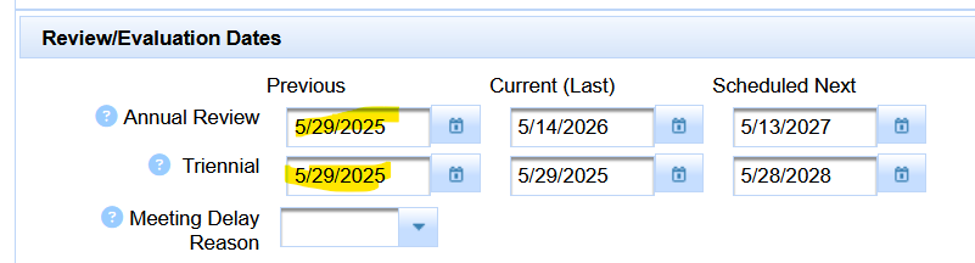
Because the same verified meeting served both purposes, the same date belongs in both appropriate Previous fields.
Correction
3. Make the Verified Correction
If you can verify that a historical Previous date is wrong but you are not responsible or authorized to correct historical program data, send the verified date and supporting documentation to your SEDS Coordinator / administrator. Authorized staff can then make the correction using the steps below.
- Remain in Student Info → Special Ed. Profile → Program.
- In the Review/Evaluation Dates area, change only the inaccurate Previous field or fields established by the investigation.
- Do not change an accurate Current/Last date merely to make the monitoring result disappear.
- Save the correction.
When SIRAS indicates an IEP meeting is open, use the meeting workflow for Current/Next dates. This Show Me is specifically for correcting verified historical Previous dates.
4. Verify the Correction
Return to the same Home compliance area or Previously Overdue query/list that exposed the issue and rerun it.

If the item disappears and the verified meeting history remains intact, the false-positive compliance result has been resolved.
Return to Data Monitoring Help. Another date, event, enrollment period, archive, or reported transaction may be driving the result.
5. Do Not Continue Into Historical Delay Reconciliation Unless the Meeting Was Actually Late
If the Previous dates were wrong and correcting them removes the item, do not add a Meeting Delay Reason or create a CALPADS correction for noncompliance that did not occur.
If the verified dates show that the meeting truly was late, continue with DINC 1 Previously Overdue Meetings: Reconcile SIRAS with CALPADS 16.21.

