


What Do You Need to Find?
| DINC 3 — Initial Evaluation after the 3rd birthdayRun the SIRAS compliance list for Part C-to-B transitions already identified as late. | All Indicator 12 candidates for the academic yearFind students who turned three during the year and had Infant Services. |
| Compare the candidate and late populationsUse the two groups to support local Indicator 12 review. | A record does not make senseVerify referral/consent/meeting dates and Part C-to-B history before changing data. |
Indicator 12 Context
The existing SIRAS guidance identifies the Reporting LEA as the LEA receiving results for Indicator 12. The source article describes Indicator 12 as using CALPADS EOY 4 data together with a California Department of Developmental Services data file.
For local monitoring, keep two populations visible:
- All candidates: students who turned three during the academic year and had Infant Services / Part C involvement.
- DINC 3 / late students: Part C-to-B Initial Evaluations held after the student's 3rd birthday.
Find All Indicator 12 Candidates
- Search for students with a birthdate between July 1 and June 30, shifted back three years for the academic year being reviewed.
- Set Had Infant Services = Y.
- Use Active Status = All when reviewing the full historical academic-year candidate population.
- Search to List and preserve the population for comparison.
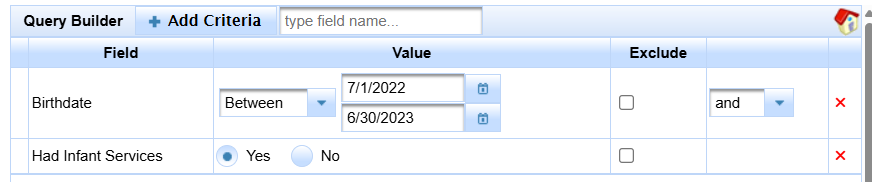
Build the full Indicator 12 candidate population for the academic year before comparing the late subset.
Find DINC 3 — Initial Evaluation after the 3rd Birthday
Query method:
- Open Search → Predefined Queries → Compliance Concerns.
- Select IFSP to IEP Initial after 3rd birthday or the current equivalent label.
- Search to List.

Use the predefined compliance query for the DINC 3 late Part C-to-B population.
Student List method:
- Open Reporting → Student Lists → Predefined Lists → Compliance Concerns.
- Select DINC 3: Init Eval after 3rd Birthday.

The DINC 3 predefined list displays the Part C-to-B Initial Evaluation population identified after the 3rd birthday.
For the same quick action inside the broader meeting-compliance workflow, see Meeting Compliance Quick Actions.
Compare the Candidate and Late Populations
Use the candidate population and DINC 3 late population as two different views:
| Population | What it tells you |
|---|---|
| All candidates | Students potentially relevant to the local Indicator 12 review for the academic year. |
| DINC 3 late students | Students whose Part C-to-B Initial Evaluation was identified after the 3rd birthday. |
Do not treat the simple count of DINC 3 records as the full Indicator 12 calculation. The state performance indicator applies its own denominator/exclusion rules.
Investigate and Correct a DINC 3 Finding
- Verify the student's birthdate and Part C/Infant Services context.
- Verify referral, parental consent, and Initial Evaluation meeting dates.
- Determine whether the meeting was actually late or whether MEET/history data is missing or incorrect.
- Review supported Meeting Delay information when applicable.
- If the record still does not make sense, use Data Monitoring Help.
- After the correction owner is known, use Process for Error Resolution.
- Submit and verify corrected reportable data when required, then rerun the DINC 3 list.

