


What Do You Need to Do?
| Find students currently identified under DINC 4Run the DINC 4: Transition Reg. Indicators predefined list. | Review students before they become DINC 4Use an age-based population plus transition-regulation fields to find blanks early. |
| A Transition Regulation answer is blank or NoDetermine whether this is a data-entry problem or an IEP/transition-content problem. | Resolve PLAN0390–PLAN0397Review the affected historical PLAN and the reporting-period context before resending. |
| Verify the correctionConfirm the intended PLAN history posts, then rerun DINC 4 and the applicable CALPADS report/error view. | |
Find Students Currently Identified under DINC 4
- Go to Reporting → Student Lists → Predefined Lists → Compliance Concerns and Overdues.
- Select DINC 4: Transition Reg. Indicators.
- Review each record returned by the list.
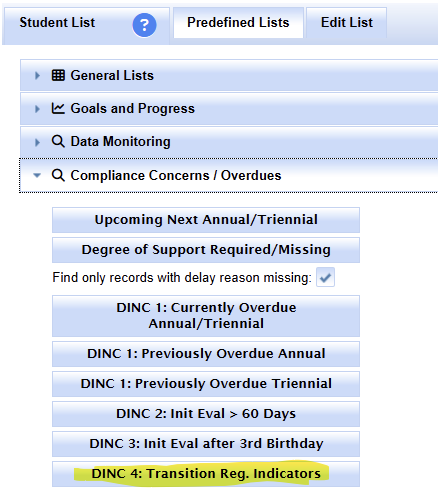
Use the DINC 4 monitoring view to identify students currently out of compliance.

Review the Transition Regulation indicator answers for blanks or No values that require follow-up.
The list is a compliance work queue. A record can appear because of a data-entry problem, because transition content was not completed as expected in the IEP process, or because historical PLAN data needs reporting review.
Prevent DINC 4: Review Students Approaching the Checkpoint
The retired transition-monitoring article used an age-based search plus a Student List to find students who would reach age 16 by EOY and whose Transition Regulation answers were still blank. Keep that preventive concept, but recalculate the age/date boundary for the current academic year rather than reusing an old hard-coded birthdate.
- Build a population of students who will reach the DINC 4 age checkpoint during the period you are planning for.
- Display the Transition Regulation fields in a Student List.
- Sort one of the Transition Regulation columns so blank values group together.
- Route blanks to the responsible IEP/data team early enough to review the actual transition content.
- Rerun the current DINC 4 predefined list as students reach the checkpoint.
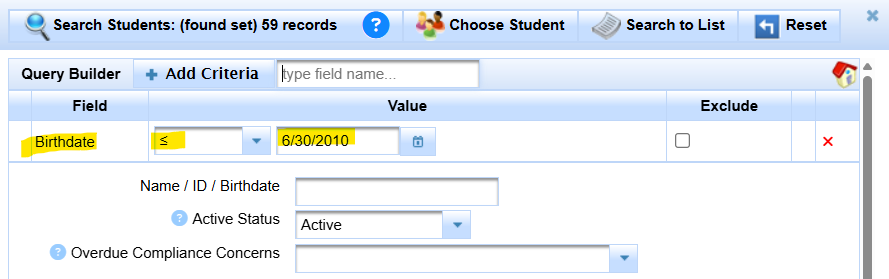
A Student List can be used proactively to review transition fields before students reach the DINC 4 checkpoint.

Sort a transition-regulation column to bring blanks together for preventive review.
A Transition Regulation Answer Is Blank or No
Before editing anything, determine why the value is blank or No.
| Finding | Next question / action |
|---|---|
| IEP documentation supports Yes, but SIRAS is blank/No. | Correct the data entry in the appropriate Current/IEP record and determine whether historical PLAN reporting also needs correction. |
| The most recent IEP did not address the required transition content. | This is not only a reporting-data problem. Route the issue to the appropriate IEP/team process. The older SIRAS guidance notes that an amendment may be needed when transition information was overlooked in the most recent IEP event. |
| The Current value looks correct, but CALPADS shows an older blank/No PLAN. | Review the applicable archived PLAN and CALPADS history before resending anything. |
| The history does not make sense. | Use Data Monitoring Help before changing finalized/historical data. |
Resolve PLAN0390–PLAN0397 Errors
PLAN0390–PLAN0397 are transition-field errors tied to the PLAN record. Use the complete current error text and reporting date before applying older scenario-specific guidance.
- Identify the PLAN0390–PLAN0397 error and the affected Plan Effective / Report Event Date.
- Open the applicable archived PLAN rather than assuming the Current record is the rejected transaction.
- Review what the archived PLAN is actually reporting for the Transition Regulation fields.
- Determine whether the archive needs a data correction, a resend, or a different historical PLAN transaction.
- If the most recent archive is a Stay Put archive that cannot send PLAN, review the next appropriate PLAN-capable archive before deciding what should be resent.
- Use Process for Error Resolution when the correction owner is known.
- Submit through Reporting data to CALPADS and verify through CALPADS Submission Log Help when required.
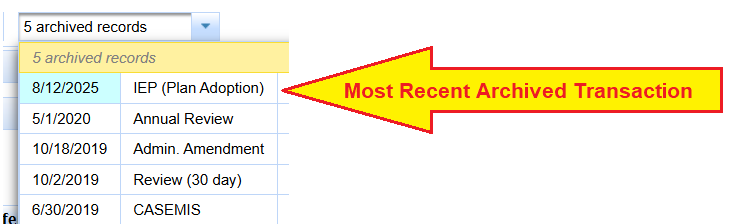
Use the applicable archived PLAN when resolving PLAN0390–PLAN0397 reporting errors.
See What the Archived PLAN Is Reporting
The prior PLAN0390–PLAN0397 article included the following reporting-detail screenshot specifically to help staff see how blank transition-regulation values were represented in the SIRAS PLAN reporting transaction.
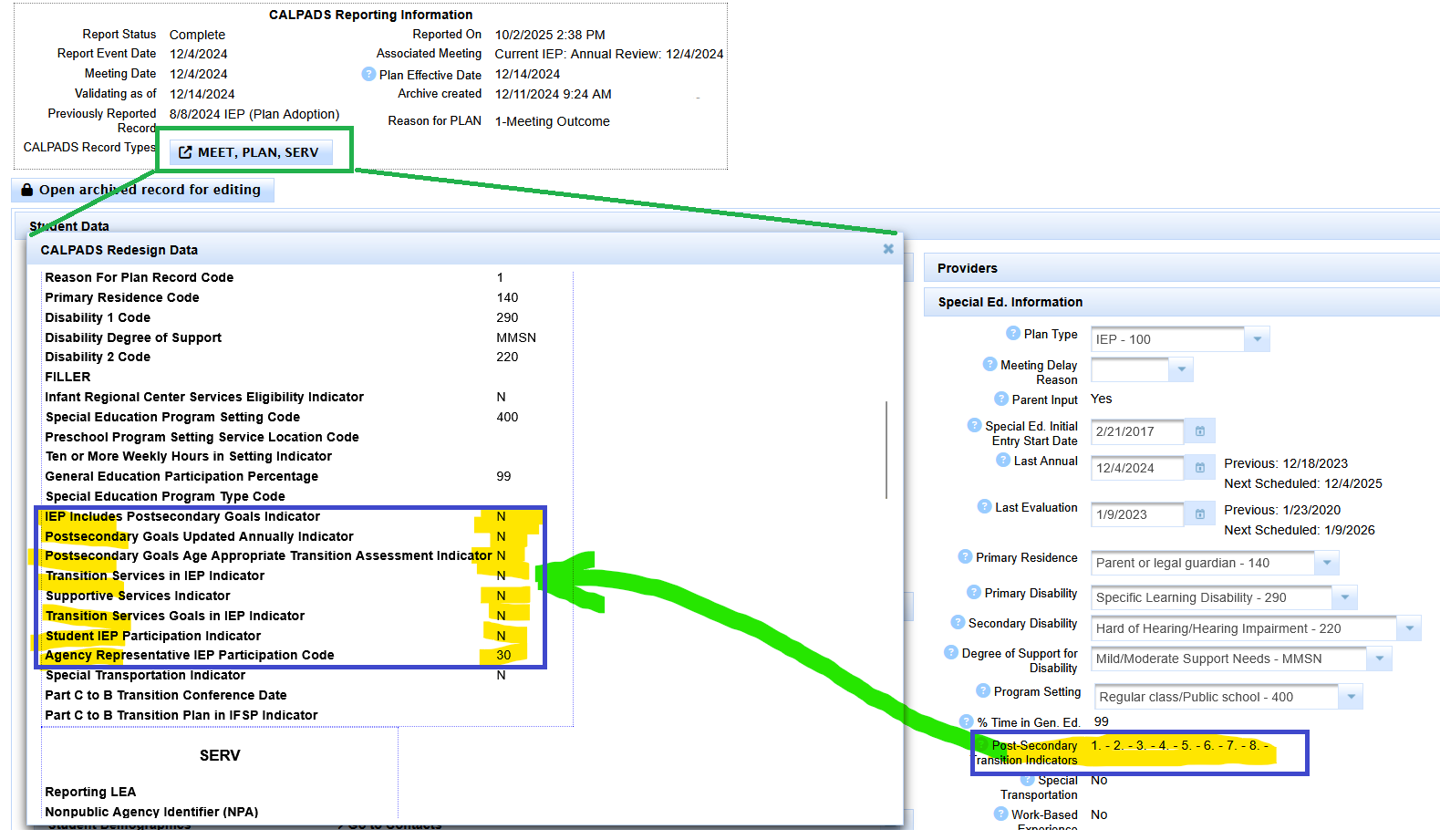
Review what the applicable archived PLAN is reporting before resending an older transaction.
Historical 2025 PLAN0390–PLAN0397 Context
The retired error articles contained dated 2025 guidance for students who were age 15 at the Fall 1 snapshot but would be age 16 by EOY. In that reporting context, blank transition values on the most recent PLAN on or before the Fall 1 date produced PLAN0390–PLAN0397 errors, and SIRAS was updated to report blank answers as N for that scenario.
Keep this only as historical context. Do not reuse the 10/1/2025 dates, 2025 birthdate examples, or the old automatic-resend timing as an evergreen rule. For a current PLAN0390–PLAN0397 error, use the error text, current reporting period, affected archived PLAN, and current SIRAS behavior.
Verify the DINC 4 Correction
- Rerun DINC 4: Transition Reg. Indicators.
- If a reportable PLAN was corrected, confirm the intended CALPADS transaction posted.
- Review the applicable CALPADS error/report to confirm the PLAN0390–PLAN0397 condition is resolved when that was the issue.
- If the record still appears but the reason is not clear, return to Data Monitoring Help.
- Return to LEA Data Monitoring Tasks.

