


Archive for Reporting: When to Create or Correct an Archived Transaction
Use Archive for Reporting when a reportable event must be documented outside the ordinary IEP Manager finalization workflow.
The MIS Summary must accurately represent the event before the archive is created.
Contents
Automatic vs. Manual Archives
- Automatic archive: created when an IEP Manager meeting or reportable event is finalized.
- Manual archive: created from the MIS Summary through Archive for Reporting when the reportable event occurred outside the normal meeting workflow.
See Archived Transactions for the Current/archive relationship.
New Information vs. Correction of Existing Information
New event or newly reportable information → create a new archive
Update Current, then create a dated archive for the new event. Examples include a later SWDS status change, a newly effective PLAN/program setting, Plan Adoption, or a MEET-only transaction needed before a meeting can be finalized.
Previously reported information was wrong → correct the existing archive
Correct Current and the archived transaction that originally sent the bad data. Remove the verified incorrect CALPADS entry as required, set the corrected existing transaction to Pending, and resend it.
A new archive represents a new event. A correction belongs in the transaction that reported the incorrect historical event.
Before Creating a Manual Archive
- Confirm the student and reporting scenario.
- Review source documentation and existing CALPADS history.
- Update Current so the MIS Summary reflects the event being reported.
- Confirm the Report Event Date.
- Confirm the Plan Effective Date when PLAN or SERV will be included.
- Resolve obvious inconsistencies before creating the archive.
The manual archive is cloned from Current. Return to Current when the preview does not represent the intended event.
Create the Archive
- Open the student’s MIS Summary.
- Select Archive for Reporting.
- Choose the option matching the event.
- Review dates and special options.
- Review which components the archive is expected to contain.
- Create the archive and open the resulting dated transaction.
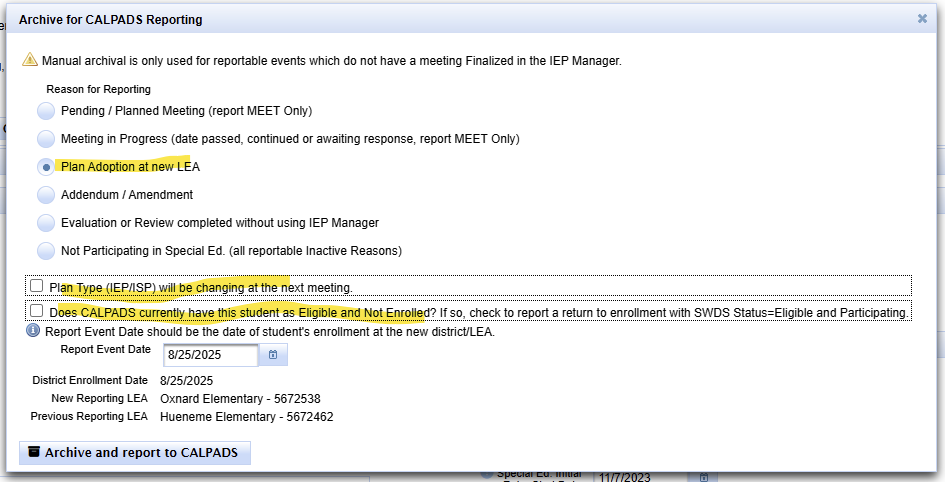
Select the archive type that matches the actual event.

Review the Expected Components
| Archive purpose | Components to review |
|---|---|
| Status change | SWDS and the applicable status effective date/non-participation reason. |
| Evaluation or review | MEET and any SWDS, PLAN, or SERV components created by the actual outcome. |
| Plan Adoption | PLAN and SERV, plus SWDS [1] only when the student’s status actually changes to eligible and participating. |
| Plan-only correction or update | PLAN and associated SERV information tied to the Plan Effective Date. |
See Archived Transaction Components: SWDS, MEET, PLAN, and SERV.
Common Manual Archives While the Record Remains Active
| Scenario | What the archive reports | Related procedure |
|---|---|---|
| Outdated Program Setting | Update Current and create a new PLAN amendment transaction dated when the new setting became applicable. This is new data, not correction of the prior valid plan. | Program Setting Updates |
| Plan Adoption baseline | Creates the receiving LEA’s PLAN and SERV baseline; may add SWDS [1] only when the arrival outcome requires a real status change. | Plan Adoption |
| Pending/Planned Initial Evaluation — MEET only | Reports the assessment-consent/pending event before the meeting occurs. Review Parent Consent Date and delay reason when applicable. | Initial Evaluation Process |
| Pending/Planned Annual or Triennial — MEET only | Reports that the overdue review is planned and documents the applicable delay reason while the event remains open. | 16.21 Compliance Check |
| Meeting in progress — MEET only | Reports the meeting date when the meeting occurred but cannot yet be finalized before a reporting deadline. Finalization later supplies the complete transaction. | Archived Transactions |
Use When Students Leave, Stop Participating, or Become Inactive when the Current record itself must become Inactive.
Plan Adoption at a New LEA
- Use after the arrival workflow determines the receiving district should adopt the existing U.S.-based plan.
- Report Event Date = District Enrollment Date.
- Plan Effective Date = District Enrollment Date.
- A standard Plan Adoption establishes the receiving district’s PLAN and SERV baseline.
- Create the Plan Adoption before the follow-up review or amendment.
See Plan Adoption.
Plan Adoption Special Options
Plan Type Is Changing
Create the Plan Adoption using the incoming plan type. The subsequent meeting documents the new plan type.

Add SWDS [1] Eligible and Participating
Select this only when the actual incoming status and participation outcome require a new SWDS [1], not merely because the student changed districts.

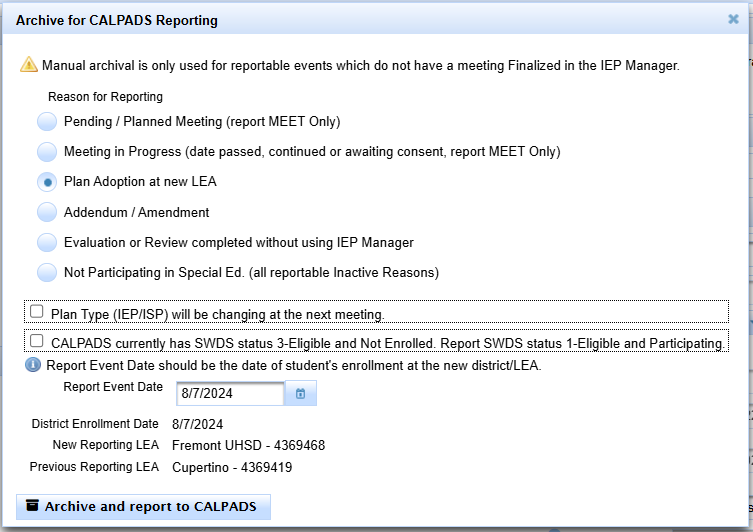
Evaluation or Review Completed Without IEP Manager
Use this option when an applicable evaluation or review must be reported from the MIS Summary rather than from a finalized IEP Manager event.
- Reconstruct accurate Current evaluation, plan, and service information.
- Choose Evaluation or Review completed without using IEP Manager.
- Review the MEET information and any other components required by the actual outcome.
- Review the preview before creating the transaction.
Verify the Archived Transaction
After creating the archive, confirm:
- archive type;
- Report Event Date;
- Plan Effective Date;
- SWDS, MEET, PLAN, and SERV components;
- Report Status; and
- whether an Associated Meeting should be present.


Correct, Resend, or Create a Later Transaction
| Situation | Action |
|---|---|
| The archived transaction contains bad data. | Open and correct that existing archive. Correct Current when it contains the same error. Remove the incorrect CALPADS entry as required, set the corrected transaction to Pending, and resend it. |
| A later real event occurred. | Update Current and create a new archive dated for the later event. |
| Current is wrong but the archive/CALPADS history is correct. | Correct Current only. Do not resend a correct historical transaction. |
| A manual archive preview is wrong before creation. | Return to Current, correct the source information, and preview again before creating the archive. |
See Archived Transactions for opening, editing, and resending an existing archive.

