


Student Exit from Special Education – Team & Meeting Process
Use this article when the IEP team is considering whether a student should exit special education eligibility or when staff need to distinguish an eligibility exit from a service change.
This article owns the team, meeting, forms, and finalization process. For Current status, inactive dates/reasons, SWDS/NONPART outcomes, transfers, cessation, completion, and reporting follow-up, use When Students Leave, Stop Participating, or Become Inactive.
1. Exit, Dismissal, Cessation & Withdrawal
| Term | Meaning |
|---|---|
| Exit | Special education eligibility ends. |
| Dismissal from a service | One or more services stop while eligibility continues. When the discontinued service is the student's only basis for participation, the team must determine whether the change also results in an eligibility exit. |
| Cessation of services | The parent or adult student stops participation while eligibility is retained. This is commonly reported as NONPART [29] Cessation of services but retain eligibility. |
| Withdrawal | The parent or adult student initiates ending eligibility. The applicable outcome may be NONPART [28] Parent withdrawal/self withdraw if over 18. |
Teams may casually say that a student is “exiting” a service. For SIRAS and CALPADS, staff must distinguish a service change, retained eligibility, and an actual end of eligibility.
Document the applicable Prior Written Notice process. See What Is Prior Written Notice (PWN)?.
2. Team-Determined Exit from Eligibility
When the IEP team determines that the student is no longer eligible, the team normally documents the decision through a Triennial/Reevaluation meeting, even when the reevaluation occurs before the regular three-year due date.
- Complete the assessment and evaluation process required for the eligibility determination.
- Create or use the applicable Triennial/Reevaluation meeting.
- Document the eligibility decision, meeting discussion, parent response, and Prior Written Notice.
- Select the SIRAS exit/no-longer-eligible control described below.
- Preview the entire meeting document.
- Finalize the meeting so SIRAS can update the Current record and create the archived reporting transaction.
The common resulting reason is:
- NONPART [30] No Longer Eligible based on Reevaluation
A service may be dismissed through the applicable review meeting under district/SELPA procedure. An eligibility exit is a different outcome.
3. Complete the Exit Meeting Forms
An eligibility-exit meeting does not necessarily require every page used for a continuing IEP. Complete the pages required by the SIRAS form set and local procedure, including the applicable:
- student/demographic and eligibility information;
- eligibility determination;
- consent/signature information;
- Prior Written Notice; and
- meeting summary or Notes & Additional Information.
After the exit control is selected, SIRAS may collapse pages that are no longer required for an exit document. Previously saved optional pages may remain available for review or removal from the meeting document.
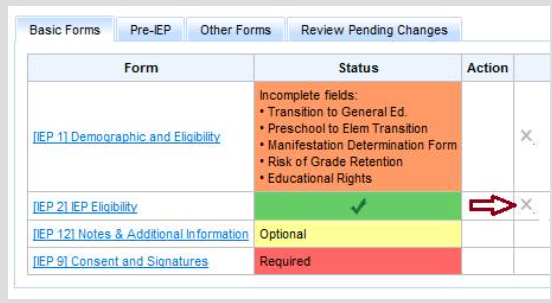
Confirm that the exit document contains the assessment, eligibility decision, parent response, PWN, and meeting-summary information needed to document what occurred.
4. Use the Applicable SIRAS Exit Control
Most SELPAs
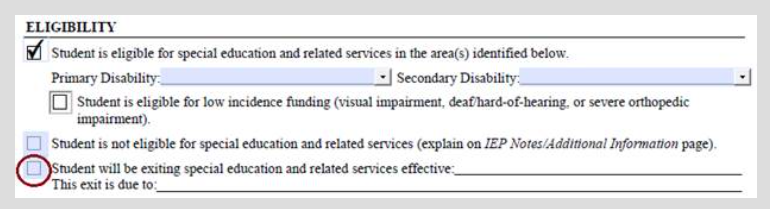
During the Triennial/Reevaluation meeting, select Student will be exiting special education and related services. SIRAS enters the no-longer-eligible exit information. Adjust the effective date when the actual exit will occur after the meeting date.
Ventura and Kern SELPAs
Use the Exit Student control provided in the applicable form set. This removes continuing eligibility/service information from the exit IEP forms and prepares the meeting for finalization.
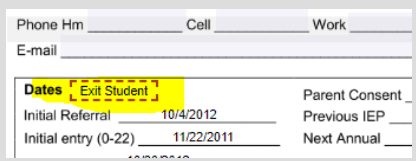
The exit forms may remove or collapse continuing-plan information. The MIS Summary must retain the prior disability and service information needed to preserve and report the student's pre-exit history.
5. Preserve MIS Data & Finalize the Meeting
- Do not manually delete the prior disabilities or services from the MIS Summary before reporting is complete.
- Preview the meeting document and verify the effective date and no-longer-eligible outcome.
- Finalize the meeting.
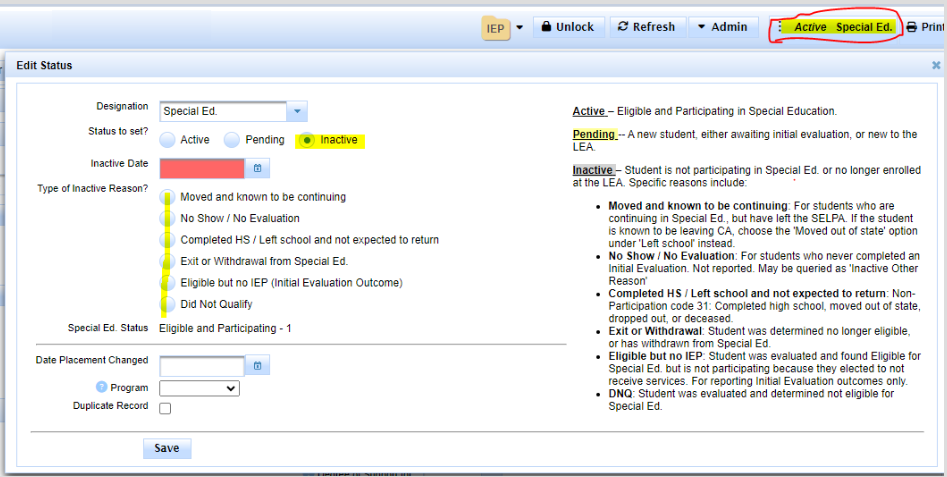
- Confirm that the Current record becomes Inactive on the correct effective date.
- Review the archived MEET/SWDS transaction.
- Confirm CALPADS submission and acceptance.
SIRAS preserves the former disability, plan, and service information so the exit transaction can accurately represent what the student was receiving immediately before eligibility ended.
If the parent initially disagrees with the exit and later agrees, see Triennial Exit Reported at Meeting Continuation Date.
6. Parent Withdrawal, Completion, Maximum Age & Transfers
Parent/adult-student withdrawal
Document the written request and Prior Written Notice. Use the appropriate meeting or local workflow, then apply the actual effective date and NONPART [28] Parent withdrawal/self withdraw if over 18 through Article 290.
Graduation, completion, or maximum age
Complete the applicable Exit Summary/local documentation. Do not assume every completion outcome ends eligibility. Use When Students Leave, Stop Participating, or Become Inactive to distinguish:
- standard diploma / eligibility-ending completion;
- other completion while eligibility remains; and
- NONPART [23] Reached maximum age.
See Forms Manager Meeting Purposes for meeting-purpose and Exit Summary options.
Student moves to another district
A transfer with expected continuation is not an eligibility exit. Make the local record Inactive using the applicable continuing-transfer reason and follow the transfer process. Do not create a no-longer-eligible transaction solely because the student left the district.
7. Special Education Exit Checklist
- ☐ Determine whether this is an eligibility exit, service dismissal, cessation, withdrawal, completion, or transfer.
- ☐ Use a reevaluation meeting when the team is determining that the student is no longer eligible.
- ☐ Document assessment results, parent response, Prior Written Notice, and the meeting summary.
- ☐ Select the applicable SIRAS exit control.
- ☐ Do not delete the prior disability/service history from the MIS Summary.
- ☐ Preview and finalize the meeting.
- ☐ Confirm the Current record reflects the actual field outcome and date.
- ☐ Review the archived reporting transaction.
- ☐ Use Article 290 for the inactive reason, SWDS/NONPART outcome, and CALPADS follow-up.

