 SIRAS Newsletter May 2026
IMPORTANT Information for all users in SIRAS
- NEW ASL Setting/Condition Menu for American Sign Language (ASL) goals now available in the GoalWizard.
- The GoalWizard is located within the Goal Developer links found under the Student Info menu and next to the Annual Goals. This Wizard assists the provider in developing legally defendable and compliant goals and benchmarks in both English and Spanish. You can find the GoalWizard Help Handout located under the Blue Question Marks in the Goal Developer.
- IEP Implementation Monitoring: The CDE is monitoring a random sample of students from each LEA for the period January 1- February 27, 2026. Click on the word ‘Search’ next to the search box to bring up the query builder. Select the ‘Saved Queries’ tab near the bottom to find your district’s query (likely called 2026 CDE IEP Implementation or something similar). Make sure logs are completed. Follow your District guidance if they log services somewhere outside SIRAS or if they have not shared this query with you.
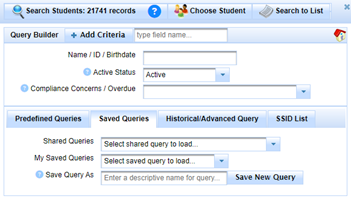
- Spring DRDP: DRDP data must be entered into SIRAS by Friday, May 22nd. You can find your list of required students by clicking on the magnifying glass to bring up the query builder and under the ‘Predefined Queries’ tab, finding the ‘Statewide Assessments (CAASPP, ELPAC & DRDP)’ Menu and selecting ‘DRDP Required’. Please remember we should not have any students marked as unable to rate except in rare circumstances. Please see the DRDP Help Sheet for more information.
- Schedule your remaining meetings for the year. Go to the Choose student list by clicking on the number of records below the SIRAS logo. Select Overdue from the Overdue menu and press Student Lists. Change the “as of” date at the top to 6/30/26 to find all students who have annuals or triennials due by the end of the school year. To view students who have annuals or triennials due within the first week(s) of next school year, adjust the “as of” date accordingly.
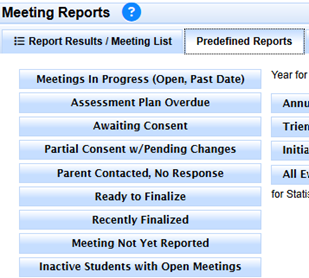
- Finalize all open and complete IEP meetings dated on or before 6/30/26: Review your meeting reports by going to the Reporting menu/Meeting Reports/Predefined Reports. Click on Meetings in Progress to locate all your open meetings in SIRAS. Follow up with Awaiting Consent meetings by sending a copy via mail, providing a copy for pick-up at the school, or do a home visit following your District’s policies and procedures. Make sure your attempts are documented in SIRAS. Refer to the Parent Response Help Sheet for more information and follow your district’s procedures for finalizing the meeting when multiple attempts have been made.
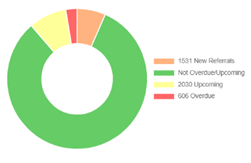
- Use the Student Data Overview links on your home page to monitor Upcoming and Overdue meetings. Review your open meetings regularly. Finalize IEP meetings as quickly as possible, right after parent consent has been received.
IMPORTANT Information for SIRAS Data Administrators in SIRAS
- IEP Implementation Monitoring data export: Find the Export preset at Tools/Data Export/Export Presets and use it to review existing data in SIRAS for the students in your predefined query 2026 CDE IEP Implementation and enter any missing data. After entering all missing data, run the Service Log Minutes Export again with the minutes grouped. See the SIRAS support ppt resource located in Happy Fox beginning on slide 17 to assist with this process. Your District will be submitting these numbers the first week of May if they have not already done so.
- EOY CALPADS reporting: Thank you for participating in the Spring CALPADS Roadshow and our SIRAS/SELPA EOY training. The materials for EOY Reporting will be posted on the SIRAS 4 Ventura Padlet and the CDE Roadshow Materials can be found HERE. If you were unable to attend the Roadshow, there are still other virtual and in person options available HERE.
- Continue practicing ongoing data monitoring procedures. These include addressing Errors/Warnings in SIRAS and in CALPADS/Certification Status, sending data to CALPADS, reviewing Predefined Queries, monitoring meetings for readiness to finalize, reviewing Statistical Reports and the New Referral List. See the SEDS Procedure Manual for a complete list of Data Monitoring Procedures.
- Review the Accountability Reports (16.21, 16.24, 16.25) from CALPADS for overdue and late IEPs. Follow up with IEP teams and in SIRAS to make sure any missing data gets to CALPADS in a timely fashion.
- Compliance Concerns: Address compliance concerns by reviewing the Overdue Monitoring Report (16.21) from CALPADS for all compliance areas (Annual, Triennial, Transition Regulations), as of End of Year (6/30). Follow up with IEP teams and in SIRAS to make sure the appropriate meeting data gets to CALPADS before staff leave for summer. Contact SELPA to schedule a district level EOY compliance review. It is most effective to include both the SIRAS Data Admin and District Admin to thoroughly address all concerns. The CDE has shared they will send us Data Quality checks focusing on several indicators in Mid-June.
- Spring DRDP: DRDP data must be entered into SIRAS by Friday, May 22nd. Refer to the DRDP Help Sheets for more information. Follow up with staff on any missing required DRDPs prior to them leaving for summer.
- Post-secondary outcome surveys: Post-secondary data is due in SIRAS on Friday, June 26th. See the Post-Secondary Help Sheets for more information.
~ SIRAS IS a Medi-Cal Billing system ~
- let us show you how it works.
 One Company. One Solution.
A Smarter Future for District Medi-Cal Billing through SIRAS
With SIRAS and Medical Billing Technology (MBT) together, you get one comprehensive solution designed to streamline processes and strengthen student support. >> learn more <<
For more information, contact: W: www.mbt4schools.com E: [email protected] P: (559) 627-6267
- Greater resources
- Expanded services
- No double data entry
- Stronger solutions
~ Let us assist with the backlog of your IEP translations ~
 IEP Translations Services
EVEN MORE NEWS! SIRAS offers - Next Level Translation Services has now the resources to translate IEP and assessment reports into ANY language. We offer high quality translations in any language with fast turnaround. Contact [email protected] for more information or click the links below:
>> Click here for Translation Request Process<<
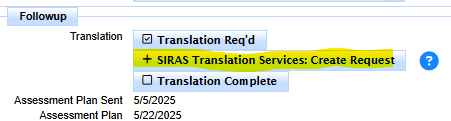
Instant quote for Spanish IEP translation available for District Sped Clerks