IMPORTANT Information for all users in SIRAS
-
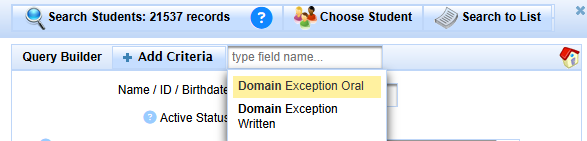
The Reclassification Worksheet was updated last year to align with CDE guidance on Criteria 1. This reflects that students must obtain an Overall score of 4 on the ELPAC or an overall score of 3 on the Alt-ELPAC before they may be considered for reclassification. Teams should continue to work within their District’s reclassification processes. Once the IEP team has determined that there are no accommodations that will allow the student to access the ELPAC, the form provides space for teams to document domain exemptions. It is recommended that you use the decision-making form from the CDE when determining domain exemptions. There is a new query for Domain Exemptions available in the query builder that can be used to pull this information so that it can be manually entered into TOMS prior to testing.
-
Transition to Adult Life: Reminder that the transition to adult life pages of the IEP should be completed for all students as they enter high school unless the IEP team determines it is not yet appropriate for a particular student. This discussion should be captured in your meeting notes. Work with your Directors and administrative team to know what this will look like in your district. K-8 districts will also want to work with receiving high school district as you are planning transfer to high school IEPs with them.
-
Annual IEP implementation monitoring: This spring, the CDE will be collecting service data for a random sample of students from each LEA for service dates January 1-February 27, 2026. Your district will be getting a list of student SSID numbers and will need your service logs to provide the data to the CDE. Follow your district’s guidance regarding logging services.
-
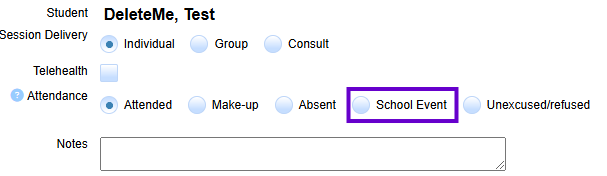
School Event was added last year as a new option under the attendance area of Service Logs. During the Implementation Monitoring process, the calculations are able to be adjusted if services were missed due to school activities such as field trips, assemblies, unexpected school closures, and state testing. Check with your Director if you have questions regarding usage of the School Event attendance code
-
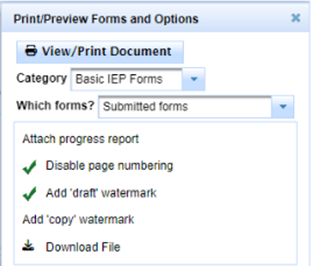
IEP Manager> Print/Preview/Options: The Preview/Print feature allows you the flexibility to combine forms that may have not yet been submitted, and/or select the forms you would like to include in the draft documents. Click on this link for further details on how to use the Print/Preview/Options feature.
-
Additionally, if your team would like to view/print a draft with blank services to have on hand at the IEP meeting you can follow the process found here.
-
-
Custom List and Query sharing: Admin Users have the ability to share custom lists and queries with others within a SELPA, district, or school. A custom list can also be associated with a query. Once a query or list is saved, the option to share to your SELPA, school or district will appear.

-
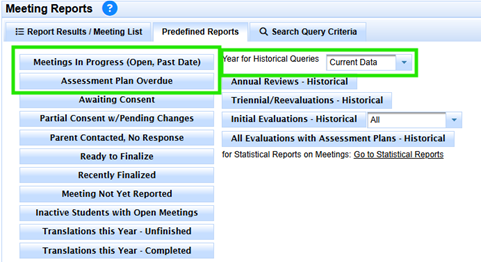
Meeting Reports: In addition to the Predefined Queries for Meetings announced in last month’s newsletter, the Meeting Reports section has reports on overdue meetings and now also contains the ability to run Historical reports on how many assessments have been completed in a specific school year.
-
Use the Student Data Overview links on your home page to monitor Upcoming and Overdue meetings. It is the IEP team’s responsibility to stay within the legal timelines for assessments, Annual Reviews, and Triennial Re-Evaluations. Use this data and the predefined meeting queries to stay organized and aware of when meetings are due.
-
Review your open meetings regularly. Finalize IEP meetings as quickly as possible, right after parent consent has been received. Remember to follow your District’s policy regarding follow-up on parent signatures and response to disagreements. Use the Scheduling Notes section in IEP Manager to document the current circumstances for other team members and for future reference.
-
Spring ELA, Math, Science and EL testing: The TOMS Export Procedure Help Sheet contains guidance for case managers on data review for accuracy of the test being administered and the accommodations needed, for SIRAS administrative staff on the data export for TOMS and for test coordinators on the upload of test supports/accommodations to TOMS. ELPAC Domain Exemptions will need to be entered into TOMS manually when recommended by the IEP team.
-
All 504/SST Module users are invited to attend Office Hours with SELPA. Find the schedule with zoom link here.
-
Office Hours with Ventura SELPA for all advanced/admin/TOT are available via this flyer.
IMPORTANT Information for SIRAS Data Administrators in SIRAS
-
Continue practicing ongoing data monitoring procedures. These include addressing Errors/Warnings in SIRAS and in CALPADS/View Submissions, sending data to CALPADS, reviewing Predefined Queries, monitoring meetings for readiness to finalize, reviewing Statistical Reports and the New Referral List. Data Discrepancies are available for view for the new EOY 1 in CALPADS. Address warnings in addition to fatal errors to help get data as clean as possible for end-of-year reporting. See the Support Center in Happy Fox for a complete list of Data Monitoring Procedures.
-
Review the Accountability Report (16.21) from CALPADS for overdue IEPs. Follow up with IEP teams and in SIRAS to make sure any missing data gets to CALPADS in a timely fashion. Prong II timeline data will be pulled by the CDE on April 10 rather than in August this year so it’s even more important that we stay on top of reporting overdue and finalized meetings and including delay codes when appropriate.
-
Review Reports 16.25 and 16.26 to monitor initial IEP timelines as well as C to B transitions. Review overall data in the new monitoring version of 16.14 for DSEAs. This will help prepare for LEA Approval and SELPA Certification.
-
Spring DRDP: All infants, preschoolers, and TK/K students who have begun SPED services before April 1 (in any district) will need to have a DRDP unless they will be turning 6 before June 30. DRDP data must be entered into SIRAS by Friday, May 22nd. Your Director may set an earlier date depending on your school calendar to ensure that there is time for staff to review any incomplete and missing data prior to leaving for summer vacation. Locate all DRDP eligible and required students by going to the Search button/Predefined Queries. Refer to the DRDP Help Sheets found in Happy Fox.
-
End of Year Reporting: Reminder that EOY reporting has been changed this year. Our special education data will be part of the new EOY 1 rather than split between EOY 3 and EOY 4 which no longer exist. The EOY 1 submission window begins May 5th with a recommended ‘zero errors’ date of June 26. All LEAs must have LEA approval no later than July 17th. The amendment window is shorter this year and closes July 31st with SELPA Approval required at that time. Reviewing your data with SELPA will be important as will addressing and data quality checks sent to us by the CDE. As your team is planning time off for summer, please keep these new dates in mind.
-
Post-secondary outcome surveys: The 2026 survey form is now posted in SIRAS and ready to be sent out. Post-secondary data is due in SIRAS on Friday, June 26th for EOY 1 Reporting. See the Post-Secondary Help Sheets on the Support Center within Happy Fox for more information. Please work in connection with the Workability specialist serving your district as they will also need to enter follow-up information in their database.
-
Register now:
-
Ventura County SELPA will host the CDE Spring CALPADS Roadshow. SIRAS and CALPADS data administrators are invited to attend in person on April 22, 9:00am-12:00pm. This event will be hybrid with an in person and zoom option. The flyer is linked here.
-
The Spring EOY meeting for SIRAS and Ventura SELPA CALPADS data administrators is scheduled for Thursday, May 1, 9:30-12:30 via Zoom. The flyer is linked here.
-
-
Join SELPA for monthly SIRAS Data Network meetings (Office hours with SELPA for SPED Data Specialists).
~ SIRAS IS a Medi-Cal Billing system ~
- let us show you how it works.
 One Company. One Solution.
A Smarter Future for District Medi-Cal Billing through SIRAS
With SIRAS and Medical Billing Technology (MBT) together, you get one comprehensive solution designed to streamline processes and strengthen student support. >> learn more <<
For more information, contact: W: www.mbt4schools.com E: [email protected] P: (559) 627-6267
- Greater resources
- Expanded services
- No double data entry
- Stronger solutions
 IEP Translations Services
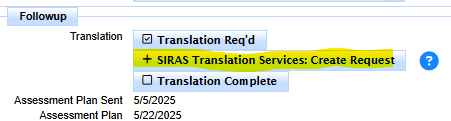
EVEN MORE NEWS! SIRAS offers - Next Level Translation Services has now the resources to translate IEP and assessment reports into ANY language. We offer high quality translations in any language with fast turnaround. Contact [email protected] for more information or click the links below:
>> Click here for Translation Request Process<<
Instant quote for Spanish IEP translation available for District Sped Clerks