


IEP Module - Inactive
If a record exists in the IEP Module, it must first be made Inactive—either through an Exit or DNQ—before it can be transferred to the SST or 504 modules. This can be done at the top of the MIS Summary page.
SST Module
If a student resides in the SST Module, the record may be referred to either the Special Education (IEP) or 504 Module through the SST Decision process following an SST meeting. Or, you can bypass the meeting process and do this at the top of the MIS Summary page.
504 Module – Inactive Record
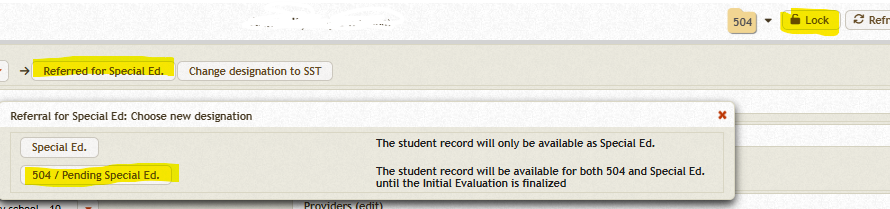
If a record resides in the 504 Module as Inactive, go to the top MIS Summary page, 'Unlock' the record, and use the “Transfer for Special Ed” button to transfer it to either the SST or IEP Module.
504 Module – Active Record
If a record resides in the 504 Module as Active and the team wishes to refer the student for Special Education, the record can be transferred from the MIS Summary page to the IEP Module with a status of Pending, pending completion of the Initial Evaluation.
-
If the student is found eligible for Special Education, the record status will change to Active and remain in the IEP Module.
-
If the student is found not eligible, the record will automatically transfer back to the 504 Module as Active.
A student can not exist simultaneously in more than one module unless its for a IEP referral.

