January 2026 SIRAS Newsletter
IMPORTANT Information for all users in SIRAS
- The SIRAS Training Server will be synced and updated within the first two weeks of the new year.
- Get Ready for Spring ELA, Math, Science and EL testing:
- Siras can send SBAC/ELPAC/504 accommodations data to TOMS with the SIRAS to TOMS API connection if you District has enabled this included feature. Districts may contact Siras if there are questions about enabling and using it.
- The statewide testing windows open soon. Review your SBAC/CAA/ELPAC data in SIRAS. Review for blank entries, outdated supports, leftover grade exempt designation, and alignment of standard vs alternate assessments. Reminder that students must be taking all standard or all alternate assessments. A common mistake is selecting the California Alternate Assessment for Science rather than the California Science Test or a mismatch between CAASPP and ELPAC testing. Your district will likely export supports and accommodations for TOMS 1-2 weeks prior to the first day of testing in your district. If needed, schedule IEPs to make necessary changes prior to the data export(s). The Statewide Testing Assessment Information Page contains guidance for case managers on data review, for SIRAS administrative staff on the data export for TOMS and for test coordinators on the upload of test supports and accommodations to TOMS.
- CAASPP and ELPAC supports for 2025-2026 have been updated by the CDE and are updated in SIRAS. New UDA menu updates have been deployed to SIRAS. The matrix itself is available under Tools>Added Forms>State Testing
- Alternate Assessments: IEP teams must carefully review a student’s eligibility for alternate assessments which are intended for use only with our students who are most significantly impacted cognitively. There are two worksheets available under Tools>Added Forms>State Testing to assist you. Note that student’s whose eligibility is SLD are not eligible for the alternate assessments as SLD criteria excludes low cognition. IEPs with mis-identified assessments will need to be corrected prior to your District’s TOMS export for the testing windows.
- ELPAC Domain Exemptions. The ELD page includes space for IEP teams to note domain exemptions for the ELPAC when the team has determined that the student has a disability that precludes assessment of the student in one or more domains of the ELPAC such that there are no appropriate accommodations for the affected domain(s). These exemptions are not available to students taking the Alternate ELPAC for which no domains may be waived. You may find a CDE domain exemption decision-making tool HERE and in the SIRAS Tools Added Forms.
- Annual IEP implementation monitoring: This year, the CDE will be collecting service data for a random sample of students from each LEA for service dates January 1 – February 27, 2026. The service log feature in SIRAS is a great way to document that services have been completed unless your District has a different documentation method they have directed you to use. As a reminder, a provider is able make a log note for multiple dates, both for individual students and group sessions using the service log feature in SIRAS. In addition, you can select the number of minutes served in a single click.
- School Event is an option under the attendance area of Service Logs. This was added because in prior years’ IEP Implementation Monitoring processes, we learned that the calculations were able to be adjusted if services were missed due to school activities such as field trips, assemblies, and state testing. This new way of documenting these instances assists your District with the monitoring process.

- Consent form lock after signature: After a parent or guardian signs a consent form, the form will be locked and cannot be edited, with limited exceptions. This protects staff from accidentally making changes after consent has been given. Click HERE for more information.
- Use the Student Data Overview links on your home page to monitor your caseload. Review your students who have overdue or upcoming meetings (annuals due within the next 30 days and triennials due within the next 75 days).
- Review your open meetings regularly. Finalize IEP meetings as quickly as possible, right after parent consent has been received. Finalized IEPs are sent to CDE as they occur throughout the year. The absence in reporting of a timely IEP meeting appears late.
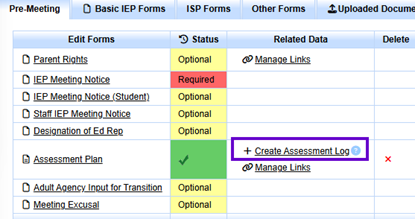
- Log the Creation of an Evaluation – “Create Assessment Log” The '+ Create Assessment Log' link is located on the Pre-Meeting tab next to the Assessment Plan, or on the Assessment Report tab in the IEP Manager (not available for Kern County and Ventura County SELPAs). This feature is a shortcut to the Service Log area where the user may record who completed the evaluation, when it was completed, and what type of evaluation was conducted. The data can be used to generate reports related to evaluation development. Click HERE for more information.
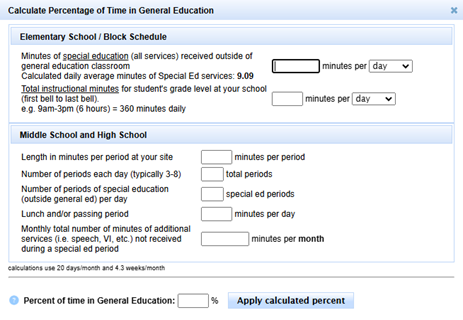
- Calculate the % in General Education as you work on your IEPs: Utilize the calculator in SIRAS regularly to assist you with keeping this up to date at each IEP as services, placement, and bell schedules change. You can find another tool to use HERE. Just click on “use template to create your own copy for use with your bell schedule.
IMPORTANT Information for SIRAS Data Administrators in SIRAS
- We are currently in the Fall 1 Amendment window. If you have made corrections to CALPADS data that were included in the LEA Approved Fall 1 submission, then the LEA will disapprove and re-approve the revised uncertified reports using the amendment window. That way, the most current information will be included for Fall 1 certification. Collaborate with SELPA If your LEA will be using this process during the amendment window. Review problem-solving resources on posted on the SIRAS4CALPADS Padlet and the Happy Fox SIRAS Support Center. In addition, reference the CDE Fall 1 2025 suggested due dates/checklist. The SELPA approval deadline for the Fall 1 amendment window is January 13, 2025, so that the SELPA can make sure all approvals are certified by the CALPADS deadline of January 24, 2025.
- After certification, save your 16 dot reports for future use. Download the data tracking worksheet and utilize it to summarize the data from CALPADS reports.
~ SIRAS IS a Medi-Cal Billing system ~
- let us show you how it works.
 One Company. One Solution.
A Smarter Future for District Medi-Cal Billing through SIRAS
With SIRAS and Medical Billing Technology (MBT) together, you get one comprehensive solution designed to streamline processes and strengthen student support. >> learn more <<
For more information, contact: W: www.mbt4schools.com E: [email protected] P: (559) 627-6267
- Greater resources
- Expanded services
- No double data entry
- Stronger solutions
 IEP Translations Services
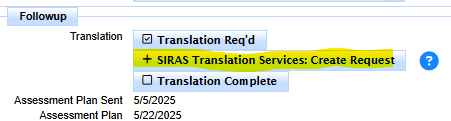
EVEN MORE NEWS! SIRAS offers - Next Level Translation Services has now the resources to translate IEP and assessment reports into ANY language. We offer high quality translations in any language with fast turnaround. Contact [email protected] for more information or click the links below:
>> Click here for Translation Request Process<<
Instant quote for Spanish IEP translation available for District Sped Clerks