


Next Year’s / Upcoming Data
- What Is Next Data Used For?
- Data Entry
- When Is Data Applied?
- Viewing Next Year’s Data
- Confirming Next Year’s Data When Finalizing a Meeting
- Before Rollover - Targeted instructions for data entry tasks leading up to end of year.
Next Year’s / Upcoming Data allows districts to enter and review future information that will automatically take effect during the annual summer rollover or at key transition points.
What Is Next Year’s Data Used For?
- Feeder District Coordination
Feeder districts can assign receiving districts before the school year begins. - Projection and Planning
Receiving districts can project enrollment and eligibility counts for staffing and classrooms. - Infant Transitions (IFSP → IEP)
Acts as a placeholder for IEP information that applies at age three. - Kindergarten Transitions
Federal Program Setting updates can be entered ahead of time and applied automatically.
Data Entry
This section is intended only for information that will change in the next school year or during a transition (IFSP → IEP, Kindergarten, school or district change). If data is not changing, it should not be entered.
To begin, navigate to Student Info → Next Year’s Data and click Create Next Year’s Data.

Types of Next Year’s Data
1. Next Year’s District, School, and Provider Information
- Entered and maintained by SPED staff
- Used for school or district changes applied during summer rollover
- Used by feeder districts to designate receiving districts (e.g., 8th grade → HS)
- IFSP → IEP transitions may be entered here to enable access for the receiving district
2. Next School Year’s IEP Plan Data
- Stores IEP changes that take effect in the fall
- Completed in the IEP Manager near the end of the school year
- Not intended to be completed in the fall
- If district, school, or providers are changing, update those first in Next Year’s Data
When Is Next Year’s Data Applied?
The annual rollover typically runs in July. Next Year’s Data is applied to students with an Active status and then cleared.
Next Year’s Data will not be applied if:
- There is an open meeting dated in the past
- The student is under age 3 (data remains a transition placeholder)
- The student’s status is Pending or Inactive
Viewing Next Year’s Data
Providers and administrators can preview future assignments and incoming students using the red schoolhouse icon in the upper-right corner.
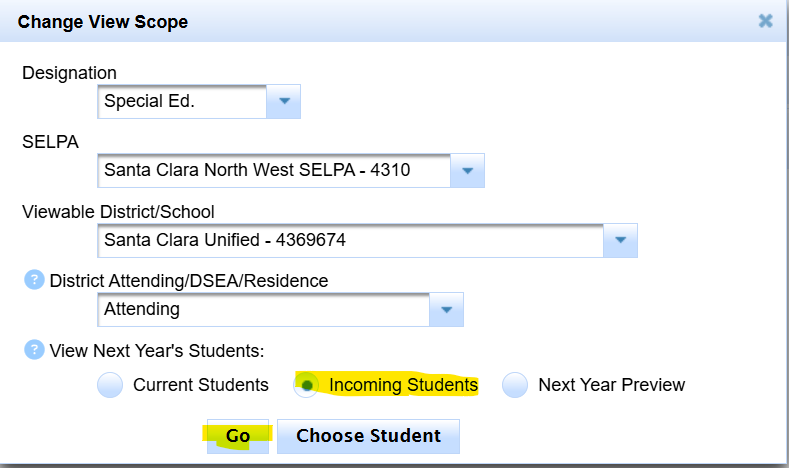
- Incoming Students: Displays only students transferring into your district or school
- Next Year Preview: Displays incoming students plus current students who are not transferring out
Records are read-only in these modes, except for the Next Year’s Data tab, which SPED staff may continue to update.
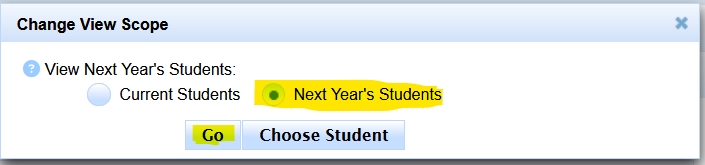
Providers: Viewing Next Year’s Caseload
- Click the red schoolhouse icon
- Select Next Year’s Students
- Click Go
To return to the current caseload, select Current Students.
Administrators: Viewing and Running Projections
Administrators can preview future students and run projections using either view:
- Incoming Students: Students transferring into your district or school
- Next Year Preview: Incoming students plus continuing students
These views support enrollment counts, eligibility projections, and staffing or classroom planning.
Viewing Next Year’s Data as a List
- Go to Reporting → Student Lists → Predefined Lists → Data Monitoring
- Select Next Year’s Data or Next Year’s Services
Confirming Next Year’s Data When Finalizing a Meeting
When finalizing a meeting in the IEP Manager, SIRAS checks for potential Next Year’s Data changes and displays a confirmation notice.
- Review Next Year’s Data if parent consent was not given for all services
- Update Next Year’s Data if amendments changed services or placement
- If a meeting remained open during July, SIRAS may prompt to apply Next Year’s Data upon finalization

