When Students Leave or Stop Participating – Inactive
Use this guide when a student leaves the district, stops participating in special education, is found no longer eligible, completes school, or when an anticipated arrival never actually enrolls.
Changing a record to Inactive is a SIRAS record-management action. It does not automatically mean a new CALPADS SWDS status should be reported. The correct action depends on what actually happened in the field and whether the student's special education eligibility or participation status changed.
For students arriving or returning, see New or Returning Students. For Plan Adoption arrival questions, see Plan Adoption Guide.
A valid earlier transaction does not become wrong merely because the student's circumstances changed later. Keep valid arrival, eligibility, plan, and participation records, then report the later change when it occurs. Correct or remove an earlier transaction only when the event it represents never actually happened.
What Happened to the Student?
| Situation | SIRAS action | CALPADS reporting |
|---|---|---|
| Expected arrival never enrolled anywhere in the district | Make the anticipated/Pending record Inactive as a true no-show or historical record. | No new SWDS status. If an anticipated Plan Adoption or PLAN/SERV was reported, mark/correct it so CALPADS does not retain an event that never occurred. |
| Student enrolled; Plan Adoption was valid; student later did not participate | Keep the valid Plan Adoption. Make the record Inactive when the later outcome is known. | Report the later SWDS/non-participation outcome. Do not erase the valid arrival transaction. |
| Student transfers/moves and is expected to continue eligibility and participation elsewhere | Make the Current record Inactive using the actual last participation/enrollment date. | Normally no SWDS status change. Do not archive a reportable inactive reason solely because the student changed districts. |
| Student remains eligible but stops participating without written revocation | Make Inactive using the cessation/non-participation reason that matches the field event. | Report SWDS 2 with the appropriate non-participation reason, commonly cessation of service without revocation. |
| Student leaves school and is not expected to return | Make Inactive using the actual CALPADS enrollment exit date and matching reason. | Report SWDS 3 when the student remains eligible but is no longer enrolled and not expected to return. |
| Eligibility ends Written revocation, reevaluation, maximum age, standard diploma, or other no-longer-eligible outcome. |
Use the meeting/archive or inactive workflow appropriate to the event. | Report SWDS 4 with the non-participation reason that matches how eligibility ended. |
1. Make the Record Inactive
Before changing status
- Confirm what actually happened in the field.
- Review the student's CALPADS enrollment, including the exit date and exit reason when the student left school.
- Confirm whether the student remains eligible and whether participation is expected to continue elsewhere.
- If an IEP/IFSP meeting is open, complete or close the meeting as appropriate before making the Current record Inactive. See Finalizing a Meeting.
- Determine whether the event changes SWDS status or only closes the local SIRAS record.
Apply the inactive status
- From the MIS Summary, change the Current record status to Inactive.
- Use the date that accurately represents the field event—commonly the enrollment exit date, last participation date, revocation date, reevaluation outcome date, or other applicable date.
- Select the inactive reason that matches the actual event.
- If SIRAS indicates the selected reason must be archived for CALPADS reporting, create the archive and review the SWDS/non-participation result.
- If the SWDS status did not change, do not create a reportable archive merely because the local record became Inactive.

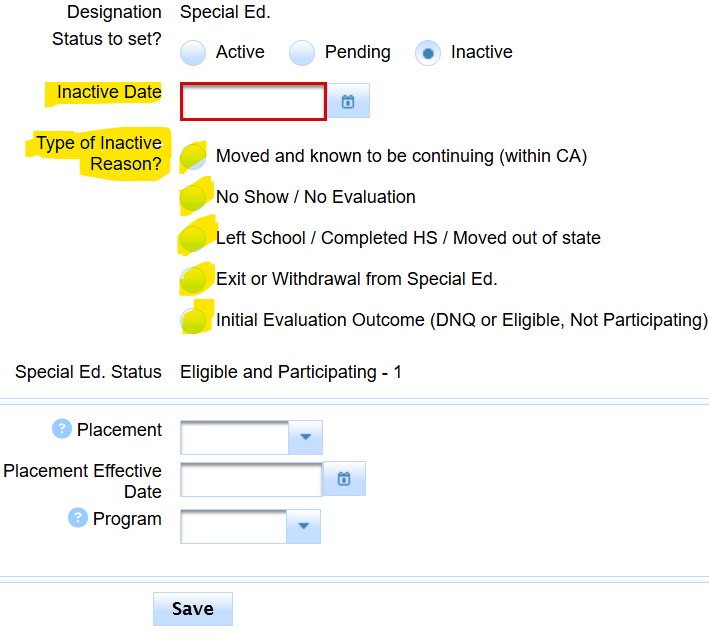


The enrollment exit reason helps explain what happened, but staff must still determine whether eligibility ended, participation stopped, or the student is simply expected to continue at another district.
2. Inactive Scenarios That Normally Do Not Require a New SWDS Record
Transfer or move with expected continuation
When a participating student leaves for another district and is expected to continue special education, the student has stopped participating with this district, but the student's overall eligibility/participation status has not necessarily changed.
Make the SIRAS Current record Inactive using the actual last date at the district. Do not archive a new SWDS status solely to confirm the transfer.

True never-enrolled no-show
A true no-show is a student who was expected to arrive but never enrolled anywhere in the district and never participated in a district meeting or plan implementation.
- Make the anticipated/Pending record Inactive using the appropriate no-show or historical reason.
- Do not report a new SWDS status merely because the student had been expected.
- If a Plan Adoption archive was created in anticipation of enrollment, mark it Do Not Report or otherwise correct it.
- Remove/correct PLAN and SERV in CALPADS when they represent an enrollment that never happened.

When the student enrolled and the district reasonably expected participation, the arrival transaction may remain valid. Report the later non-participation or exit outcome instead of deleting the historical arrival.
Pending record where participation never began
If the SIRAS record remained Pending and the student never enrolled or participated, making it Inactive normally closes the local record without a reportable SWDS status change. Confirm that no meeting, Plan Adoption, or other reportable event occurred before using this path.
3. Reportable SWDS Status Changes
Use the status and reason that represent the real event. The following are common patterns; always compare the student's actual facts to the current CDE Special Education File Submission Scenarios.
| Field outcome | Common CALPADS result |
|---|---|
| Eligible student stops services without written revocation, including a parentally placed private-school student who declines available ISP services but retains eligibility. | SWDS 2 – Eligible, Not Participating Common reason: 29 – Cessation of Service without Revocation. |
| Eligible student leaves school and is not expected to return, such as moving out of state/country, dropping out, death, or a non-diploma completer who remains eligible. | SWDS 3 – Eligible, Not Enrolled Common reason: 31 – Left School Not Expected to Return. |
| Parent/adult student provides written revocation of special education eligibility/services. | SWDS 4 – Not Eligible Reason 28 – Written Revocation. |
| Student reaches maximum age. | SWDS 4 – Not Eligible Reason 23 – Maximum Age. |
| Reevaluation determines the student is no longer eligible and the determination is effective. | SWDS 4 – Not Eligible Reason 30 – No Longer Eligible. The finalized reevaluation meeting normally creates the needed reporting transaction. |
| Student graduates with a standard high school diploma. | SWDS 4 – Not Eligible Reason 30 – No Longer Eligible. |


Reevaluation no longer eligible
When the IEP team completes an eligibility reevaluation and the resulting no-longer-eligible determination takes effect, finalizing the meeting generally creates the MEET/SWDS reporting archive. Do not create a duplicate manual status transaction unless SIRAS indicates one is still needed.

4. Plan Adoption Followed by Non-Participation
Plan Adoption was valid at arrival
If the student actually enrolled and staff reasonably believed the student would participate immediately or after a meeting to review the incoming plan, the Plan Adoption accurately documented the district's arrival responsibility.
If staff later determine the student will not participate:
- keep the valid Plan Adoption archive;
- make the Current record Inactive as of the later field event; and
- report the appropriate later SWDS/non-participation outcome.
CALPADS may appropriately contain successive SWDS records when they reflect successive events. Do not rewrite the arrival as though the final outcome had been known from the beginning.
Plan Adoption represented an enrollment that never occurred
If the student never enrolled anywhere in the district, the anticipated Plan Adoption did not represent a real arrival. Mark the archive Do Not Report/correct the SIRAS transaction and remove or correct the associated PLAN/SERV reporting in CALPADS.
See Plan Adoption Guide for the arrival prerequisites and transaction details.
5. High School Completion & Maximum-Age Outcomes
Standard high school diploma
A standard diploma ends special education eligibility. Complete the district's Exit Summary/local procedures and report the applicable SWDS 4 no-longer-eligible outcome using the actual enrollment exit date.
Other completers who remain eligible
A certificate of completion, high school equivalency outcome, alternate pathway diploma, or other non-standard-diploma completion may not end eligibility. If the student is not expected to return, the statewide reporting may use an eligible/not-enrolled outcome rather than not eligible.
Some students may return for services until maximum age. Confirm with the IEP team and district procedures whether the student is truly finished before reporting the final outcome.
Maximum age
Use the actual date services end under the applicable maximum-age rule and report the SWDS 4 maximum-age outcome. Follow district/SELPA procedures when services continue through a permitted semester or school-year endpoint.
6. 504 Records
When a 504 student leaves or the local 504 record is no longer active, change the SIRAS record to Inactive using the last local participation date and the reason that matches the event.
SIRAS does not submit 504 eligibility/status changes through the CALPADS special education SWDS process. Ensure the district office/SIS staff receive the information needed to update the local 504 program record.

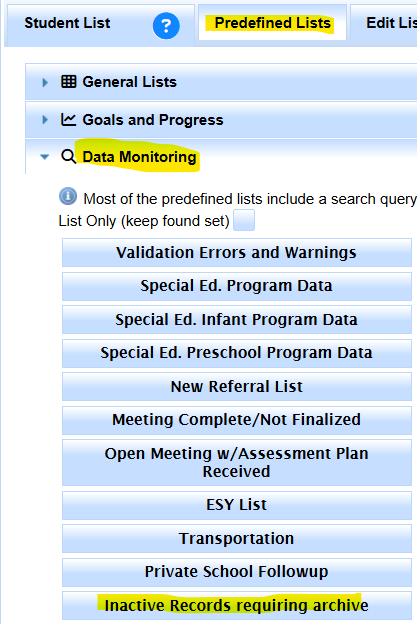
7. Find Inactive Records That Still Need a Reporting Archive
To find records that were made Inactive using a reportable reason but still need an archive:
- Open the Student List.
- Select Predefined Lists.
- Open Data Monitoring.
- Select Inactive Records Requiring Archive.
- Review each record to confirm the status, date, reason, and CALPADS outcome before archiving.