IEP 7C Emergency Conditions Provision - new version options

Mar 20, 2026
Special education staff should review the revised form in its entirety and ensure that each section is addressed by checking the box that appropriately applies to the student. One example to consider: if Extended School Year (ESY) is NOT part of the offer of FAPE in a student's IEP, the IEP Team would check “Not Applicable.”

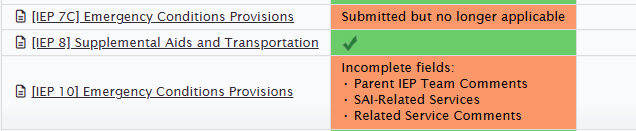
If an IEP team previously submitted the prior version of the form and the IEP has not yet been finalized, you may now see both the original form and the updated form in the system for that particular student. The earlier version will appear with a message indicating 'submitted, but no longer applicable' (see screenshot). In this situation, you may either:
- Keep the originally submitted form, or
- Select the red “X” to remove the prior version, allowing the updated form to remain in place.