


Use this guide when a student arrives from outside California or presents an IEP based on eligibility established in another U.S. state.
Where the student most recently lived is not the same as where the student's eligibility was first established. The CA Entry Date is not used simply because a student returns from another state or country. It is used only when an IEP eligibility established in another U.S. state is being introduced into California CALPADS special education reporting for the first time.
Before entering these fields, complete the arrival review in New or Returning Students and review the student's existing CALPADS SWDS, MEET, PLAN, and SERV reporting history.
TLDR - To find Out Of State, click in the SELPA_FROM menu.
A missing or incomplete SIRAS record does not mean the student has no California special education history. If CALPADS already contains the student's Special Education Initial Entry Start Date and related SWDS history, leave CA Entry Date blank.
Which Out-of-State Scenario Applies?
| Student situation | SELPA From | CA Entry Date | Reporting result |
|---|---|---|---|
| Student previously had California special education history, left California or the United States, and is now returning. CALPADS already contains the student's eligibility/SWDS history. | May be set to Out of State to describe where the incoming record is returning from. | Leave blank. | Use the standard arrival and Plan Adoption Guide workflow. Do not recreate SWDS or MEET history that already exists in CALPADS. |
| The student's IEP eligibility was established in another U.S. state, and CALPADS has no special education history for that eligibility. | Set to Out of State and identify the state where the eligibility/IEP was established. | Enter the District Enrollment Date. | Use the out-of-state Plan Adoption workflow so SIRAS can establish the missing SWDS, MEET, PLAN, and SERV reporting baseline. |
| The family presents special education documentation or a plan developed outside the United States. | Do not use the out-of-state fields to create a U.S.-recognized eligibility. | Do not use CA Entry Date to establish eligibility. | Use the Initial Evaluation Process to establish locally based eligibility and, when appropriate, an IEP. |
The student's existing CALPADS history—not the student's most recent travel or residence—determines whether CA Entry Date is needed.

1. SELPA From – What It Describes
SELPA From describes the source of the incoming special education record or transfer. A student returning from outside California may appropriately show Out of State in this field even when the student's California eligibility history already exists in CALPADS.
SELPA From does not by itself determine whether the student needs a CA Entry Date or the expanded out-of-state Plan Adoption reporting.
The SIRAS MIS Summary contains the student's Current information in SIRAS. CALPADS separately contains the student's statewide SWDS, MEET, PLAN, and SERV reporting history. Review both before deciding how to populate the out-of-state fields.
2. CA Entry Date – When to Enter It
Leave CA Entry Date blank when CALPADS history already exists
If CALPADS already contains the student's Special Education Initial Entry Start Date and SWDS eligibility history, leave CA Entry Date blank—even when the student has recently returned from another state or another country.
Update the District Enrollment Date and other arrival information, reconstruct the SIRAS MIS Summary from the best available records, and use the standard Plan Adoption workflow when Plan Adoption is needed.
Enter CA Entry Date only for a first California CALPADS baseline
Enter CA Entry Date when all of the following are true:
- the student has an existing IEP eligibility established in another U.S. state;
- CALPADS has no existing special education history for that eligibility; and
- the district is introducing that out-of-state-established eligibility into California CALPADS reporting.
For this scenario:
- SELPA From = Out of State
- identify the state where the eligibility/IEP was established
- CA Entry Date = District Enrollment Date
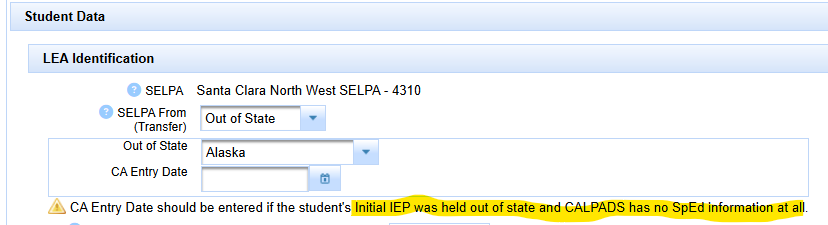
The original evaluation date belongs in the student's evaluation/meeting history. CA Entry Date identifies when the out-of-state-established eligibility entered California reporting through the receiving district.
3. Out-of-State MEET History
When CALPADS has no prior California history for the out-of-state-established eligibility, the receiving district may need to establish the most recent reportable MEET information along with SWDS, PLAN, and SERV.
The out-of-state MEET history can be added through:
- CALPADS Online Maintenance, or
- a SIRAS MEET-only reporting transaction when directed by SIRAS Support.
Do not enter CA Entry Date merely to compensate for missing or incomplete MEET history. Review the student's actual eligibility and meeting records and use the appropriate correction/reporting method.
For assistance with a MEET-only transaction, contact SIRAS Support.
4. Out-of-State Field Checklist
- ☐ Review the student's CALPADS SWDS, MEET, PLAN, and SERV reporting history.
- ☐ Confirm whether a Special Education Initial Entry Start Date already exists in CALPADS.
- ☐ Distinguish where the student most recently arrived from from where the IEP eligibility was established.
- ☐ Leave CA Entry Date blank when California CALPADS history already exists.
- ☐ Use CA Entry Date only when an eligibility established in another U.S. state is being introduced into California CALPADS reporting for the first time.
- ☐ When CA Entry Date is required, set it equal to the District Enrollment Date.
- ☐ Use Plan Adoption Guide for the transaction and reporting steps.

