


email for link & eSignature Troubleshooting

Apr 19, 2026
Some typical issues users have with email for link & eSignature are:
Its always best to send the email form link through SIRAS. Sending the email form link through SIRAS allows SIRAS to confirm that the email had been sent

- However, there are some occasions where either the recipient is not getting the email for mysterious reasons (typically spam or district blocking the SIRAS email). These situations are rare.
Recipients not getting SIRAS email form link:
- Confirm the recipients email address is correct.
Email goes to spam or junk mail.
- Pull SIRAS email out of Spam folder and flag in as 'not spam' in your email program
- If school email, alert the IT Department to "whitelist" the domain @notify.sirassystems.com so the SIRAS email does not get blocked by the district or flagged as spam.
The SIRAS email form link leads to the correct page, but the appropriate box is not highlighted so you cannot e-sign.
- When sending the email, it is important to identify the recipient. There are 3 recipients:
NOTE: if someone such as a principal or a counselor already has access to SIRAS, they should log in SIRAS, go to the form where they need to sign and sign.
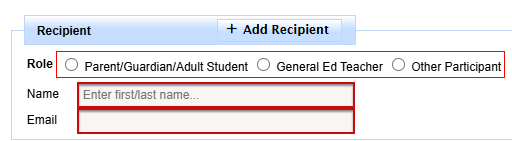
- Parent/Guardian/Adult Student - this would be the ed rights holder, the individual that has the authority to sign a consent form. Can only eSign Parent/Guardian signature lines which will be highlighted in yellow, all other eSignature lines will be blocked.
- General Ed Teacher - General Ed Teacher within the school district. Can eSign any eSignature line EXCEPT the Parent/Guardian as they will be blocked out.
- Other Participant - anyone other than the General Ed Teacher or the Parent/Guardian. Typically this would be a principal, a student, a counselor, outside agency, etc assuming that they do NOT already have access to SIRAS. Can eSign any eSignature line EXCEPT the Parent/Guardian as they will be blocked out.
Click on the form link and the SIRAS Login page appear:
- This can happen if the form link was copied and pasted into the senders personal email. Sometimes the entire link does not copy over to the email. If that happens SIRAS will open up the login page of SIRAS which would certainly be confusing. Best, recopy the link or better, to use the SIRAS program to send the email.
Sending Spanish form(s) to Recipient:
- Click 'Spanish' and the email form link will open the Spanish form when clicked by the Recipient instead of the English form.

Recipient email program only accepts plain text:

- This is rarely used, but if the Recipients email is plain text (not rich text or HTML). The Recipient would need to copy the text (link) and paste into their browser to open the page.
General Directions using the SIRAS Email Form Link & eSignature

