


What are they?
One of two scenarios happened:
1) In late SPRING: (The setup for records that may need to be re-activated later.) Initial IEPs happen for students who won't start participating until Fall next year.
Or
2) Any Initial IEP where parents agree to initial provision but the student will not start participating for whatever reason.
These two scenarios result in an Inactive SIRAS record where the inactive reason is an Initial IEP outcome of Eligible but No Plan.
- Parent decline FAPE NPR 11
- Future Start Date NPR 12
- Other Reason NPR 12
When do we need to act on them
- This is intended for when students return in fall to begin the plan that was determined at last years Initial IEP.
- Or it may be that parents have returned mid year.
- Or it may be that parents changed mind about the student participating after Staff reached out to remind them
In the first instance, the initial IEP was closed but participation wasn't slated to start in the fall of the next year.
Due to how CALPADS requires Initial Evaluation Reporting, Initials at the end of one AY where the student won't be participating until the following year must be reported in the following fashion.
End of Year, we report MEET of the initial evaluation and we report the SWDS status as of 6/30, which is SWDS 2, Eligible No Plan with Non Participation reason 12, Other or Future start date.
The current record in SIRAS is made inactive at that time.
In the following FALL (after summer):
When the student returns and is confirmed to be enrolled and participating in the fall of the next academic year.
We make the record active in SIRAS at that time.
We then ensure the updated Active MIS page is archived.
That archived active transaction will send a SWDS 1 and PLAN and SERV, all effective as of the district enrollment date.
If staff decide to delay participation until after an IEP event is held, then the SWDS 1 and PLAN and SERV records will all be effective as of the plan effective date of that event.
If the event happens to be a cardinal meeting type of plan review or triennial, then SIRAS will report the corresponding MEET record after that IEP event in the IEP manager is finalized.
The SWDS 1 will tell CALPADS that participation has started.
This is reported automatically by SIRAS.
If there is an error or SWDS 1 is not reported as expected, reach out to [email protected] for immediate assistance.
How do we find them?
Predefined Queries
Data Monitoring
Recent Initials: Eligible Not Participating
This query finds students who had their Initial Evaluation within the last year, but were not immediately participating so marked as Inactive (Eligible NOT Participating), but now the Plan Effective Date is upcoming (within 1 month) or has passed. For all students who are now Participating, go to the MIS Summary and click 'Update and Report with Status: Active, Eligible and Participating'
Use this query in Fall to find students that had end of year initials from the previous year where they were found eligible but were not going to start until the beginning of the next year.
Assuming you are reading this in Fall, we can use this query to find candidate records that should be returning.
What do we do with them?
Assuming we have confirmed:
Student has returned or staff
Student is and while the record is still 'inactive', we update the following fields.
Click Unlock
School Attending
District Enrollment Date
Providers
Once that has been updated click the Update and Report with Status: Active, Eligible and Participating button
Open up Data Monitoring and click the query button
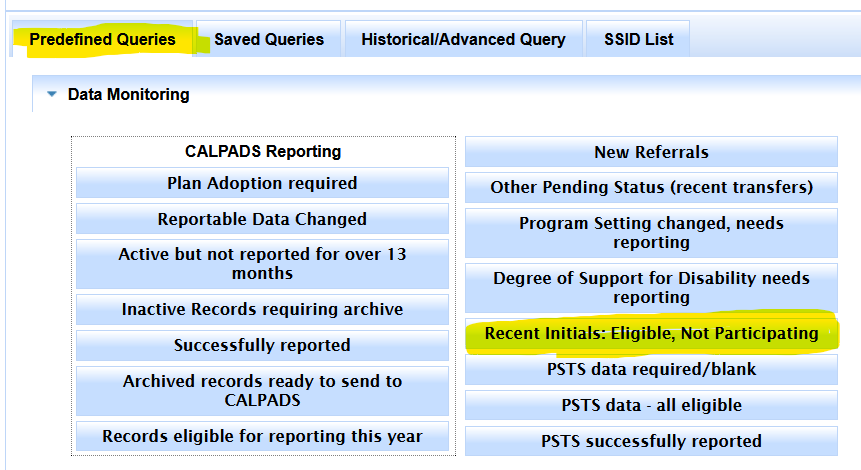
Find student records that are confirmed returning and enrolled
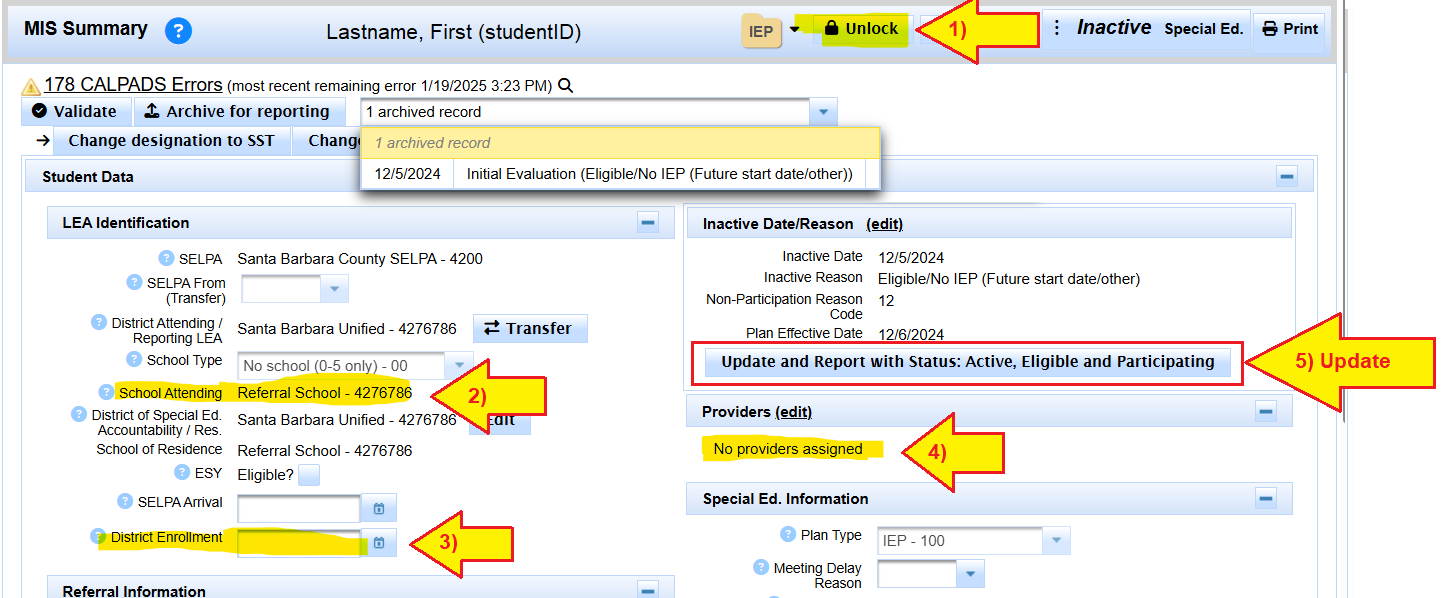
Update/verify School Attending
Update District Enrollment date
Update Providers
Click the Update and Report ... button
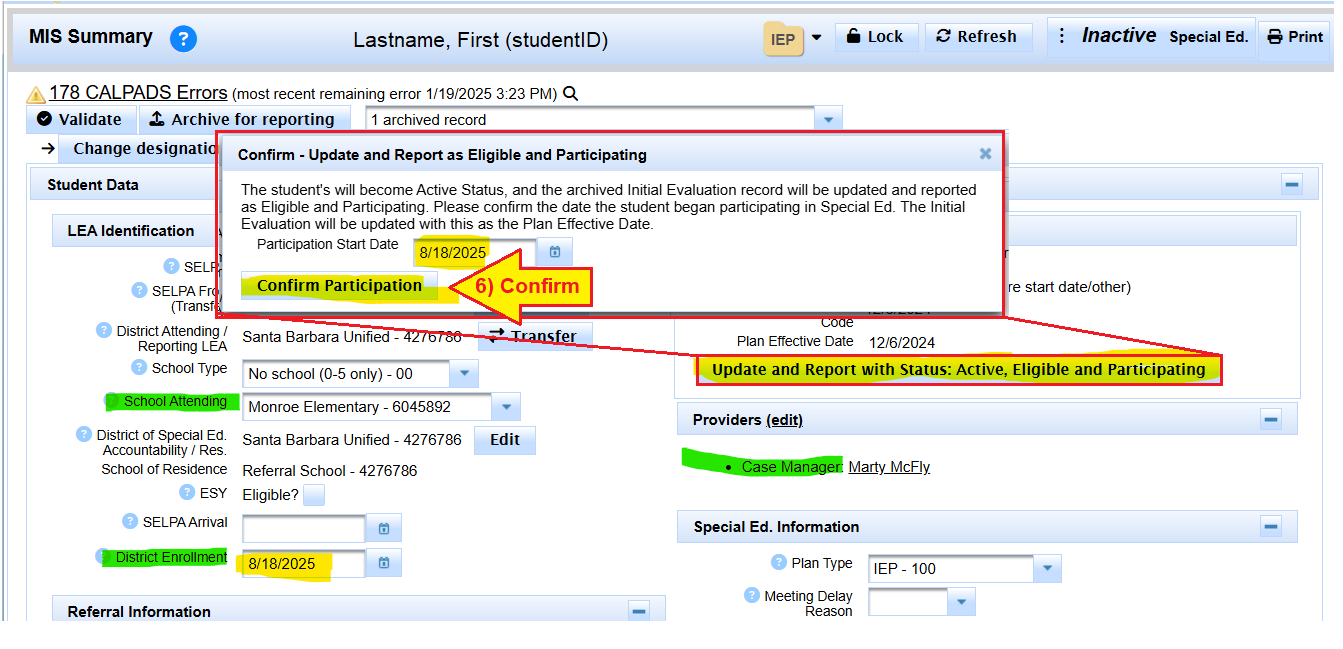
Confirm district enrollment and participation start date are in alignment
Click 'Confirm Participation'
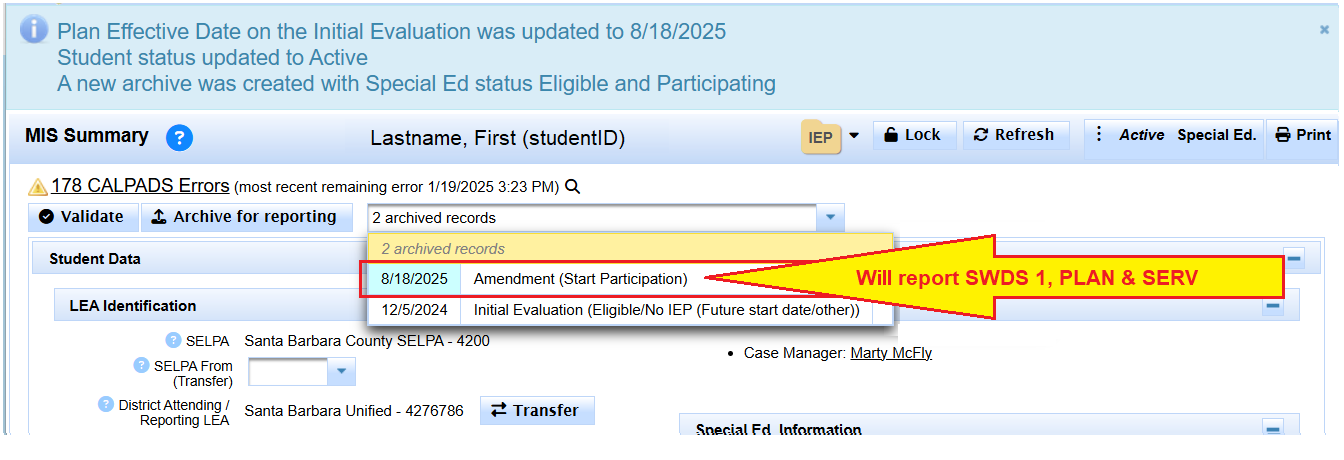
This will create an archived transaction that will report not only the PLAN the student has from the Initial, but SIRAS knows to automatically send a SWDS 1 record needed to update CALPADS with the new SWDS 1 effective date.

