


23.16 Disability Degree of Support
A coded value representing the degree of support needed to support a student's disability(ies).
- ESN - Extensive Support Needs
- MMSN - Mild/Moderate Support Needs
Who should fill in this information as needed?
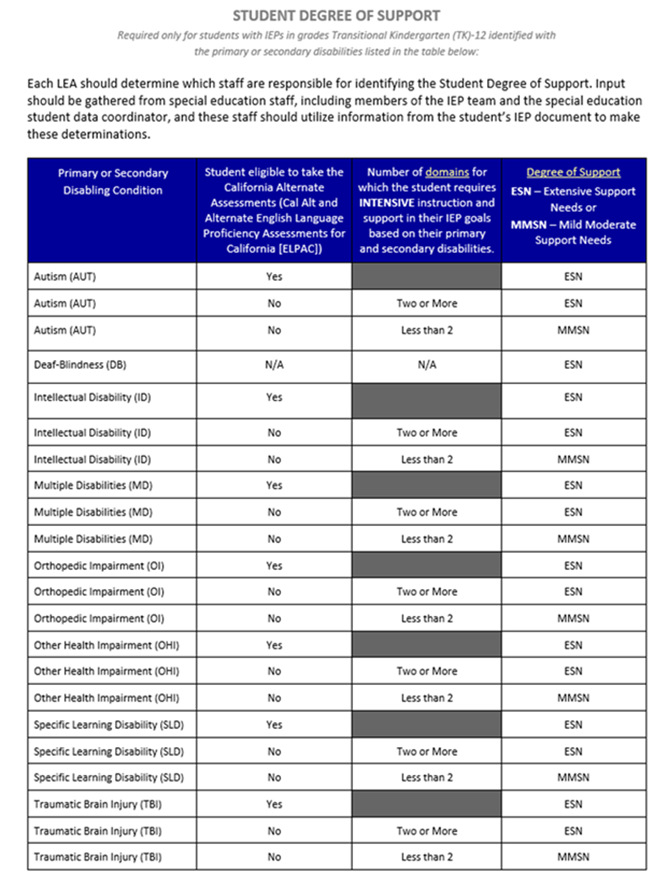
Each LEA should determine which staff are responsible for identifying the Student Degree of Support. Input should be gathered from special education staff, including members of the IEP team and the special education student data coordinator, and these staff should utilize information from the student’s IEP document to make these determinations. For Additional information, please review CDE’s Student Degree of Support Help Document (updated Sept. 2024) Look for the CDE Degree of Support Help Video/PPT
If you encounter any issues or need further assistance, seek guidance from your Special Ed Department supervisor.
What records require degree of support?
- Records that don't require degree of support will show as blank or NA.
- Records that do require degree of support can be easily found with predefined queries outlined below.
- If a meeting is in progress for a record with a primary or secondary disability, the meeting will not be able to be closed until the missing degree of support is entered on the MIS page.
- The degree of support is not part of the IEP documentation.
How do we indicate degree of support for a particular student?
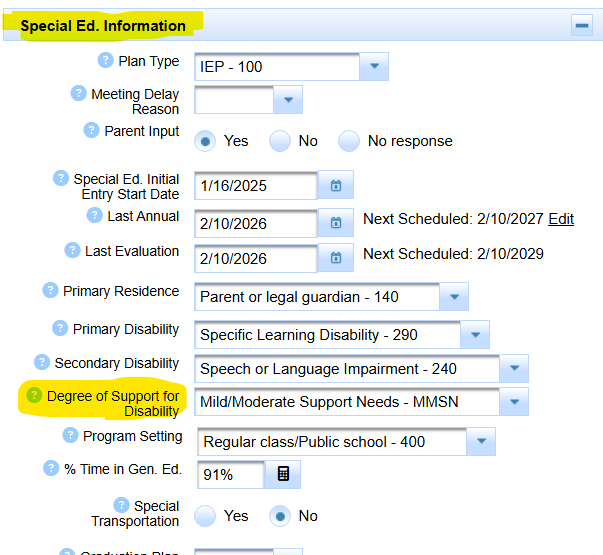
- It is filled into the Degree of Support for Disability menu on the MIS Summary page.
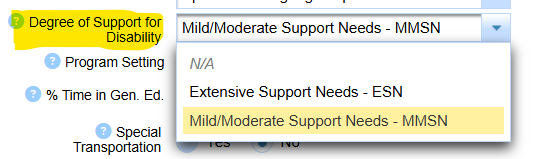
How do we indicate degree of support for a group of students?
- We do not recommend batch editing this important information.
- It should be carefully considered per student by appropriate staff.
- SIRAS does allow this ability but it must be carefully used. CLICK HERE for batch edit help.
Can we batch archive Degree of Support in SIRAS?
- Yes SIRAS will do this for you.
- Email [email protected]
- Request this to be done
- Include the date the archived PLAN transactions are to be effective as of.
How do we report Degree of Support to CALPADS?
- Once degree of support is filled in on the MIS page, it will be reported with the next archived transaction created.
- Enter the degree of support on the MIS page, then click the archive for reporting button.
- Be sure that the report event date is on or before Census.
How do we fill in and report Degree of Support to CALPADS AFTER Census Day or EOY has passed?
Is the last IEP date prior to Census date?
- Archive an amendment that no earlier than district enrollment date or last IEP date.
Is there an archive with plan effective date prior to census on the MIS we can use?
- (This won't work for stay put.)
- Open that archive, fill out degree of support and resend to CALPADS.
If Not
- Create back in time archive dated on district enrollment date but no later than census date.
- Report that new 'back dated' archive.
- Backdating is required to have a plan effective date included in your final CALPADS Snapshot.
How do we report Degree of Suport after a stay put IEP for student already SWDS 1 during the current reporting period?
Is the most recent IEP/EVAL date after Census?
Or
Is the most recent IEP/EVAL prior to Census but it's plan effective date is after Census?
Then do back in time solution to a date prior to the most recent meeting date, like district enrollment
CALPADS Note: [The degree of support is reported by sending a PLAN record from SIRAS]

How to find students requiring/missing Degree of Support:
- Click on Search
- Click on Predefined queries
- Click on Compliance concerns
- Click on Degree of support required

How to find students with updated Degree of Support that needs to be reported:
These are records where the degree of support has been filled in but no archived transaction created.
If there is a meeting in progress, as long as the effective date of the meeting is prior to the upcoming report date and the meeting will not be 'stay put' the archived transaction from the meeting in progress will be reported in it's PLAN file.
- Click on Search
- Click on Predefined queries
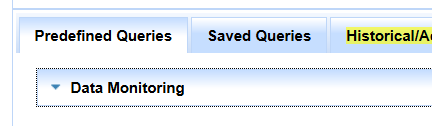
- Click on Data Monitoring
- Click on Degree of support needs reporting

CALPADS Documentation:
A coded value representing the degree of support needed to support a student's disability.
23.16 Disability Degree of Support
The Student Degree of Support field is only required to be populated for students on Individualized Education Programs (IEPs) in grades Transitional Kindergarten (TK) through 12 identified with the following primary or secondary disabilities:
- Autism (AUT) - [320]
- Deaf-blindness (DB) - [300]
- Emotional Disability (ED) - [260]
- Intellectual Disability (ID) - [210]
- Multiple Disabilities (MD) - [310]
- Orthopedic Impairment (OI) - [270]
- Other Health Impairment (OHI) - [280]
- Specific Learning Disability (SLD) - [290]
- Traumatic Brain Injury (TBI) - [330]
Remember that accurate and timely data entry ensures that the student’s needs are properly addressed. If you encounter any issues or need further assistance, don’t hesitate to seek guidance from your Special Ed Department supervisor.

STUDENT DEGREE OF SUPPORT
Required only for students with IEPs in grades Transitional Kindergarten (TK)-12 identified with the primary or secondary disabilities listed
in the table below:
For additional information, please review CDE’s Student Degree of Support FQAs

For additional information, please review CDE’s Student Degree of Support FQAs

